In YAFRay, the appearance of Absorption is can be achieve by:
absorption value (in yafray xml) = -log( Result Color (actual color I wanted to see) ) / Distance (between light entering the object to the point I want to see the color)
of course, distance should be great than 0, otherwise it is meaningless!
Now go on with my test scene. Since I am using GMax, the material setting is based on GMax. But it works for all yafray export applications.
I use a teapot with radius:6, and a big box 100X100X-3 as base.
The material is Standard Material (generic):
Diffuse(color): black (r="0.0" g="0.0" b="0.0")
Specular: while (r="1.0" g="1.0" b="1.0")
Glossiness(hard):15
IOR:1.5
Refraction(transmitted):255 194 31 (r="1.0" g="0.760784" b="0.121569")
fresnel refrection color (transmitted2):255 0 31 (r="1.0" g="0.0" b="0.121569")
2-sided(tir):on
The scene should rendered in yafray like this:
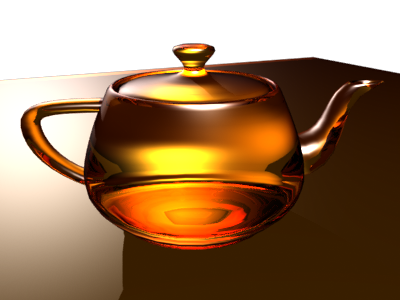
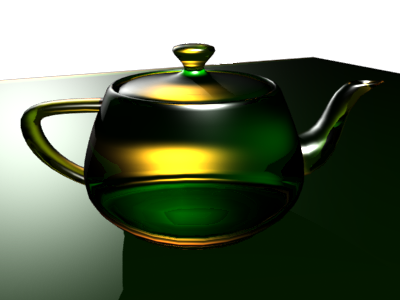
Now I add the absorption there (*Dispersion* texturemap in filtermap). Since I want it to turn green after a distance of 10!
The material now:
Result color: 0 125 45
Distance: 10
(absorption r="0.784385" g="0.071295" b="0.17346")
Diffuse(color): black (r="0.0" g="0.0" b="0.0")
Specular: while (r="1.0" g="1.0" b="1.0")
Glossiness(hard):15
IOR:1.5
Refraction(transmitted):255 194 31 (r="1.0" g="0.760784" b="0.121569")
fresnel refrection color (transmitted2):255 0 31 (r="1.0" g="0.0" b="0.121569")
2-sided(tir):on
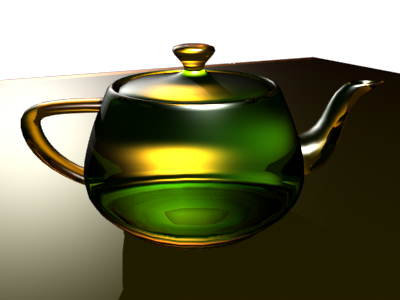
A bit too much, so I change the distance to 50!
(absorption r="0.156877" g="0.014259" b="0.034692")
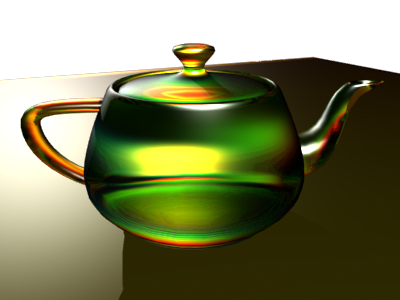
I also try combine dispersion:
Intensity: 0.5
Samples:7
Kam � 2005.
