Setting up a new NT user account and mail box
Check List:
On OMS -
Create user profile folder under D:\Users
Create login script under C:\Winnt\system32\Repl\Import\Scripts
Create user account
Create mail box
Delete Custom Recipient (if any)
On Win98 station -
Add user to the Policy file
(wait 5 minutes for policy to replicate to
INET)
Confirm user account setup by logging on as new
user
Configure user settings in MS Office applications
Procedure
On OMS launch Windows NT Explorer under Start
Button/Windows NT Explorer
- Drill down to D:\Users
- Copy the D:\Users\Staff Model folder
and paste it back into the D:\Users folder
- Rename the new folder to the user name of the
staff member you are creating the account for. Note:
User names are always the first initial and seven letters from the last name
(e.g. VRobinso).
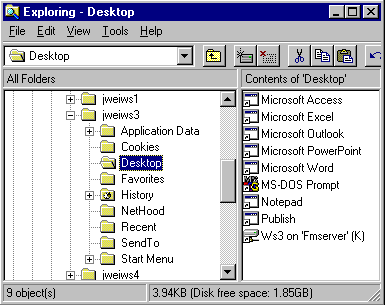
- Open the new folder and double click on the
Desktop subfolder. Rename the "XYZ on 'OMS' " shortcut so that
"XYZ"=the user's branch code (e.g. FRM on 'OMS').
- In Windows NT Explorer drill down to C:\Winnt\system32\Repl\Import\Scripts.
- Copy the albstaff folder and paste it
back into the C:\Winnt\system32\Repl\Import\Scripts folder
- Rename the new folder with the user name of
the account you are setting up (e.g. vrobinso).
- Open the new folder and right click the hdrive.bat
file. Select Edit from the pop up menu.
- In the first line of the file change the branch
code at the end of the line to whatever branch the new user works at (e.g.
change net use h: \\OMS\alb to net
use h: \\OMS\alb).
- Select File | Save and close the file
editor.
- Close Windows NT Explorer.
- Launch the User Manager program by double clicking
the shortcut on the OMS desktop.
- Open the User menu and select New
User
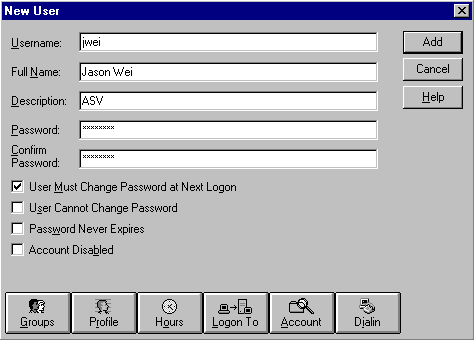
in the User properties dialog enter the Username,
Full Name, Description, Password (same as the user name (e.g. vrobinso)),
Confirm password and uncheck the User must Change password at Next Logon
box.
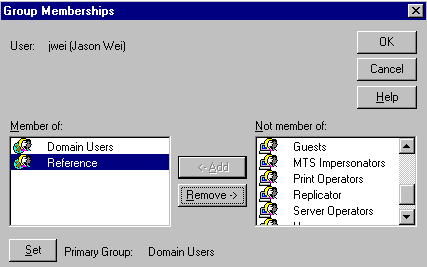
- Click the Group button and add the user
to the appropriate groups (e.g. individual branch groups, Reference, etc.),
then click the OK button.
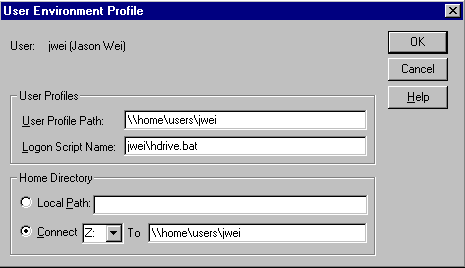
- Click the Profile button on the New user
dialog.
- In the User Profile Path field enter \\oms\users\USERNAME
(e.g. the path to the folder you set
up at the beginning of this procedure). In the Logon Script Name field
enter USERNAME\hdrive.bat
(i.e. the logon script you set up under C:\Winnt40\system32\Repl\Import\Scripts).
In the Home Directory - Connect To field enter \\oms\users\USERNAME.
Click the OK button.
- At the New User dialog click the Add button.
The system will automatically open the Exchange Mail Box Properties dialog.
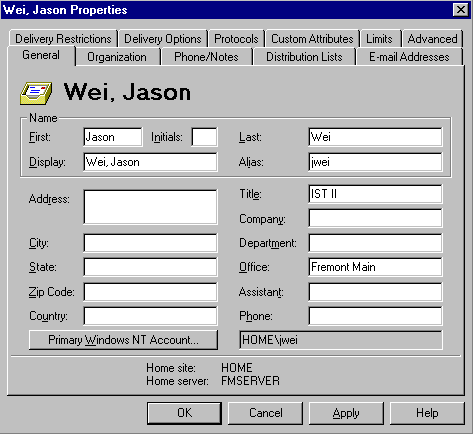
- Enter the user's and last name. Change the display
field to Last, First name. Make sure that the Alias field has
the first initial and FULL last name of the user. NOTE: This field
fills in automatically with the user name (i.e. truncates the users last name
to seven letters) but this field drives the user's e-mail address which we
want to be First initial, Full Last Name (e.g. vrobinson).
- Enter the user's working title (e.g. SLZ Unit
Supervisor or ALB Branch Manager, etc.) and put the user's branch code in
the Office field
- Click the E-mail Addresses Tab then the
New button.
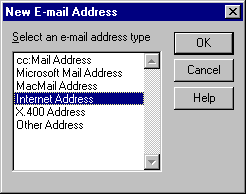
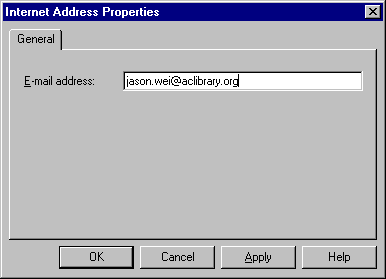
- At the main Properties dialog click the Delivery
Options Tab and make sure that Alternate Recipients field is
set to None, then click the OK button.
- Launch the Exchange Administrator program by
double clicking the OMS desktop shortcut.
- Check to see if the new user has a custom recipient
under the Recipients or III Mail containers. A Custom Recipient
record has a globe to the left of the name and the name is followed by "III
- Mail". If there is a Custom Recipient for the user delete it. NOTE: Custom
Recipients were set up as forwards to III mail boxes. As users move from III
mail to Exchange mail it is no longer appropriate for their III Mail address
(i.e. Custom Recipient) to appear in the Exchange Server's address book.
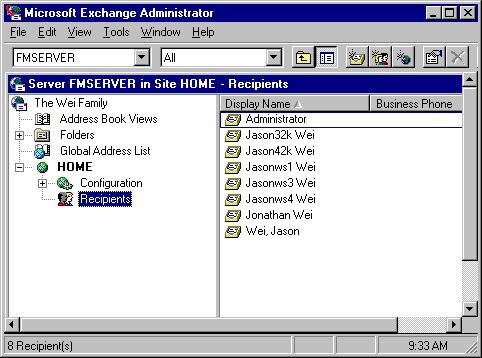
Once the new user's mailbox is set up they must
be added to the All Exchange Users distribution list. To do this:
- Double click the All Exchange Users list
in the Recipients container
- Click the modify button below the list
members box
- Scroll through the list of recipients until
you find the new member then double click his/her name and click the OK
button
- Click the OK button to close the All
Exchange Users property box.
The following steps
must be performed on a Win98 station that has the System Policy Editor installed.
NOTE: Any Training room station will work.
- Logon to the network as libsysop
- Launch the System Policy Editor under Start
Button | Run | poledit
- At the bottom of the File menu select
\\OMS\netlogon\config.pol
- Click on the Staff Model head then select
Copy from the Edit menu.
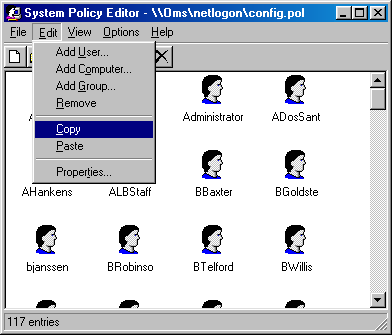
- Select Add User from the Edit
menu.
- Click the Browse button in the Add
User dialog.
- Select the new user you just set up and click
the Add button, then click the OK button.
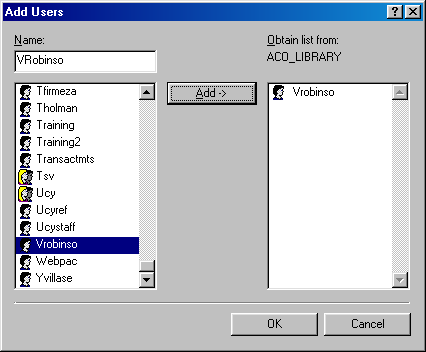
- Scroll to the bottom of the user "heads" display
and single click on the user head that you just added. Select Paste
from the Edit menu.
- Click the Yes button in the "Are you
sure you want to paste the clipboard contents to user "USERNAME"?" dialog.
- Select Properties from the Edit
menu.
- In the Properties dialog drill down to Windows
98 System\Shell\Custom Folders and single click on Custom Programs
Folder.
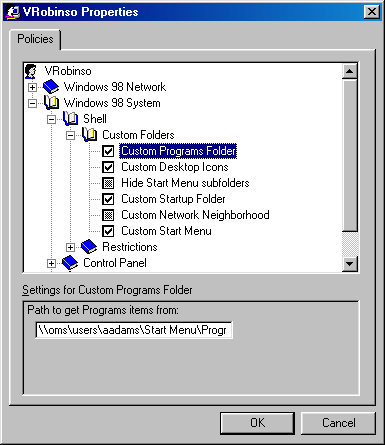
- In the Path field near the bottom of
the dialog replace aadams with the new user name (e.g. \\oms\users\vrobinso\Start
Menu\Programs).
- Single click the Custom Desktop Icons
line and again replace aadams with the new user name.
- Single click the Custom Startup Folder line
and again replace aadams with the new user name.
- Single click the Custom Start Menu line
and again replace aadams with the new user name.
- Click the OK button.
- Select Save from the File menu
in the System Policy Editor window.
- Exit the System Policy Editor.
Note: The login scripts and the master policy
file live on OMS but must also reside on INET (the Backup Domain Controller)
for users to properly logon to the ACO_LIBRARY domain. OMS automatically replicates/synchronizes
these file to INET every 5 minutes, so wait 5-6 minutes before attempting the
following steps.
The following steps
must be performed on a Win98 station that has the System Policy Editor installed.
NOTE: Any Training room station will work.
- Logon using the new user account. Answer Yes
to the prompt "You have not logged on at this computer before. Would you
like this computer to retain your individual settings for use when you log
on here in the future?" Note: Make sure that the black logon script
windows appears during the login process (it flashes by very quickly).
- Verify that the desktop contains shortcuts to
all of the MS Office applications, Netscape, Anzio and the mapped network
drive (e.g. ALB on 'OMS' or FRM on 'OMS', etc.). Double click the mapped network
drive icon to verify that the user has the correct permissions to access there
shared folder (if access is denied return to OMS and verify that the user
account is a member of the appropriate group (e.g. Accounting, FRM, CSV, etc.)).
- Launch Windows Explorer and verify that there
is an H:\ drive (to the user's branch share) and a P:\ drive (to System Documents).
If there are any other mapped drives disconnect them by right clicking the
drive icon and selecting Disconnect.
- Launch MS Word and select Options under
the Tools menu.
- Click the File Locations Tab and verify
that the Documents line is defaulting to the user's branch share (e.g.
\\oms\csv, or \\oms\frm, etc.). If it is not then double click the Documents
line and set the path to the H:\ drive.
- Click the User Information Tab of the
Options dialog and enter the user's full name (e.g. Vivian Robinson) and initials
(e.g. vr). Click the Ok button and close MS Word.
- Launch MS Excel and open the Tools | Options
menu.
- Click the General Tab and set the Default
File Location to H:\ and enter the user's full name (e.g. Vivian Robinson).
Click the OK button on the Options dialog and close MS Excel.
- Launch MS Power Point and open the Tools
| Options menu.
- Enter H:\ in the Default File Location
field and click the OK button. Close MS Power Point.
- Launch MS Access and select Open an existing
database (it is required that a database file be open before you can modify
the Options settings). Select any database from the list and click the OK
button.
- Once the selected database is finished loading
open the Tools | Options menu.
- Click the General Tab and enter H:\
in the Default Database Folder field. Click the OK button and close
MS Access.
- Logoff to finish the setup process.
- On OMS Server run NET ACCOUNTS /SYNC (This will
replicate and instantly update the Domain Account Database.