Streams
As in any programming language, C++, too, has a handful of I/O operations and manipulators. There is no extensible system of classes for any type of I/O operations. These classes allow for maximum modifications, at the user-level as well as the programmer level, on input or output data.
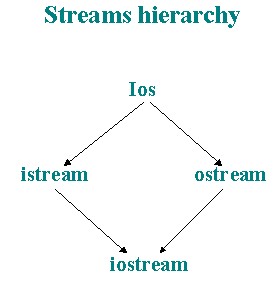
A stream is a source or destination of a collection of characters or numbers. There are two types of streams - input and output streams. Input streams allow for fetching of characters, while output streams enable storage of characters/string. The streams library of classes is a hierarchy of classes as shown below
Streamsbufs.ios is a virtual base class for istream (input stream) and ostream (output stream). The iostream (input/output) class is derived from these two classes.
Insertion
The traditional "Hello world !" program can be written in C++ as follows
#include <iostream.h>
void main(){
cout << "Hello world !";
}
cout replaces printf but the rest is same. cout is a predefined output stream, which directs output (formatted) to the standard output device. << is referred to as the insertion operator and works like this. The character string to the right is stored into the stream on the left. The insertion operator can be stringed too as follows
cout << "Hello world !\n" << This is the second line !";
The insertion operator has a left to right associativity and each operator, in a stringed statement, passes a reference back to the cout streams. Although both the istream and ostream are virtual base classes for iostream, there is still a possibility of ambiguity, which can be caused by the precedence of operators. For instance,
cout << (x&y); will work but cout << x&y; will not.
Since a reference to the stream is returned to the << operator, the AND-ing of bits will be understood by the compiler as a reference to 'y' and moreover, due to the left-to-right associativity, the << operator will be processed before &. Hence the parameters are used to avoid ambiguity in such a statement.
Extraction
cin is the predefined input stream, which fetches characters from the standard input device. To read an integer,
int i;
cin >> i;
By default, cin skips white spaces. For instance, if you enter "<space>678ab2" in the above example, "i" would contain the value "678". The space would be skipped, "678" would be read and "ab" not being of integer type, will be excluded. This same rule applies for floating-point numbers, too.
The extraction for strings is different as strings may contain lots of white spaces as separators between words. For instance, if you enter "Joe Bill", "Joe" will be stored but not "Bill", which will remain in the stream until it is extracted.
This problem can be sorted out by using the get() or getline(char *,int x) methods, which enable reading of the complete string regardless of white spaces. For example,
char name[20];
cin.getline(name,20);
But, there is a hitch here, too. What if the user were to type more than the 20 characters allotted to the variable, name ? A memory overflow will occur and to avoid this to happen, the stream can be formatted to accept only n number of characters
char name[20];
cin.width(20);
cin.getline(name,20);
width also works for the output stream
cout.fill(" ");
cout.width(5);
The setw() manipulator allows a space length, specified within the parameters as an integer, before the next insertion.
cout << "Hello" << setw(2) << world !";
will insert 2 spaces between the words "Hello" and "world !"
The endl manipulator skips to the next line just like the '\n' escape sequence in printf.
cout << "Hello world !" << endl << "This is the second line";
File I/O
Apart from console-based or device based I/O, file I/O is also possible through the fstream class.
fstream ifile("somefile.$$$",ios::in);
will open an input file stream ifile, which will point to the file. Subsequently, methods like open, read, write, close can be used to perform the various file I/O operations.
ifile.open("somefile.txt",ios::in);
char buf[1000];
ifile.read((char *)&buf,1000);
ifile.write((char *)&buf,1000);
ifile.close();
The parameters for the read and write methods are worth a mention here. The first parameter of both the methods take char * and thus a casting needs to be done to use any other data-type. And since, the parameter is of pointer type, a reference using the address-of operator & is also required.
ifile.seekg(0,ios::beg or ios::end);
seeks from the specified position in the file in the direction starting from the beginning or the end of the file.
long x=ifile.tellg();
will return the current position of the file pointer in the file.
There are many manipulators and formatting methods available in C++, like setfill, setiosflags, tie, setprecision, flush, putback, ignore, which can be used with, equally, utter ease.
Every stream, in C++, has a state that indicates if an error occurred or not. But, while,
if (!cin)
cout<<"Error!";
is okay,
if (cin)
cout <<"Okay";
is not okay ! With regular usage and experience of the streams and other C++ pre-defined methods, you will be able to understand why. The state is defined by a set of bits in the ios class. goodbit, eofbit, failbit, badbit, hardfail are some of these bits and the corresponding methods are int good(), int bad(), int fail().
Printing through streams can be done with the following statement,
ofstream cprn(4);
where cprn may be used as cout to insert to the standard output device on a DOS-based computer. To create a buffered stream,
char prnbuf[1000];
ofstream cprn(4,prnbuf,1000);
where 4 is the handle number for the standard printer for a DOS-based computer.