How to make your own
Jurassic Park Screensaver
|
After trying out and testing literally a half dozen different free screensaver maker programs, I finally found one that actually works. A lot of the free screensaver makers I tried, many of them crashed, or worked only in preview mode. The best program by far is IrfanView by Irfan Skiljan http://www.irfanview.net Creates stand alone programs either EXE or SCR files. THAT ACTAUALL WORK WITHOUT CRASHING. To make your own screensaver, gather up a collection of your favorite photos and audio files (if you want audio) Open IrfanView and click on Files, Slideshow 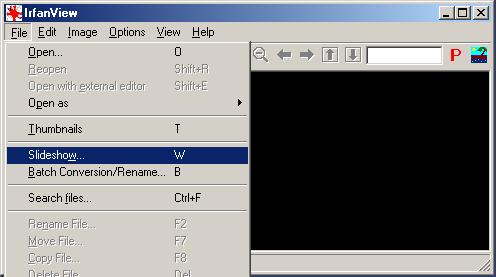 Cue up the folder with your images and click Add. 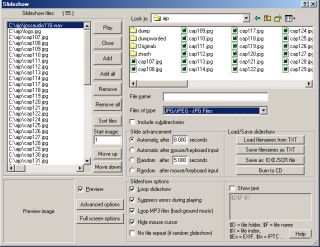 You'll see your filenames added to the play list. If you want audio, cue it up and add it to the list as well. You can add as many different sounds as you want. When satisfied with your composition click "Make EXE / SCR file" 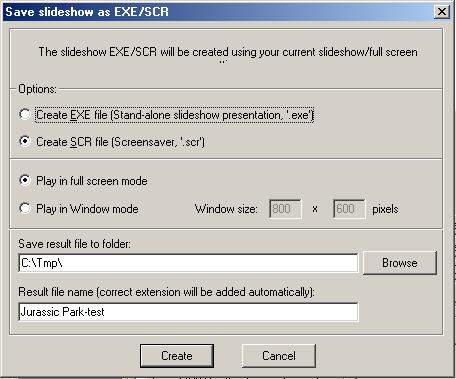 (An SCR file is just an EXE file with an SCR extension.) Place the SCR file in you Windows\System folder, then right click on your desktop and select Properties then the Screen Saver tab. Scroll down the combo box list and select the SCR file you just made and click Preview. 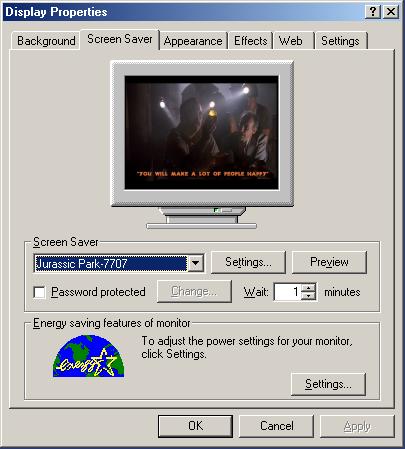 If you are satisfied with the result click Apply and OK and your new screensaver will be enabled. That's it! I really enjoyed making this little screen saver and got a bit nostalgic at times, the pictures, the music, what an amazing movie. -Jeff [email protected] www.geocities.com/jurassic.jeff |
