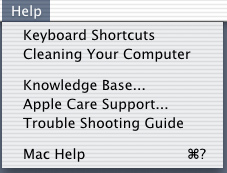
Keyboard Shortcuts
- Takes you to the keyboard shortcuts section which obviously lists all the keyboard commands in the Finder for example hold option + command and click & drag with the mouse to use the hand tool for scrolling in a Finder Window (not many people know this), its great for new users or switchers who aren't used to keyboard commands.
Cleaning Your Computer ( should say the model not 'Computer' ex. 'Cleaning Your iMac' )
- Real important item! Examples of first time user mistakes: LCD monitors will be ruined if they are cleaned with alcohol, the keyboard may look waterproof, but its not, and my favorite the iMac LCD doesn't rotate 360º degrees. By having detailed cleaning instructions and basic information about the components that are included with the Macintosh (monitor, mouse, keyboard, etc...) easily available, a lot of problems can be avoided!
Knowledge Base...
- Link to the apple knowledge base.
Apple Care Support...
Trouble Shooting Guide
- Basic trouble shoouting guide to common problems, answers to common questions, and regular maintainance procedures/preventive steps. Ex. the trusty paper clip is no longer needed in new Mac models in case a cd/dvd gets stuck in the drive, what to do in case of the rare kernel panic, and the blinking (oh, the question mark should be blinking, if not you are using IE shame on you... Blame it on M$ for not making it standard)