| Title |
Page
|
| Abstract |
ii
|
| Section | |
|
1
|
|
|
2
|
|
|
4
|
|
|
5
|
| Appendix | |
|
7
|
|
|
10
|
|
|
13
|
| Bibliography |
20
|
I decided to create DSPNet to give fraternity brothers that live in the chapter house the ability to share their computing resources. Providing a local area network with internet access is one of the current trends in student housing. I believe that this network will provide the opportunity to share files, reduce the overall cost of internet access, and create an infrastructure for access to and maintenance of house records.
DSPNet requires a significant investment from our Alumni Corporation Board who owns the chapter house. One of the pieces of this project is a detailed proposal for a permanent installation. The active chapter and individual brothers will also have costs that are outlined. I implemented the current network using my own resources and donated equipment, but this setup is very limited.
This document discusses the current implementation of the network, the permanent proposal, and the plans for future upgrades and expansion. With hard work, a little money for equipment, and attention to detail, this investment will pay off. The network will be a money-saving tool that will bring value to the house and convenience to the residents.
Description and Purpose of DSPNet
When I first started working at Xing Technology Corporation each individual employee set up and maintained their computer and local area network (LAN) connection. Employees could share their files with each other. If one user had a big hard drive they could have a repository of programs that people could copy to their own computers when they needed to use them, and delete them afterwards. Everyone printed out documents on one main printer. Everyone shared one constant connection to the internet which was very convenient since users didn�t have to log on and log off every time they wanted to access the outside world.
I live in the Delta Sigma Phi chapter house with twenty to thirty other men who each have at least one computer in their rooms. People were constantly going back and fourth between rooms to get files and to use each other�s printers. When large files needed to be transferred people would have to use a stack of floppies and a very slow copying process. Many brothers were constantly tying up their phone lines making calls to the internet to check their mail and look at web pages.
I looked at these problems and realized that if the fraternity house were to be set up like my workplace, the above processes could be executed with greater efficiency. In addition to being more efficient, living in the house would be more convenient. If everyone shared one internet connection, they no longer would have to tie up their individual phone lines to check their mail or web browse. They also could split the cost of one internet service charge and one phone line instead of paying the same total amount each.
When I shared my thoughts on the subject with other brothers I found support for my ideas. People were even willing to help me run the cables and drill the holes. So I recruited a little help and put the project in motion, which I�ve decided to name DSPNet.
Initial Implementation
The first issue that I had to deal with was cost versus performance. I could use 10Base2 coaxial cable to connect the computers. This would be cheap and easy to run. No expensive hubs would be needed since the connections run from computer to computer. One major problem stuck out in my mind though. If one person disconnected their cable, the whole network would go down.
In a fraternity house you learn very quickly that everything you make must be foolproof. A 10Base2 coaxial cable setup was definitely not foolproof. A star topology where users could connect and disconnect their computers as they pleased seemed like the answer to our problem. This type of network would not be affected by the actions of any one user.
Unfortunately, with the convenience of the star topology came the higher cost of equipment. A star topology centers around a hub that all of the individual computers plug into. The cable that these hubs use to connect the computers is unshielded twisted pair (UTP). The additional cost of the hub and cables is significant.
Using UTP instead of coaxial cable provides some important advantages beyond just being foolproof. Specifically, if Category 5 UTP cable is used, the network can run at two different speeds. The hub being used determines the speed. The network can run at 10 megabits per second (Mbps) or 100 Mbps. The corresponding names for the equipment being used is 10BaseT or 100BaseT.
I chose to use a 10BaseT hub since 100BaseT hubs aren�t in widespread use at this time. 10baseT technology is also cheaper to buy for both hubs and ethernet cards.
I decided to run cables on an as needed basis. I put an 8 port hub up in the attic and ran individual cables to the rooms. The attic provided an easy way to wire rooms without having unsightly cables strewn about everywhere.
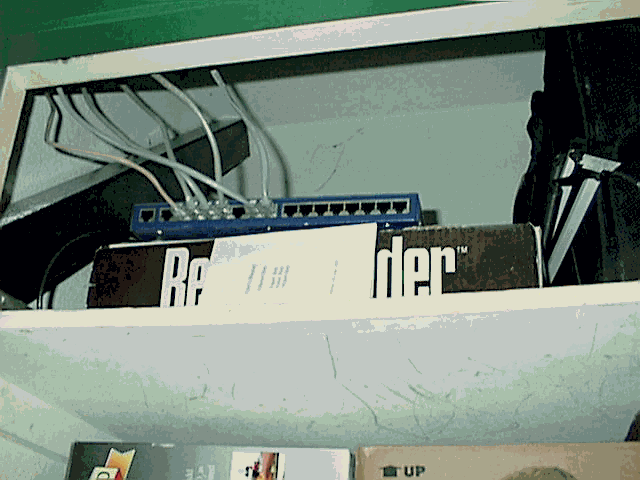
I eventually moved the hub to a water heater closet to provide more convenient access (See Figure 1). This decision proved wise when one of our alumni donated a 16 port hub to replace the 8 port. Switching the hubs took about 5 minutes since all I had to do was unplug all of the cables from the old hub and plug them into the new hub.
The next step in setting up the network was to install ethernet cards into the individual computers. I ended up helping each user do this on their individual computer. This repetitive and time consuming process motivated me to start writing the DSPNet User�s Manual which can be found in Appendix C.
We got file and printer sharing working on the computers and began to enjoy the benefits of having a network. We were not offering any internet access yet. To achieve this we needed to set up a proxy server that would allow the LAN to communicate to the internet over one external connection. Figure 2 gives a visual representation of this concept.
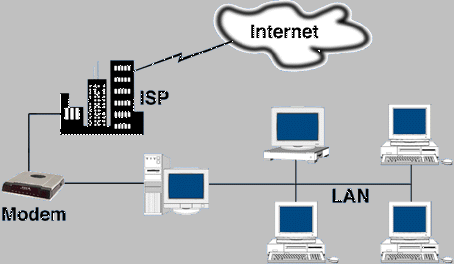
I found a software package named WinGate that provided the type of service that we needed. WinGate is a proxy server that runs on a single Windows computer and routes all internet traffic over the single connection. I decided to use my Windows 95 machine and a 56kbps modem for this purpose.
When the WinGate proxy server was finally up and running, people began to understand the cost savings and convenience that would be realized if we made this network permanent and setup a house internet account. Instead of each user paying $11-20 to an internet service provider (ISP) each month and an additional $20 to the phone company for an extra line, we could split that one cost among the whole house. This concept of sharing common expenses to reduce the individual�s cost is in fact one of the great things about the fraternity system, so this strategy fits right in.
Permanent Implementation
The central idea for a permanent version of the network is to wire each room in a professional way. This can be achieved by running all wire in a systematic fashion to wall mounted outlets in each room. These outlets become permanent fixtures in the room much like phone jacks. A user then hooks into these with their own network cable and ethernet card. I�ve chosen to locate these jacks in the closets of rooms that that the cable can be run along the wall in a hidden fashion.
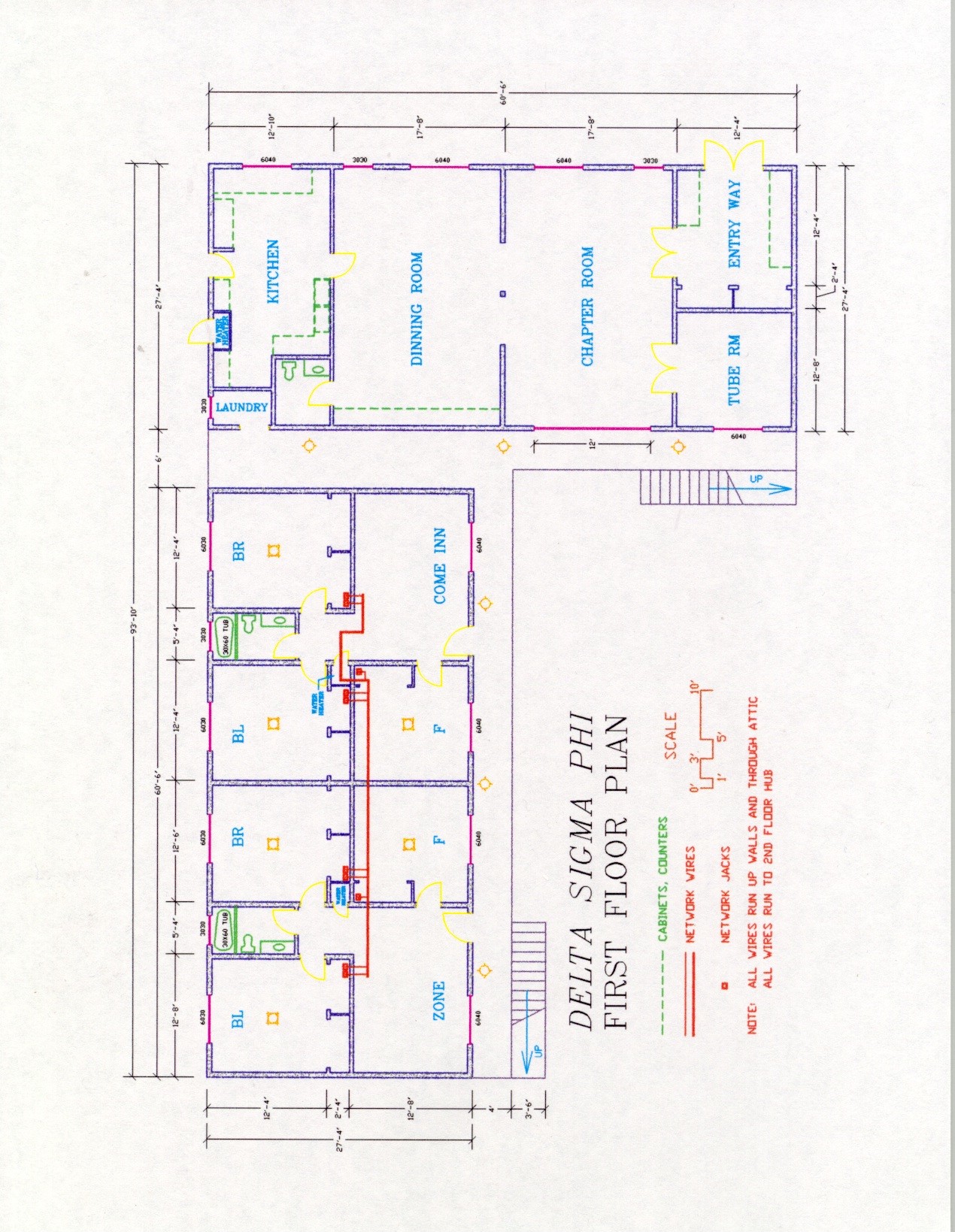
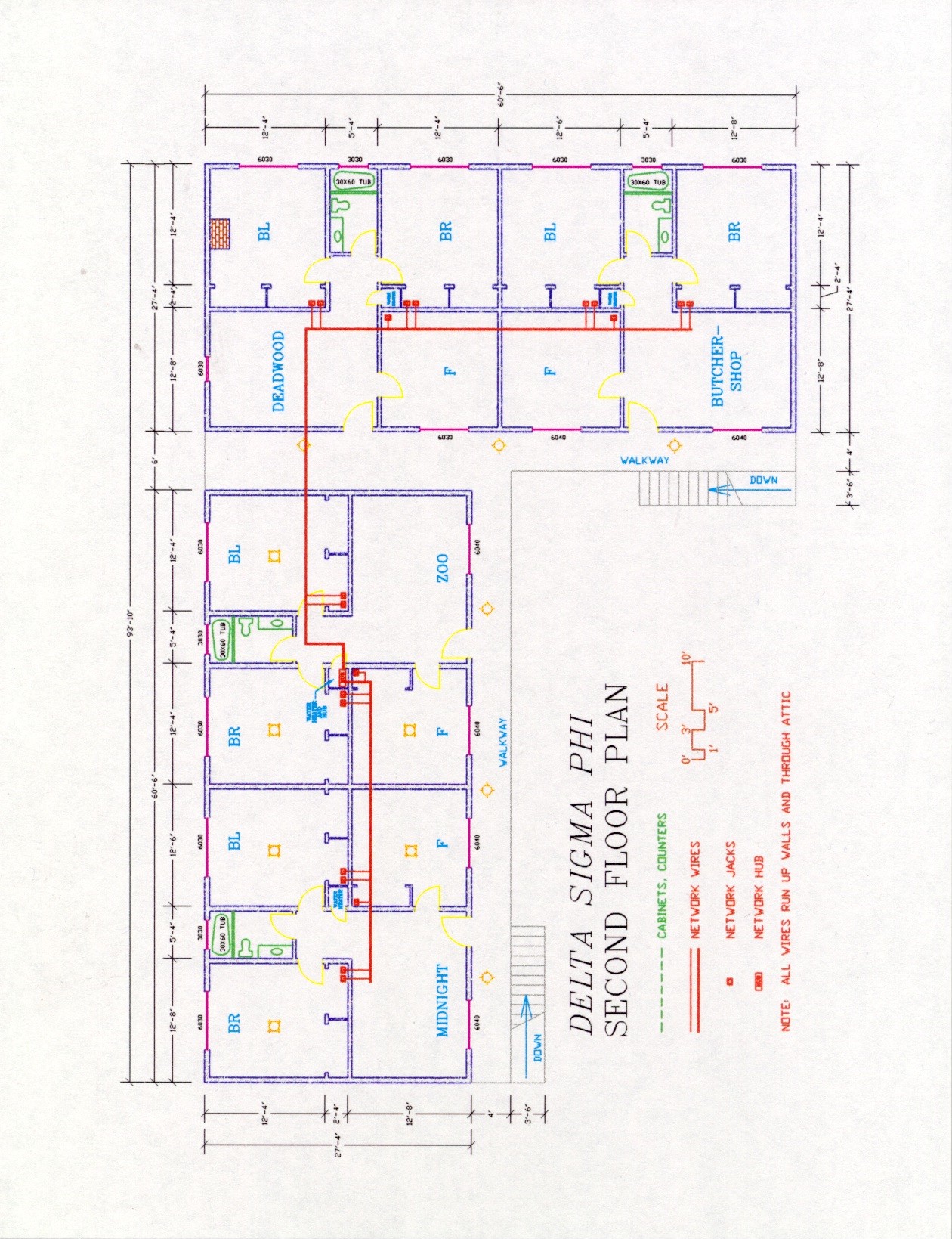
Each cable will be given a few yards of slack so that if the drywall is ever redone, the cables can be place inside the walls. The location of each wall-mounted outlet is indicated in the house blueprints, which are found in Appendix A. Since this will be an addition to the physical house, I have put together a proposal for funding that will be presented to our landlord the Alumni Corporation Board (ACB). This proposal can be found in Appendix B.
The plan is to have 30 wall-mounted jacks distributed through the 18 rooms. This provides one jack for each single occupancy front room and two jacks for each double occupancy back room. I have asked for only 16 total ports since it is unlikely that all 30 occupants will need to be on the network. If need arises, another hub can be added quite easily to the configuration.
I have prepared a DSPNet User�s Manual that details how to install and configure each network connection. This manual is based on the permanent solution with a shared house proxy server. The manual in its entirety is found in Appendix C.
Future Upgrades and Expansion
The most important feature of DSPNet is that it takes into account the future. The network can be expanded to accommodate more users and upgraded to faster speeds. In this section I will detail how to handle the possible reconfiguring of the network.
Connecting more users is the easiest of all reconfigurations to perform. To add more than 16 users, we must buy a new hub and connect it to the current one via a Category 5 UTP cable. The new hub can be placed on top of the original and the new users can be plugged into the newly available jacks. If more than 30 connections are ever required, a hub can be plugged into any normal wall jack to provide more connections.
Another likely upgrade that isn�t too hard to perform regards the speed of the internet connection. An additional modem and phone line can be added to double the capacity of the internet connection. If ISDN or cable modems become viable, the WinGate machine will support them. In this case the new device would take the place of the modem.
If we were able to get a block of IP addresses, the proxy server could be replaced by a gateway. This gateway would direct traffic in almost the same way that the proxy server did but greater performance and simplicity would be achieved since the connection would be direct and not through a server.
The last possible speed related upgrade is for the LAN. We could replace the hub(s) with 100BaseT and get ten times the current performance locally. I don�t see a need to do this for a very long time since the internet connection is the bottleneck, not the LAN. It is reasonable to conceive that the local network could have lots of traffic on it and 100BaseT would be desirable however.
I propose that ACB and the active brotherhood take part in a joint venture that upgrades our chapter house using the latest technology. I am suggesting that we use Category 5 parts everywhere so that if the standards of networking speed go up to 100 Mbps we are already wired for it. I am also requesting only 16 ports total for the hubs, this allows for most rooms to have a connection, but doesn't waste money on ports that are not needed at this time. If in the future we need to have more ports, we can slap another 8 or 16 port hub in and all the wiring is already in place. So this plan allows for both the ability to upgrade and expand.
There are couple reasons for this proposal; first off every room in the house has a computer in it currently. I have set up an ad hoc network, but I will be graduating soon and taking some of my stuff with me. The brothers that are on this ad hoc network are already seeing the benefits of connectivity. Recently in the Carnation, Purdue's chapter was featured for installing a similar network; they were hailed as being up to date with the times. I think we should also be up to date with the times since we are a polytechnic school. Down the road, when we hook up Internet service, the house network will save brothers money. The brothers won't have to have all of the extra phone lines that they currently have, and they won't have to each pay $20 a month to an ISP. The house as a whole can share the much lower costs of having one good connection.
Brothers in the house will do all labor. The price of the equipment is what I can get stuff at wholesale through my personal sources. This is a great opportunity to add value to house.
ACB's Part (Internal House Wiring)
1 16 Port Hub Donated
3000' Category 5 UTP Solid Core Cable $240
12 Dual Port Surface Wall Mounts (CAT5 Solid Core)($8) $96
6 Single Port Surface Wall Mounts (CAT5 Solid Core)($5) $30
30 Jacks ($.15) $ 4.50
Total Cost: $370.50
Active's Part (Individual Connections & ISP Service)
Each brother that wants connectivity must own or buy a 10BaseT Network Card ($25) AND a Cable ($14) to plug into the wall mount.
The house will pay for a subscription to an ISP, a modem, and an accompanying phone line or ISDN line.
This manual is provided to help new users configure their system and get started on the house network.
Necessary Equipment
The first step is to put the card into your computer and to connect it to the network by running the ethernet cable from the connection in your closet to the connector on the ethernet card.
Hopefully Windows will find your card and set it up for you through its Plug and Play interface. If so please skip to the next section, otherwise follow these steps.
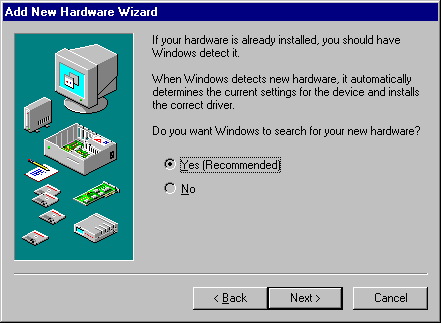
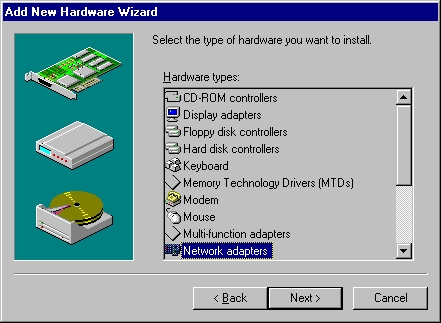
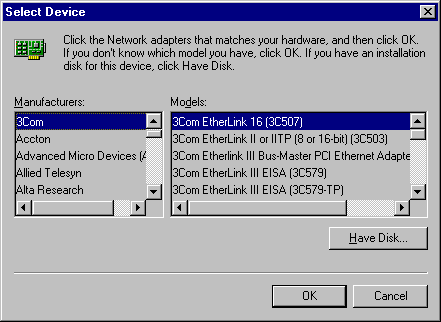
Adding the Protocol Stack
Configuring Peer to Peer Networking
1. Using NOTEPAD, create a new text file or edit the existing file HOSTS file that is located in your Windows directory. The only entry in this file should be the IP address and name of the proxy server, separated by at least one space. It should look like this:
192.168.0.1 wingate
Configuring Your Internet Programs to Use the Proxy Server
To telnet you must go through the wingate proxy server. Open telnet and connect to wingate. You should get a wingate> prompt. Type in the machine you want to telnet to and proceed with your normal telnet session.
To use a web browser such as Netscape or Internet Explorer you must tell it to go through the proxy server. The address for the proxy server is 192.168.0.1 the default port is 80
To ftp you must ftp to the wingate proxy server. Open the FTP session and connect to wingate. Enter your username, the "at" symbol, and the site you wish to FTP. It should look like this: [email protected] Enter your password for that site in the usual fashion.
For greater detail on how to configure specific applications please visit WinGate�s homepage at: http://www.wingate.net
The DSPNet mapping scheme for IP addresses uses the standard private network reserved addresses. Basically each IP address consists of the standard subnet of 192.168.0 plus a two-digit individual address. The first digit designates the suite the computer is in, and the second digit designates the room.
The two-digit numbers 0-10 are reserved for the gateway and servers.
Butcher Shop 1
Deadwood 2
Zoo 3
Midnight 4
Zone 5
Come Inn 6
Front 1
Back Left 2 & 4
Back Right 3 & 5
Example: Front of Zone would have the IP address: 192.168.0.51
Bob Cerelli�s Windows95 Page, http://www.halcyon.com/cerelli/index.html
Ethernet HUB for Workgroup Installation and Planning Guide
FAQ Windows 95 Networking, http://ourworld.compuserve.com/homepages/j_helmig/faq.htm
NetLan Network Interface Card Manual
The WinGate Homepage, http://www.wingate.net