Definition
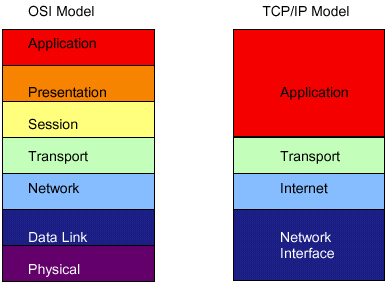
TCP/IP is a suite of protocols containing subprotocols, its predecessor was developed by the US Department of Defense in the late 60s. TCP/IP is the most popular protocol in computer communications, it is the standard for the Internet and is becoming more popular in LANs. This is a routable protocol, it can be interpreted by routers. It is also very flexible. The TCP/IP subprotocols can be assigned to 4 layers similarly to the OSI model. It is described below.
Application Layer
This layer is similar to the Application, Presentation and Session layers of the OSI model. Applications are allowed access to a network via this layer.
Transport Layer
This layer is similar to the Transport layer of the OSI model.
Internet Layer
This layer is similar to the Network layer of the OSI model.
Network Interface Layer
This layer is similar to the Data Link and Physical layers of the OSI model. This layer does mainly the formatting of data and transmitting data to the network medium.
TCP/IP Core Protocols
These protocols provide basic services.
Internet Protocol (IP)
This protocol belongs to the Internet layer in the TCP/IP suite and contains the details of data transmission. IP is the vital part that enable the TCP/IP suite to internetwork which means to pass through multiple LAN segments and multiple types of networks through a router. The data frame of IP is referred to as an IP datagram and contains the information necessary for routers to transfer data.
Transmission Control Protocol (TCP)
TCP corresponds to the Transport layer of the TCP/IP suit. TCP offers reliability by providing connection-oriented transmission of data, efficient flow control, checksum and sequencing information. TCP sits on top of the IP. The portion that holds TCP data fields and is encapsulated is called the TCP segment.
User Datagram Protocol (UDP)
This protocol is located in the Transport layer of the TCP/IP suit. It is connectionless, unreliable and it provides no error-checking or sequencing. UDP is useful for quick transaction of data e.g. audio or video streaming over the Internet.
Internet Control Massage Protocol (ICMP)
This protocol is situated in the Internet layer of the TCP/IP suite and its responsibility is to notify a sender when something goes wrong in the transmission process.
ARP (Address Resolution Protocol)
ARP resides in the Internet layer of the TCP/IP suite. ARP resolves hardware addresses. Each network adapter has a unique hardware address (commonly referred to as a MAC address) which it uses for identification on the network. ARP works with the IP core protocol since IP need an address before it can transmit data to it. When there is a need to locate a computer on the TCP/IP network, ARP first checks its local database to see if it contains the hardware address for the computer it is trying to connect to. If the address is not in the ARP database, ARP broadcasts a message to the known IP address for its hardware address. The computer it is trying to locate will receive the broadcast and send a reply with its IP and hardware addresses. To make ARP more efficient computers store the resolved IP and hardware addresses in cache.
TCP/IP Application Layer Protocols
These protocols translate the user requests into a format the network can understand.
SNMP (Simple Network Management Protocol)
SNMP is used to monitor and control network devices. It can be used to gather specific information from an agent. An SNMP protocol is a functional group of SNMP agents and managers. Agents receive requests and report information to the SNMP managers for the device the agent belongs to and the information is then stored on a database. Management tools use SNMP.
FTP (File Transfer Protocol)
FTP is used to transfer files from a computer to a server, or vice versa.
TELNET
Telnet is there for terminal type access, it is used for remote users to access a network over LANs or WANs and make changes to the computers for example over the Internet. This is also uses to connect different computer systems e.g. PCs and UNIX.
SMTP (Simple Mail Transfer Protocol)
This protocol is responsible for moving massages from one e-mail server to another. It uses the POP (Post Office Protocol) to keep track of storing and forwarding of massages.
Addressing
Each network address must be unique which
means each computer on a network must have its own unique network address. If
there were identical addresses there would be conflicts in the network. There
are two types of network addresses, MAC is the physical address which is provided
by a manufacturer and is burned onto every NIC. A logical IP address depends
on rules set by the protocol standards. The logical address can be assigned
manually. The logical address can also be assigned automatically by using the
DHCP (Dynamic Host Configuration Protocol). Dynamic Host Configuration Protocol
is a way of getting your server to allocate an IP address to the device that
you wish to connect to the network. Basically a piece of software on the server
is programmed with a list of IP addresses that it can give to a device upon
request. This means that if a product supports DHCP, and you have enabled that
protocol and the DHCP server is running on your network, then your device will
be given an IP address by the server. At
its most basic level, the IP address is taken from a pool of free IP addresses,
this means that the IP address could change from one day to another.
An IP address consists of four octets (1 octet = 8 bits), or 32 bits. The value in each octet ranges from 0 to 255 decimal, or 00000000 - 11111111 binary. Here's how binary octets convert to decimal:
1 1 1 1 1 1 1 1
128 64 32 16 8 4 2 1 (128+64+32+16+8+4+2+1=255)
Now here's a sample octet conversion:
1 0 0 0 0 0 0 1
128 0 0 0 0 0 0 1 (128+0+0+0+0+0+0+1=129)
And this is a sample address representation
(4 octets):
10. 1. 23. 19 (decimal)
00001010.00000001.00010111.00010011 (binary)
These octets are broken down to provide an addressing scheme that can accommodate large and small networks. There are five different classes of networks, A to E. Classes A to C are the most common, classes D and E are reserved. To determine the class of an address, look at the first octet of the dotted-decimal address.
Class A: 1 - 126 (e.g.. 10.1.23.19)
Class B: 128-191 (e.g.. 172.16.19.48)
Class C: 192-223 (e.g.. 193.18.9.10)
In a class A address, the first octet is
the network portion, so the class A example above has a major network address
of 10. Octets 2, 3, and 4 (the next 24 bits) are for the network manager to
divide into subnets and hosts. Class A addresses are used for networks that
have more than 65,536 hosts (up to 16,581,375 hosts). The value "127"
is referred to as a "loopback address". Any IP address that begins
with 127 is a loopback address e.g. the IP address 127.0.0.1 is a loopback address.
It is used for testing purposes only.
In a class B address, the first two octets
are the network portion, so the class B example above has a major network address
of 172.16. Octets 3 and 4 (16 bits) are for local subnets and hosts. Class B
addresses are used for networks that have between 256 and 65,536 hosts.
In a class C address, the first three octets
are the network portion. The class C example above has a major network address
of 193.18.9. Octet 4 (8 bits) is for local subnets and hosts - perfect for networks
with less than 256 hosts.