Welcome
Welcome to Josh Rosenbaum's Message Notifier site. Message Notifier has been dormant for quite a while, but it still works nicely. Hopefully I will get some time in the future to enhance it.My personal page is at http://www.joshrosenbaum.org/.
Email Me
Sign Guestbook (You can leave comments, bug reports, and/or feature requests as well.)
View New Guestbook Entries
View Guestbook Archive
News
03/18/2007
Well, 3 years later and I finally release a new version. This version (1.38) fixes 4 bugs. (3 crash bugs and one annoying one where sending group messages would cause an alert.) See below for changes. Sorry I haven't been able to work on this much. There are a ton of features that could be added, but I just haven't had time. After 1.38 has been in use for a while and is stable, I'll submit it to the Trillian site.03/21/2004
Hmm, so much for version 1.36. I decided to work on the plugin a little more and now 1.37 is done. It fixes a problem in Win9x/ME with the user priority drop downs not working correctly. It also fixes the ignore username functionality in 2.0. (Now allows you to ignore by display name, or network name.) Also, there is now a version check feature for Trillian 2.0+ users. By default, it is set to run everytime Message Notifier starts. You can disable this in preferences if you would like. There is also a button to manually check for an update. I'm sorry I haven't gotten any of the feature requests done. I still have them.03/21/2004
Well, I decided to try USB for a while on my keyboard. In doing so, I noticed that my leds weren't flashing. Apparently the error that determines what routine to use isn't happening on my logitech keyboard. (Maybe others.) In any case, after much research, I finally settled with the easiest option to hopefully settle this once and for all. I've added a checkbox to the options that allows the user to specify whether they are using a USB keyboard or not.03/20/2004
Thanks to Shao for reporting a new bug. Apparently Trillian changed the API in 2.0 so that messages sent to the plugin use the actual address of the contact, rather than the display name. I have updated to the new plugin.h, and accounted for this problem. If anyone has any problems, please let me know. This should've only affected the "priority sound by user" feature.02/12/2004
Thanks go out to Mike "Oompa" Skalnik for finding a bug in MN. I have released 1.34 which fixes some debugging information popping up in Win9x and WinNT 4.0 or less. Sorry about that to anyone who had the problem. I'm actually surprised someone didn't point this error out earlier. Must be a lot of Windows 2000/XP users out there. It couldn't be that my plugin is under used. ;)12/26/2003
Well, I found some time here after Christmas to check up on some bugs. I added an altenative flashing method for NT based machines. (Actually just an option. I had the method there, just no option to use it.) So if your lights aren't working right after using this new version, then try to toggle the checkbox. (It only appears for NT based machines.) Sorry that there are no new changes. Also, I have seen screens where the text goes off the Trillian preferences screen. I obviously need to rework the preferences at some point, but I think I might add a feature or two first. We'll see. It's taken this long to update, but maybe it'll put some fire under me. :)09/25/2003
Sorry I haven't updated in so long! I have some good news and some bad news for you. :) The good news is that Lord Dukinger reported a very bad bug related to blinking the number of messages received as well as problems related to USB keyboards. This bug is now fixed thanks to him giving up a lot of his time to help me find it. (Remote debugging is so fun! :P) In any case a couple of bugs are fixed related to the blink # of messages option. Also, I wrote a new routine for NT/2000/XP/andUp USB keyboards, so hopefully this works better for you guys. It occasionally skips a light here and there, though, but it doesn't crash or lock the keyboard lights. (I don't think.) Now for the bad news. I haven't had any time to put out a new version yet with all the new features everyone wants. As soon as I get some time, I will do this! In the mean time, I recommend everyone upgrade to 1.32 to prevent problems. Thanks again to Lord Dukinger for all the time and effort he put into helping me squash these bugs. Oh, I also changed the clearing of lights at start to just clear lights that are selected.09/04/2003
FINALLY! The worms have stopped filling my mail account. If you sent a message in the last two weeks and never got a reply, or it bounced, please resend it.8/31/2003
If you're tired of the MSN security update message activating Message Notifier, then put ".NET Messenger Service Staff" into one of the custom ignore boxes. (Without the quotes.)8/29/2003:
Well, there was a lot of email in my bulk mail folder. Looked like all viruses, so I just emptied the thing. If you tried to send me email in the last week, or you did and you got no reply, please send it again, as I didn't get it.8/18/2003
Well well well, a bug was found! Apparently switching to the multi-tab preferences had other unintended side effects. For example, some of the control's ids were being duplicated. (check marks, buttons, etc.) This should be fixed now in 1.31. (Thanks again Brian for reporting this! I still can't believe I missed this!)8/13/2003:9:33pm
Sorry guys, if you downloaded the plugin in the last 5.5 hours, please download it again. There was one problem with it. I still call it 1.3, but the files are updated. (Accidentally deleted my lights class when it was still needed.) :P In any case, it's fixed. :P8/13/2003:4:03pm
It's here! Try it out now, and let me know if you find any bugs. Features, changes, and screenshot are below. Old news here.Donations!
I have a paypal account you can donate money to if you feel like it. Thanks. :)Message Notifier 1.38 for Trillian
Download:
MessageNotifier1_38ByJoshRosenbaum.zip for TrillianMessage Notifier 1.37 for Trillian
Download:
Mirror on Civillians.comThis plugin has not been tested by the 'Civillians', please acknowledge the fact that Civillians is not
responsible for any damage caused to your computer because of this plugin.
Also available on the Trillian Featured Plugins page.
Message Notifier Readme
Short(??) Description
"This Trillian plugin notifies you by keyboard lights and/or pc speaker sound when someone sends you a message. It will flash the num/caps/scroll lock keys (selectable) either all at once, or one at a time. It can also flash the number of messages that you have received since you've been gone. There are many sounds to choose from, or you can disable them. Priority sounds can be setup to activate on certain text or by certain users sending messages. Limits can be set on both lights and sounds, so you can have the alert activated for only a few seconds, or forever. (They are also automatically disabled upon user input.) You can set notification to ignore certain mediums, as well as to ignore IRC group messages. Message Notifier can also ignore specific users as well. Can be activated by screen saver, on away, automatically, or manually. Plus many more options."Shorter Description
Notifies by keyboard lights and/or pc speaker when message received. Lights flash together or one at a time. Can flash number of messages received. Priority sounds based on received text or certain user. Can place limits on both lights and sound. Can Ignore any medium, IRC group messages, or aliases. Activated by screen saver, on away, automatically, or manually. Plus more.Short as I could get it
Keyboard lights/pc speaker when message received. Lights flash together/one at a time. Can flash # of messages received. Priority sounds based on received text / certain user. Place limits on lights &or sound. Ignore any medium/IRC group messages/aliases.Changes:
Version 1.38:- Fix crashes related to exiting Trillian when the "Screen Saver Detection" or "Enable When Away/Invisible" options are activated. Both of these options have been switched to a non-threaded mode.
- Away/Invisible detection will only activate the alarm if away/invisible is set on the connection of the incoming message. Previously, if any connection was marked as away/invisible, we did an alert.
- Fix crash when "Ignore Online/Offline Messages" is unchecked and an msn window for an offline user is opened.
- Don't alert when sending a group message.
- Fixed a problem in Windows 9x/ME where priority by username drop downs weren't showing the users.
Added a version checker. Defaults to checking everytime the plugin is started. (Not loaded.) You can
turn this off in the preferences, though. There is also a button you can press to manually check for updates.
This feature requires Trillian 2.0+ as I use the Trillian API for this functionality. Also, ignore names should
work better. On Trillian 2.0+ it will match either the displayed name or the network id of the user. (1.0 will match
only display name.)
- Added USB checkbox that allows a user to manually specify they have a USB keyboard. Hopefully
this will solve some problems. Of note, when using a USB keyboard (or Windows 9x/ME) you should
turn off the on screen key lock notifications, as this will significantly slow down the plugin.
For my Logitech, this was in the Logitech iTouch Configuration, under Options and marked:
"Show lock key notifications".
- Updated to 2.0 API plugin.h. Also fixed a bug in Trillian 2.0, as it has switched the way
message_broadcast works. (name => display_name) This caused a problem with priority sounds
based on username. Should work fine now. Note: 1.0 users, please let me know if this works OK
for you
- Whoops! Debugging popups for Win9x and NT below 4 are gone now.
- Added a new Misc tab that I will use in the future. Also for NT based computers, there a
checkbox that is togglable so that people with problems on those machines can try an
alternate light method. I also found a bug that would cause one of the blinking routines
not to work right.
- Fixed problem with crashing when using "Blink Number Of Messages." If you use this option
I highly recommend you update! (THANKS Lord Dukinger!) - Also fixed problem of alert exiting out too early when this option was selected.
- Using a brand new Windows NT,2000,xp,and up light flashing routine for USB keyboards, and
any other that causes problems for the normal routine. Hopefully this works better. - Changed starting clear all lights to just clear lights that are going to be blinked.
- Fixed resource duplicate ID problem where clicking checkmarks would activate
other features.
- Fixed LED's so that they started off all blank. Also sets them back to what they were when
notification started. (Although Windows 9x may have problems with that.) - Fixed invalid pointer in configFile.
- Fixed certain text boxes not updating main program variables.
- Who knows what else. :P
- Added a different LED Toggle method for USB keyboards, or others that might have problems.
- Fixed some values not being loaded on startup.
- Added option (set to default) that alternates lights now instead of flashing all at once.
- Moved LED options around in preferences.
- Changed various startup defaults.
- Added song durations to title listing.
- Increased size of drop down song window.
- Added audio test feature.
- Changed website. My college one was finally taken down. :(
- Added option to detect when you are set to away, and to automatically enable notification.
(Currently this activates when any connection goes to away/brb/invisible/etc. I may make it
connection based later.) - Added keyboard detection for 95, 98, ME, and NT (Global hook) (kbhook.dll needs to be in
same dir as MessageNotifier.dll) - Fixed bug where clearing priority text wouldn't actually clear it while the plugin was running.
Current Features:
- Flash Num/Caps/Scroll Locks keys (selectable) when message received (until some user
input found) - Play audio (i.e. songs, sounds) when message received. (Until user input found)
- Options to select various sounds/songs.
- Decrease/increase speed of audio.
- Option to start detection when screen saver starts or when you go away/invisible.
- Trillian list options to enable detection, the PC Speaker, and screen saver detection.
- Priority text options. When certain text (case doesn't matter) is typed in a message,
priority audio will be played. If a message is received while the normal audio alarm is
active, the priority audio will take over. In this same fashion, priority one audio will
take precedence over priority two messages. - Option to enable detection as soon as plugin is started.
- Play audio for a certain number of times
- Play audio for a certain amount of seconds
- 1.3 - Tabbed preferences. (A bit different layout, but basically the same.)
- 1.3 - Ignore Online/Offline Messages. This option will ignore the information messages that
can occur in the windows. (Such as online/offline ones.) - 1.3 - Option to only alert on private IRC messages. (default)
- 1.3 - Notification based on medium. Now you can ignore messages from certain mediums. (I also
included a custom field. I was thinking this might be useful for Trillian 2.0, but I
honestly don't really know as I haven't tried Trillian 2.0) - 1.3 - Filter out certain nicks from any medium. Put your IRC nicks here, as the IRC server
sends your outgoing messages back, and they are registered as incoming messages in
Trillian. - 1.3 - Blink the number of messages received. (I think this is best use with "Alternate LEDs"
on.) Also, this ignores the number of blinks times, and blink duration options. - 1.3 - Blink # of seconds.
- 1.3 - Blink # of times.
- 1.3 - Blink only when sound on. This will shut off notification if there is no sound, or a
sound limit has been reached. If you set the sound to shut off in 3 seconds, and this
option is selected, then notification (including lights) will shut down. - 1.3 - Make priority sounds when certain users send messages.
Known Bugs/Errata:
- Some songs play too fast or too slow. Use the multiplier feature in preferences for now
- Some songs have messed up notes
- Mail notification overrides away status, so the "Enable When Away/Invisible" option will
not work correctly when mail comes in unless you are away on another connection.
Possible Bugs/Errata:
- Windows NT 4 or below with a USB keyboard: May not work, because of an alternate LED
flashing function used for some(all?) USB keyboards. I haven't been able to test it, but
if you do, please let me know if the plugin works. Basically, what could possibly happen
is that the notification is shut down right away. So you don't have to worry about
anything harmful. :) - Windows 9x/ME: Sometimes numlock/caplock/scrolllock might be in different state at the
end of a notification than they were at the start. I tried working on this, however, the
solution seems to cause other problems. Solution: For now the only one is to upgrade to
a windows NT based OS. (NT/2000/XP/2003) I might look into this more for later versions.
Future Features To Add:
- Not a feature, but I have a bunch of optimizing I'd like to do
- Perhaps a 'light' version with not so many songs
- Knight Rideresque Lights
- Use sound card for notes
- Activate alarm when monitor power goes off
- Allow people to send music strings and have them played
- Allow people to send a certain jukebox command and have song played
- Maybe make priority text case sensitive?
- Some different light usage
- Option to continuously blink until message is acknowledged.
- Use sounds only on certain actions. Like window out of focus, window creation, etc.
- Allow priority text to be turned off. Perhaps by new text or maybe by typing text again?
Maybe have option to disable priority when user who enabled it logs off? - For the ignore nicks option, I would like to use a list instead of four text boxes.
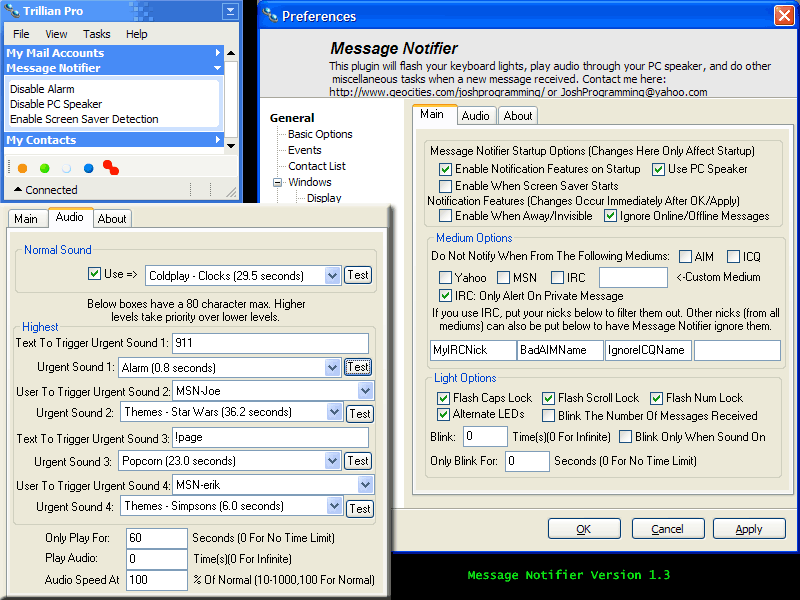
Screenshot:
Thumb of Screenshot: