· Structures and Classes
o
Structures.
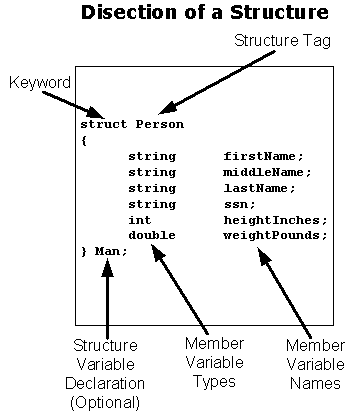
§ A structure is a collection
of variables that are referenced under one name
§ Structures provide
convenient means of keeping related information together
§ Structures are called
compound data types because they consist of several different, yet logically
connected, variables

§ An example using a structure
in C++ that involves accessing and
mutating the member variables is shown below
#include
<iostream>
#include
<string>
using
namespace std;
struct
Person
{
string firstName;
string middleName;
string lastName;
string ssn;
int heightInches;
double weightPounds;
}
Man;
int
main()
{
Man.firstName = "Joseph";
Man.middleName = "K.";
Man.lastName = "Russell";
Man.ssn = "123-45-6789";
Man.heightInches = 71;
Man.weightPounds = 178.5;
cout <<
Man.firstName << " " << Man.middleName
<< " " <<
Man.lastName << endl
<< "SSN: " <<
Man.ssn << endl
<< "Height: "
<< Man.heightInches
<< " inches\n" <<
"Weight: "
<< Man.weightPounds <<
" pounds\n";
cout << "\nENTER NEW
INFORMATION\n\n";
cout << "First Name: ";
cin >> Man.firstName;
cout << "Middle Name: ";
cin >> Man.middleName;
cout << "Last Name: ";
cin >> Man.lastName;
cout << "SSN: ";
cin >> Man.ssn;
cout << "Height in inches: ";
cin >> Man.heightInches;
cout << "Weight in pounds:
";
cin >> Man.weightPounds;
cout << "\nTHE NEW
INFORMATION\n\n";
cout <<
Man.firstName << " " << Man.middleName
<< " " <<
Man.lastName << endl
<< "SSN: " <<
Man.ssn << endl
<< "Height: " <<
Man.heightInches
<< " inches\n" <<
"Weight: "
<< Man.weightPounds <<
" pounds\n";
return 0;
}
// Example
Output
Joseph K. Russell
SSN: 123-45-6789
Height: 71 inches
Weight: 178.5 pounds
ENTER NEW INFORMATION
First Name: John
Middle Name:
Last Name: Doe
SSN: 890.45.3214
Height in inches: 68
Weight in pounds: 168
THE NEW INFORMATION
John Quincy Doe
SSN: 890.45.3214
Height: 68 inches
Weight: 168 pounds
o
Classes.
§ A class defines a new data type, which can be used
to create objects. For example, the
variable named salesman is a Person object in the declaration
shown below.
Person salesman;
§ When a class is defined, the programmer
defines both the data and the functions that operate upon that data. The data is called member data and the
functions are called member functions.
§ By default, data and
function members of a class are private to that class. The public keyword is an access
specifier that is used to declare the public members of a class.
§ A constructor is a special
member function that is invoked when an object is created. If you do not declare a constructor for a class, the compiler will create a
default constructor for you that will create an empty object.
§ If you declare a constructor
for a class that takes one or more arguments, you may want to
write your own default constructor that takes no arguments because the compiler
will not provide a default constructor under these circumstances.
§ Member functions are invoked
using the dot operator similar to the way a public member variable would be accessed
or changed.
//
Example
Person
student;
student.displayName();
§ Only member function
prototypes are needed in the definition of a class.
§ Member function definitions outside
of the class must include the class name for which they
belong. This is done by using the scope
resolution operator (::). The name
preceding the :: is called the type qualifier because it qualifies the function
name to one type.
//
Example
void
Person::displayName()
{
cout << _firstName << “ “
<< _middleName << “ “
<< _lastName << endl;
}
o
Revisiting Encapsulation
§ An Abstract Data Type (ADT)
is a data type where the programmers do not have access to the details of how
the values and operations of the type are implemented. Example: int, double, and char are ADTs.
§ Implementation pertains to
the way in which methods of the class operate on the member variables, i.e.,
the way in which the variables of the class are manipulated.
§ The Interface is the
information a programmer needs to use the class. This is the programmer’s Application
Programmer’s Interface (API) to the class.
§ Encapsulation is
accomplished by creating an ADT. This is
done by separating the interface from the implementation. A good benefit of encapsulation is that you
can change the implementation at any time without having to change other parts
of your program.
o
Public and Private Members
§ Public members can be
referenced by name anyplace without restriction.
§ Private Members can only be
referenced by name within the definitions of member functions of the same class or by friends of the class.
· Constructors – A constructor
is a special member function that is automatically called when an object of a class is declared.
o
If no constructor is specified by the programmer, the compiler will
provide one automatically that will produce an empty object.
o
Constructors can be overloaded.
If you are providing a constructor that takes one or more arguments, you
may want to include your own default constructor.
//
Example
#include
<iostream>
#include
<string>
using
namespace std;
class
Person
{
public:
Person();
Person(string, string, int);
Person(int);
void displayName();
void displayHeight();
private:
string _firstName;
string _lastName;
int _heightInches;
};
Person::Person()
{
cout << "Inside my default
constructor.\n";
_firstName = "John";
_lastName = "Doe";
_heightInches = 68;
}
Person::Person(string
firstName, string lastName, int heightInches)
{
cout << "In constructor that
takes all information.\n";
_firstName = firstName;
_lastName = lastName;
_heightInches = heightInches;
}
Person::Person(int
heightInches)
{
cout << "In constructor that
takes height only.\n";
_firstName = "Jane";
_lastName = "Smith";
_heightInches = heightInches;
}
void
Person::displayName()
{
cout << endl << _firstName
<< " " << _lastName << endl;
}
void
Person::displayHeight()
{
cout << "Height = "
<< _heightInches << " inches.\n";
}
int
main()
{
Person A, B("Joseph",
"Russell", 71), C(70), D(B);
A.displayName();
A.displayHeight();
B.displayName();
B.displayHeight();
C.displayName();
C.displayHeight();
D.displayName();
D.displayHeight();
return 0;
}
//
Output for the above program
Inside my default constructor.
In constructor that takes all information
In constructor that takes height only.
John Doe
Height = 68 inches.
Joseph Russell
Height = 71 inches.
Jane Smith
Height = 70 inches.
Joseph Russell
Height = 71 inches.
· Initialization Section – An
initialization section goes after the parenthesis that ends the parameter list
and before the opening brace of the function body
// Example
Person::Person(int heightInches) :
_heightInches(heightInches)
{
if(_heightInches > 72)
cout << "The person
is over six feet tall.\n";
else
cout << "The person
is less than six feet tall.\n";
}
//
Replacing the constructor in the above program
// yields the following output:
Inside my default constructor.
In constructor that takes all information.
The person is less than six feet tall.
John Doe
Height = 68 inches.
Joseph Russell
Height = 71 inches.
Height = 70 inches.
Joseph Russell
Height = 71 inches.
· Review the Display 7.2
Example in the book beginning on page 269.