 |
|
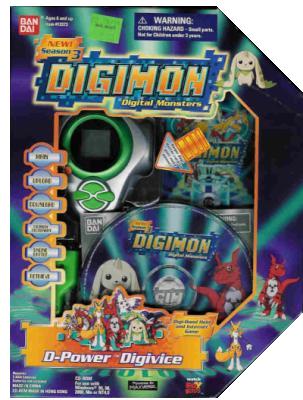
| Getting Started Batteries When you first get your D-Power, you will need 2 "AAA" batteries. Using a small sized screw driver, turn the screw counter clockwise to loosen. Pull up the battery cover, insert new batteries, and replace the cover. ___________________________________________________ Turning On/Off The D-Power will automatically turn off after one minute of not being used. To turn it back on, press the orange button on the lower left hand side of the colored ring surrounding the LCD screen. You may have to press it twice. This button can also be used as an alternative to turing it back off again. |

The D-Power |
| D-Power Instructions |
 |
 |
|
 |
|
| _________________________________________________________________________ Controlls Left / Right Buttons - Select options Down Button - Execute commands / Display walking status Up button - Cancel / Previous menu _________________________________________________________________________ Game Start After batteries have been put in, an opening animation will begin. Press the down button to show the slection screens. Press the left or right buttons to scroll through Digimon. Don't worry. By the end of the first level, you should have all three. Press the down button to select your Digimon. _________________________________________________________________________ Setting up Online Game Play You must download the disc that came with your D-Power. This may take a while. Then you must register yourself with a six-character name (I was able to type in a 15 character name) and a character to play as. Now you may begin your journey. _________________________________________________________________________ Basic Game Plot You can go to 12 levels. You'll find a boss in each level. In each level, depending on how high it is, you can go around with your digimon constantly at Champion, Ultimate, or even Mega. After the 12th level there is a secret level. You must first beat it in the regular D-Power (not connected to the computer). I know of a few people who have reached it. It is supposed to be the only level you can beat a boss in full 3-D rather than just battle other people. Note: In the "secret" level, you will encounter MaloMyotismon as the boss. Many have reported sudden glitches and errors occuring after this battle. You may want to save your Digimon on the computer, battle him and download the old file to avoid error. You can upload the file with him defeated if you would like to move on to the online "secret" level before getting the old file back. ______________________________________________________________________________________ Online Battle There are amazing 3-D graphics and battle music, thought to be even better than Digimon World 2! Card slashing is the disappointing part of battle. You may slash cards, but the D-Power doesn't read it, it only measures how fast you slash. If you slash fast, you get speed. If you slash slow, you get power. If you slash at normal speed, you get "sniper". You may also choose to "D-Energy" swipe. This uses your collected D-Energy to greatly raise your Digimon's strength for one turn. If you lose a battle with all three digimon on you team, Guilmon, Renamon, and Terriermon, or one of their digivolutions, Impmon might come and steal a digimon on your team. It is known that with every few battles, your digimon gain levels. During battle, there is an Instant Messaging feature, but you have to pick a message from a list. Fights go by very fast. You do not have to wait turns! It is like a mortal combat game except you move a little slow. As your Digimon grow in strength, they move faster online. _________________________________________________________________________ Online Controls Left Arrow key-Move left Right arrow key-Move right Up arrow key-Jump Down arrow key-Duck down S-DigiTech A-Punch W-Firing attack Z-Kick Esc-Surrender, give up a battle and lose You may push two keys at the same time. Example: Jump + Kick = jump up and as soon as you come down you kick. I find jump and fire very efficient. This combination works with all controlls. _________________________________________________________________________ Areas, Maps, and Digivolutions Chart Area 1 - Map 1 - Rookie Area 2 - Map 1 - Rookie Area 3 - Map 1 - Rookie Area 4 - Map 2 - Champion Area 5 - Map 2 - Champion Area 6 - Map 2 - Champion Area 7 - Map 3 - Ultimate Area 8 - Map 3 - Ultimate Area 9 - Map 3 - Ultimate Area 10 - Map 4 - Mega Area 11 - Map 4 - Mega Area 12 - Map 4 - Mega Area 13 - Map ? - Mega (Secret level) _________________________________________________________________________ D-Power Cheats Custom Digivolution level- Ever want to be a rookie or any other stage in an area that is too high to maintain that form? This is the code: Go to the "V.S. Battle" screen and select it. Choose the Digimon you want to change in Digivolution (it must be the Digimon you currently have in use). Then, scroll to the form you want it to be at. Enter a Digibattle with another D-Power. It doesn't matter who wins, but after the battle is over, your Digimon should remain at the level you chose! Have a better chance of Impmon going away- It is very annoying how Impmon steals your Digimon and then you have to train it all over again, right? This will help you out: When Impmon appears after you have lost a battle, press either the left or right button rapidly. There may be and animation of your Digimon beating Impmon up. Then, he should leave! (Note: This doesn't always work) D-Energy Swipe without using D-Energy points!- This code will let you use a D-Energy swipe without using D-Energy points: When you are in a fight go to the "swipe card" screen. Instead of swiping the card push the bottom button. Then when the "swipe card" icon is flashing push the button on the right. That's about it. ^_^ __________________________________________________________________________ Common Problems Cable Modem Error- To get online with a cable modem, you must ignore the error message you get when you click online. Make sure you have a Digimon uploaded or retrieved for online battle. After you close the message, click the online button and the maxverse login page should open. If the problem is not solved, go to www.d-poweronline.com and download the patch D-Power Battle Connection Error- A lot of the time an error message appears when you try to connect you D-Power to another one for battle. Simply keep connecting them and pressing the down button and they will eventually connect for battle. |
| Site Marker |
 |