 To create a link on your web page you first need to open your HTML page
from Notepad, located in the Accesories menu.
Once you have this done choose the spot where you want your link to show.
It could be either at the begining of your page or at the end, in this case
I wrote it at the begining.
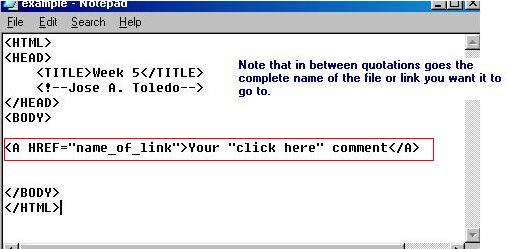
Then add the text that is in the red rectangle, and your link should be ready to work.
To create a link on your web page you first need to open your HTML page
from Notepad, located in the Accesories menu.
Once you have this done choose the spot where you want your link to show.
It could be either at the begining of your page or at the end, in this case
I wrote it at the begining.
Then add the text that is in the red rectangle, and your link should be ready to work.