
1. Open up a new Paint page.
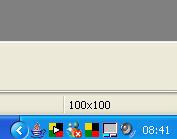
2. Reduce the size of the white area until it is 100x100 pixels; you can see the size in the bottom right-hand corner of the screen:
4. If you want a background image you can simply copy & paste one from the internet and resize it to fit the square.
5. Add in your text using the text tool (the A).
6. Save your square as a JPEG as some programmes will not import files as images if they are saved in other formats.
7. Attach your square to an email and you're DONE!