Planning
Visit NCTP The National Center for Technology Planning
An excellent source for finding links for technology planning
Learn how to develop effective technology plans!!!
Allow John See to help you:
- focus on
short term, instead of long term, technology goals
- focus on
applications, not just technology itself
- go beyond
enhancing curriculum
- define technology
as more than computers
- stress integration
of technology in the curriculum
- tie technology
to staff development
Add the technology planning recipe for success to your computer's cookbook!!!
Larry S. Anderson and John F. Perry offer their advice on technology planning. Learn how they define technology planning and describe thier recipe for success.
Access topics of interest such as:
- committee
representation
- progress
reports
- subdivision
of responsibilities
- establishing
time frames
- setting
target dates
- building
consensus
- formulating,
implementing, and evaluating a plan
- the role
of educational programs
- resources
for planning
How
to build
a
Computer
Lab
Learn how to build a computer lab according to Ginny Whitkanack!!!
From budgeting, to printers, to air quality... this site has all the information you could ever desire when building a computer lab.
Learn more
about:
- getting
started
- the purpose
of labs
- budgeting
and costs
- workstations
- printers
- audiovisual
equipment
- furniture
- supplies
and fixtures
- network
equipment
- software
- security
devices
- design of
the facility
- electronic
requirements
- teaching
lab versus open lab
- air quality
- life safety
requirements
- ADA requirements
- running
the lab
- staffing
the lab
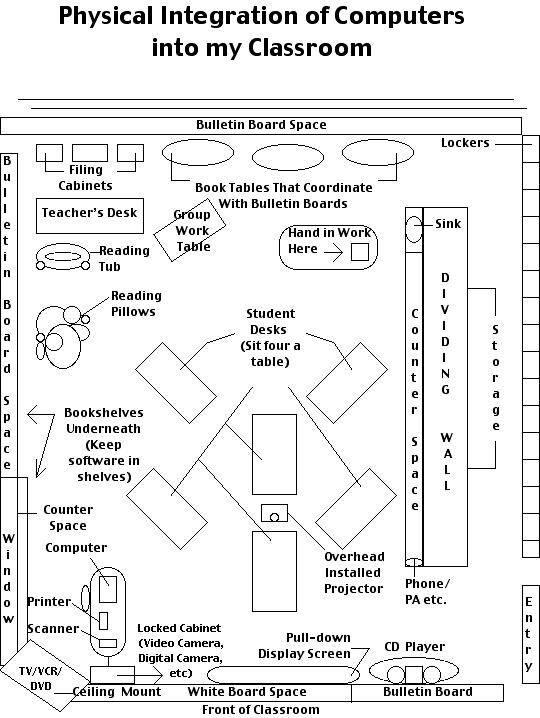
Physical Considerations
Learn how to adjust to the differences between computers labs versus classroom integration of computers!!!
Diane Culbertson, an information resource specialist, shares stories and information on current computer situations in the schools.
Get information on important topics such as:
- Should computer
labs be phased out of schools?
- Computer
pods in the classroom, library, or hallway.
- Effects
of computer locations on first graders usage and the enjoyment of computers.
- Computer
skills for information problem-solving: Learning and teaching technology
in context.
- West Virginia
story: Achievement gains from a statewide comprehensive instructional technology
program.
- Subject
cultures and the introduction of classroom computers.
- Assessing
the impact of computer integration on students.
- Putting
computers into elementary classrooms and endash; not labs.
- Barrier
to computer integration: Microinteraction among computer coordinators and
classroom teachers in elementary schools.
Get some expert advice on how to set up computers in your classroom!!!
Peggy Healy Sterns believes that a classroom computer can be a motivating and powerful classroom tool. Read some of her tips for setting up and using technology in the classroom.
Access suggestions
in areas such as:
- How will
the computer most likely be used?
- What can
you do with only one computer?
- What can
you do with several computers?
- Where can
you find help?
Visit Corporate Vision Consulting to help ease the eyestrain for kid computer users!!!
Get information on how computers affect students' eyes and visual system.
There is information
on items such as:
- computer
vision syndrome
- classroom
lighting
- general
eye care tips
Return to My Guide to Computer and Software Management
Background courtesy of http://www.nepthys.com/textures/