---Important Networking Terms----------------------------------------
Peer-to-Peer Networks:
The simplest networks are called peer-to-peer
networks. In these networks each client has its own storage area, which
might be shared with other clients. There is no central storage in this
type of network. Peer-to-peer networks are often used in small classroom
computer labs.
Client / Server Networks:
More commonly we see client/server networks.
These networks have storage devices on the network that may hold data forusers
to share. If you have worked on a client/server network, you have probably
heard the term file server used in reference to these storage devices.
A client may use the network to connect to one of these storage devices
and get some documents to view or edit.
LAN:
The term LAN has become almost synonymous with
the word network. A local area network, or LAN, is a network in which all
clients share a common infrastructure (wires) and are usually in the same
building, or group of buildings.
A comparison of the different
LAN technologies.
| Protocol |
Wiring |
Maximum bandwidth |
Maximum
length
|
Topology |
Cost |
| Ethernet |
Cat 5 twisted pair |
10 Mbps |
100 meters |
Star |
Low |
| Thick |
10 Mbps |
500 meters |
Bus |
High |
| Coaxial cable |
10 Mbps |
200 meters |
Bus |
Low |
| Fiber |
10 Mbps |
1000 meters |
Star |
Very high |
| Fast Ethernet |
Cat 5 twisted pair |
100 Mbps |
100 meters |
Star |
High |
| Token Ring |
Coaxial cable |
16 Mbps |
100 meters |
Ring |
High |
| FDDI |
Fiber |
100 Mbps |
1000 meters |
Star |
Very high |
| CDDI |
Cat 5 twisted pair |
100 Mbps |
100 meters |
Star |
Very high |
| LocalTalk |
Cat 3 twisted pair |
230 Kbps |
300 meters |
Bus |
Very low |
| ATM |
Fiber |
1 Gbps |
100 meters |
Star |
Very high |
Topology:
The topology defines the shape of a network.
Some networks are shaped like rings with all the client stations connected
in a logical circle; others are shaped like stars with all the client stations
connected to a central point. Probably the most common network topology
today is the star as exemplified by 10BaseT networking. This networking
scheme draws from many standards including the IEEE 802.3 Ethernet standard
and EIA/TIA standards for network cabling.
Star topology
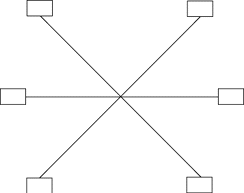
The star topology for a local area network looks
like a star. All network wiring runs from the client to a central location
or hub.
Ring topology
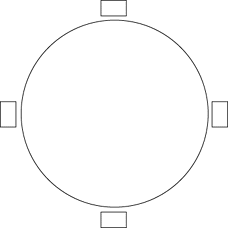
The ring or loop topology connects computers in
a continuous loop. In local area ring networks, though, the physical wiring
topology really looks like a star. The logical ring topology depends on
the network electronics you are using. IBM's Token Ring takes advantage
of this topology. The token is constantly passing around the network. A
computer can transmit when it gets the token.
Bus topology
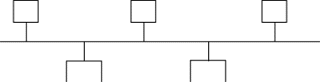
The bus topology was the first local area network
topology in use. In this pattern network clients are strung along a single
cable. The cable must be electrically terminated at each end to function
properly. A variation of the bus topology is the daisy chain. In a daisy
chain, the first component is connected to the second, the second to the
third, the third to the fourth, and so on.
Protocols:
A protocol is a standard for how devices communicate.
Protocols can be broken down into layers. For example, physical protocols
specify things like voltage levels on wires, while network protocols might
specify how a client might request a re-transmit of some data that it needs.
A group of protocols that work together is called a protocol suite. An
example of a common protocol suite is TCP/IP, which defines communication
on the Internet.
WAN:
In contrast, a wide area network, or WAN, is
one that spans a larger geographic area. For instance, a network that links
two or more LANs that are separated by some distance might be called a
WAN.
A Few Technologies for Networking
the WAN:
Plain Old Telephone Service
(POTS)
Just as its name implies, this technology relies
on standard phone lines to connect schools. Using current analog modem
technology, this service can run at speeds up to 28.8 Kbps in each direction.
It is a cheap and usually easy way to get a machine connected to the Internet
quickly. It has low start-up costs and low monthly rates. If an extra phone
line is already available, the school can reuse it with no installation
charge. An office can even share the line because it is only connected
when it is in use, although this is not recommended. An ISP will need to
provide Internet connectivity, but these are usually available at reasonable
rates as well.
Leased line
Another type of WAN connection is a leased line.
With a leased line, the district buys a permanent connection from the phone
company, either
to another school or to an ISP. The district
sets up a router and a Channel Service Unit/Digital Service Unit (CSU/DSU)
at each school that
will connect and connects the leased line to
the CSU/DSU. This establishes a network between the two ends of the
leased line.
Integrated Services Digital Network
(ISDN)
ISDN is a technology that is finally becoming
available from most telephone companies. It offers connections at either
64 Kbps or 128 Kbps
in each direction. It also expands by multiples
of 64 Kbps. The basic service, called a Basic Rate Interface (BRI), contains
two 64 Kbps data
lines called B-Channels and a 16 Kbps control
line called a D-Channel.
Cable TV
Cable tv is another alternative to the phone
company that is emerging. It allows a district to provide WAN connectivity
using the cable tv
wiring. Although still a new technology, it promises
to offer high speeds and low costs. However, several technical problems
need solutions.
These are due to the current implementation of
cable tv systems that send the same signal from a central office to many
destinations.
A comparison of different
WAN technologies
| Technology |
Speeds |
Maximum distance |
Startup Costs |
Recurring cost |
| Installation cost |
Equipment cost |
Line charge |
Internet Access |
| Plain Old Telephone Service |
9.6 Kbps - 28.8 Kbps |
Unlimited |
$75 |
$150 |
$30/month |
$20/month |
| Dry line |
56 Kbps |
2-4 miles |
$500-$1000 |
$300 |
$50/month |
$250/month |
| Leased line |
56 Kbps -
1.5 Mbps
|
Unlimited |
$500-$1000 |
$1500 |
$200/month -
$800/month
|
$250/month -
$2000/month
|
| Integrated Service Digital Network |
64 Kbps -
128 Kbps
|
Unlimited |
$150 |
$500-$1500 |
$50/month + $.005/minute |
$250/month |
| Wireless |
2 Mbps |
25 miles |
$0 |
$6000-$15000 |
$0 |
$250/month |
| Cable TV |
4 Mbps |
|
|
|
$50/month |
| Satellite |
56 Kbps -
115 Kbps
|
Unlimited |
$0 |
$15000 |
$800/month - $1200/month |
| Fiber |
10 Mbps - 1 Gbps + |
1000 meters |
$2/foot |
$2000 |
$0 |
Depends on ISP |
Fast Ethernet:
This is a new enhancement of Ethernet that runs
at speeds of 100 Mbps, ten times the rate of original Ethernet. Known also
as
100baseT, it requires that the wiring it runs
over be category 5 (cat 5) wiring, a higher quality than the cat 3 used
by normal Ethernet. The
equipment needed to use Fast Ethernet is also
more expensive than normal Ethernet, and although the prices are dropping,
it is most likely too
expensive for schools to install initially. Like
10baseT, it connects as a star topology and has a 100 meter maximum length
restriction. This
allows a district using cat 5 wiring to begin
with 10baseT and later upgrade to 100baseT without replacing the wiring.
(All of the above information was taken from http://devius.cs.uiuc.edu/schools/bl-thesis/toc.doc.html)
Background courtesy of http://www.aaabackgrounds.com/
Back to
the Networking Table of Contents