Hacking OS X Bezels
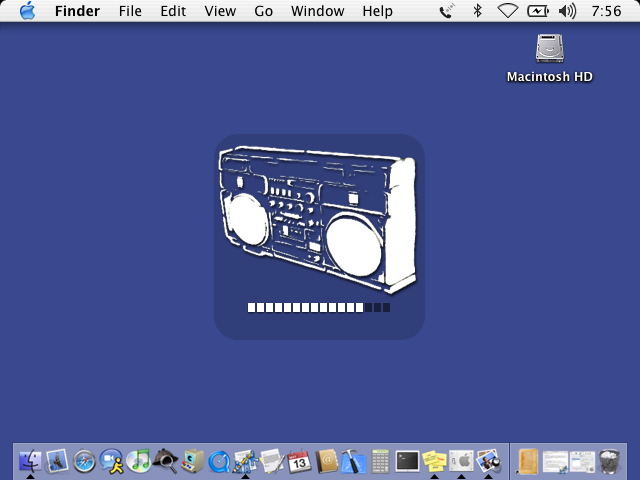
Panther
In Panther, you can change any of the bezel images found in System/Library/CoreServices/BezelUI/Images with any image editing application that supports PNG and transparency. It's good to note that the bezel's background should be black at 15% transparency (or "alpha"). To create a nice custom bezel:
-
BACKUP the files you are going to replace! You don't want to screw up your bezels and have a ruined interface for the remainder of Jaguar's installed life!
Download my blank bezel template here
Open up Photoshop (or whatever you would prefer to work in)
Open the template, and create a new layer on top of the blank bezel background
Draw or modify whatever image you want to fit the bezel, using white as the primary drawing color (if you want to maintain consistency)
Keep in mind that for a volume or brightness bezel you must leave enough space at the bottom for the level indicator bars
Apply a gentle drop-shadow to the white art layer. The best results are achieved with a 2px distance, 0 spread, 3px size, and 70% opacity. Interestingly enough, most of the lighting in Apple's products (bezel graphics included) is at a straight-up 90°. This might seem boring, but honestly anything else doesn't look nearly as good. If you are ever trying to get that nice set-in look in a brushed metal button (or any other widget) try a 1px bevel and emboss with light at 90°.
Save the image as a PNG-24 image (in Photoshop, use "save for web")
Copy to /System/Library/CoreServices/BezelUI/Images with the appropriate name for the bezel you are replacing

Special Consideration for Jaguar
Jaguar makes things a little more difficult than Panther does. In Jaguar, the bezel files are TIFFs located in /System/Library/LoginPlugins/BezelService.loginPlugin/Contents/Resources/Images. Interestingly enough, the "Volume.wav" tick noise (I am going off of memory here, it could be something slightly different, but still the only ".wav" file in the package) is still in that location in Panther; hoever, the images have relocated and the file is now an AIFF, and not a WAV sound.
Notes
No. You cannot make the bezels bigger. Yes. You can use color.