Tuning the radio. |
| Just like tuning a music radio, it easy, its simple, and straight forward. |
| The radio is a very important piece of equipment on flight simulator, on older versions it seemed difficult to do. On 2002 its easy as walking! The radio is useful for tuning into different things. Unfortunately we can't tune into radio stations and pick up music, unless ATC start singing. We can use it to tune ATC (Air Traffic Control), and many different airports. We can use it to give out our unique signal which tells atc where we are. The best bit of all however we can use it to tune into ILs, Vor and ADf stations. Very useful thing indeed! | |
| This animation explains the parts of the radio stack. |
| Tuning into ATC. |
ATC do 2 things,
1) they tell you if your about to crash into another aeroplane by calling out "traffic alerts", where they tell you hey, look to your 9'o'clock (diagram below explains these times), see that aeroplane, its pretty close to you be careful not to crash into it. Well, except of course they put it in posh language. It would sound to you like "traffic warning, 4 miles at your 9o'clock, Cessna 168g. Report the traffic in site". It is pretty straight forward, there is a plane at your left 4 miles away from you, can you see it, if so tell me". Then you would get the option saying back if you see that plane or not. It seems obvious to me the use in that.
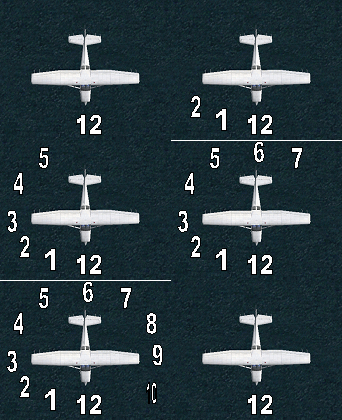 |
The clock is used by ATC to tell you where to look in traffic. 3 o clock is to the right and 9 o'clock to the left. 12o'clock is straight in front of you and 6'oclock is behind you. |
2)The second thing they do is guide you when you are on a IFR(Instrument flight rules) flight. That would be when you can't see out your window and they guide you to the airport of your choice. That really goes into Flight planning, which again is a really cool but difficult to use tool. Anyway they would tell you to turn for an example to a heading of "zero, niner, zero degrees", in English that is 90 degrees. They call 9 "niner", because apparently it is clearer. Any way, in that case just turn to 90degrees or east.
Okay so how do you tune into an ATC station.
All you have to do is when you are flying, or almost anywhere just press the " ' " key on your keypad and that opens up the atc traffic control box. That box will give you a list of options. Usually, "1)select airport" and "2)tune London city on 114.12". (The likely hood is that your 2 option would be different. When your close to london its london, butit differs from place to place. All this is the ATC in your area)All you have to do is press 2 and then choose to speak to them. Its pretty simple.
| Tuning into airports. |
This is much the same as tuning into atc, you press the " ' " key and choose the option "select airport". You will be given an option of several airports, select the airport you wish to land at and press the number key associated with it. Speak to that airports tower and request permission to land, or what ever. They tell you which runway to land at, like runway 15 right ( runway 150 degrees on the right).
| Tuning the transponder. |
5 months ago if someone had said that to me I would probably had gone cross eyed. But really the transponder is stupidly easy to tune. But first what does a transponder do? Your transponder tells ATC where you are in the sky, it tells them your altitude and where about's you are. You have most probably seen those radar screens on films where an airoplane is a small blip on their screen, that is what happens at atc. Its makes flying allot safer, 1) you can't get lost with a transponder and 2)atc can tell how close you are to other aeroplanes from it.
Okay, so now you know what a transponder is. How do you tune it. Well thanks to flight sim 2002, there is a thing called auto tune. So you don't have to! When they talk about "squawk 2342" that's the number that is automatically tuned into your transponder.
| Using the Nav Function.-Tuning into VOr and ILs. |
In flight simulator there are thousands of Vor and ILs stations. You cant just guess Vor or ILs Frequencies and hope that you get the right station. Thanks to flight simulators cool Map feature, you can quite easily find out lots of information on airport frequencies. Select the map feature from the instrument panels special selection. You should then be greeted with something like diagram 3. You have probably seen this before, how is it useful? Other than being able to give you a general idea of where about's you are in the simulation land (like the GPs), if you double click over airports you will be given a list. Make sure first of all that you have a menu for the right airport, over wise its useless (it should say the airports name at the top of the the list).
| To find out airport information from the map tool, right click on the airport and select the airport. Here I am trying to find out information on JFK in new York. When I double click on the airport I get 2 options. This is because there is also a Vor which I might want information about. If you scroll down the table you will get a table much like the one below this. | 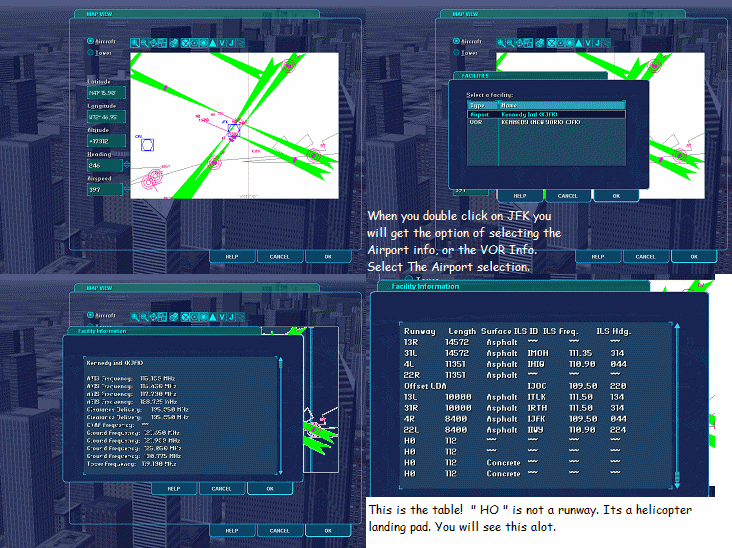 |
| Runway | Length | Surface | ILS ID | ILS Freq. | ILS Hdg. |
| 13R | 14572 | Asphalt | *** | *** | *** |
| 31L | 14572 | Asphalt | IMOH | 111.35 | 314 |
From the table you get you will get allot of information (note: the table above does not show all the information, quite honestly there are loads of runways, I couldn't be bothered to copy out all the runways with their information). Towards the bottom is where you will find information like my table above. From my table, which I copied from the map information on JFK airport you find out allot. Runway 13 R, which would be in the direction of 130 degrees on the right is 14572 m long. Its surface is made from Asphalt, but it doesn't have an ILs frequency for landing in poor weather conditions. Runway 31 L, which is in the direction of about's 310 degrees and is on the Left is 14572 m long and its surface is made from asphalt. This runway does have an ILs frequency, 111.35, which we would tune into the NAV 1 part (found on a Cessna in the top right hand corner of the radio stack). Then we can land using the Ils. Earlier on I said that this runway is in the direction of 310 degrees, I found that out because that is how they number runways. They find out which direction the runway is heading, and round it to 2 significant figures (2 sig fig as my maths teacher used to say), then they bump off the last digit. Thanks to ILs heading we can find out the exact direction of the runway, in the case of runway 31L its true heading is 313 degrees, which you will agree with be when rounded to 2 sig fig and the 0 on the end is bumped off becomes 31. So that is the significance of ILs Hdg. ILs Id is the most stupidest thing to put on a simulator, all it does is allow you to know that you are tuned into the right runway by when you have tuned in and pressed the button on the radio stack that looks like an on off button with comm1, Comm 2, Nav 1 and so on written on top of it (these buttons are found at the top), it beeps Morse code out at you to which has its own code, then you know you are tuned into the right runway. So if you tuned into runway 31L, and pressed the top button associated with it you would get Morse code that would spell out IMOH. Personally I think its much easier just to double check your frequency rather than de-code Morse code, but that's me.
Anyway as you can see its quite easy to find out airport information if you know how. That's the best skill I learnt, because it allowed me to use ILs, which is by far the best thing ever for me since I found the F-14 plane.
| Tuning into NBD Radio stations.(ADf) |
NBD's are things (or stations) that we tune into when using the ADf (auto directional finder). NBDs are patticually useful, even for VFR flying because they are often located on the outer marker for certain runways. That helps us get lined up. On the map NBD stations look like 3 red rings. Double clicking on them from the map will get up information about the NBD, most importantly the Frequency.
| Now make sure that you don't get ILS and ADf mixed up, they are totally different. You can't put an an ADf frequency into the Nav 1 part where you put in the frequency of Vor stations or ILs.Diagram 4 shows what NBD stations look like, where you would find out its frequency, and diagram 5 shows where to enter that frequency. |  |
 |
|
|
| Making sure that NBD's, VOR, Airports, History, and others show up on your map. |
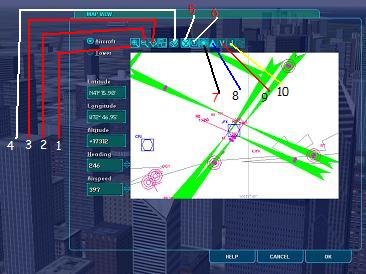 |
The map can be quite confusing, and often it is cramped and showing things which are not quite necessary. That's why you have the option to only show certain things. Remember this, if you have decided that you want airports to be hidden, you wont find any! The map also has a few other features, like being able to zoom in/out and print out. It also gives you the option to change certain parameters about your aeroplane, like its speed, heading. |
|
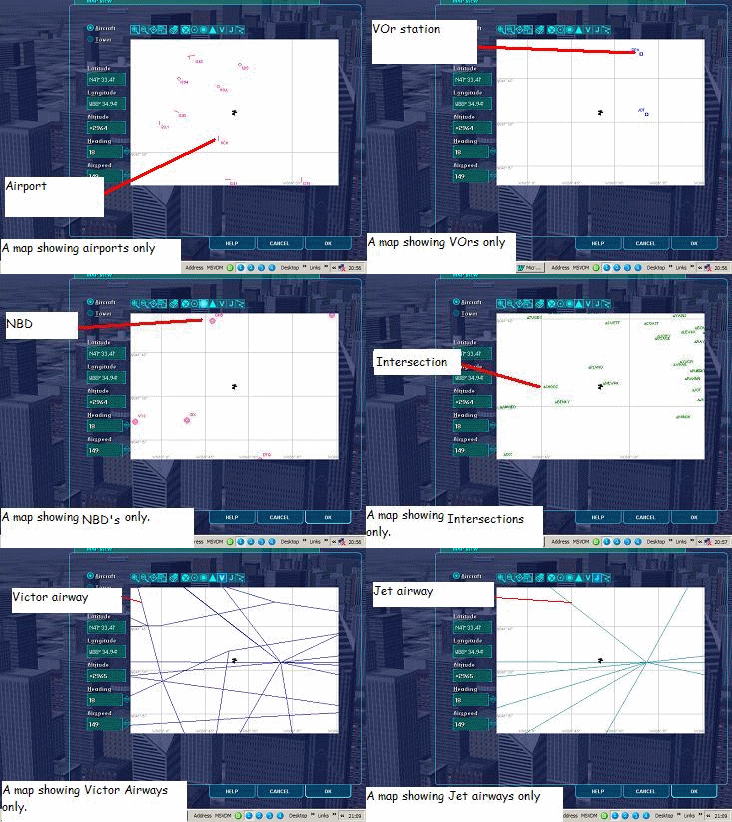
| Being able to spot different things on the Map. |
|
| Just 1 Animation to show you what the different things look like. |
| Fini. |
These are things that you might not pick up by yourself. There are lots more features about the radio and map which would be easier if you just experiemented. Thats the best way, practice makes perfect!
Copyright � 1997-Colins Flight simulator 2002 Web page.