Question
|
Answer
|
| How do I assign new keys? ____________________________
About the only I have done since installation of FS 2002
Professional Edition is calibrate the joy stick....and, now only the button that works is
the brake button. None of my keys and shortcut keys work. |
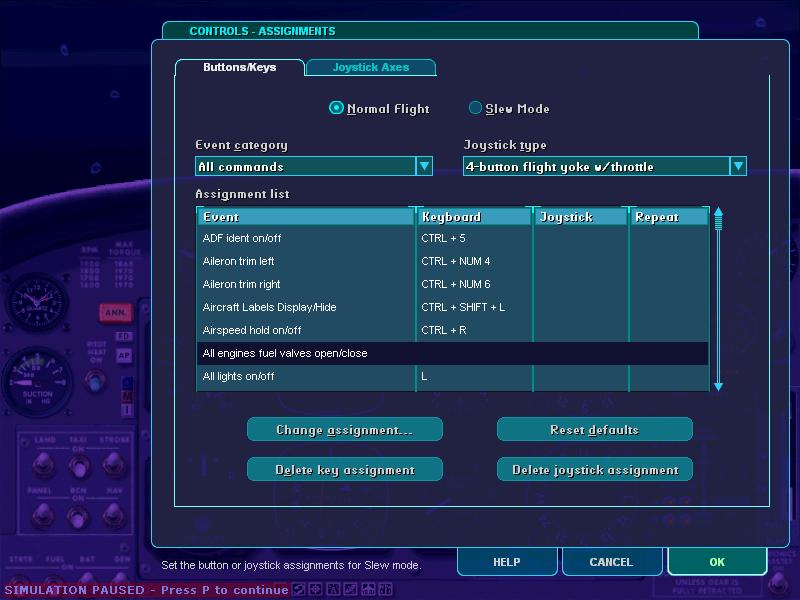
When in a flight, go to the main menu go to options, controls, assignments. 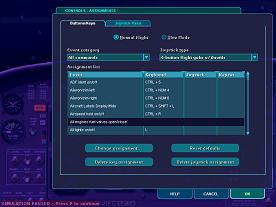
For each option you can assign a key on the keyboard (or the joystick).______________________________
I don't know how you managed to un-asign all your keys, but you should be able to
reassign them all by clicking on "Reset defaults". |
I have a question regarding the
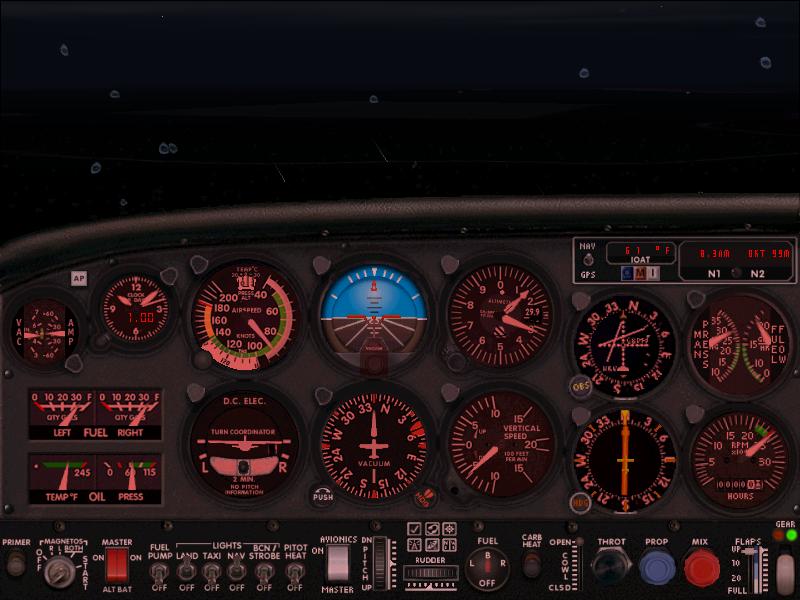
VOR indicators in some of the aeroplanes in FS2002. Some of them like the skylane RG only have 1 VOR indicator (VOR 1). Now, I know in FS 1995 you could switch it to VOR 2 using the tab key but
it does not seem to work in FS2002. How do you get VOR1 indicator to show. Thank You.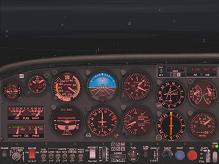 |
(Click on any image to zoom in) You
are right, the skylane does have only 1 Vor indicator but it still has 2 NAV
Radio's. The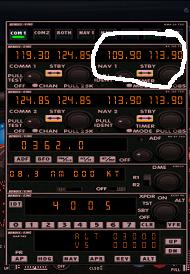 simple
solution to this is just to tune in vor/ils frequencies in the NAV1 radio part. simple
solution to this is just to tune in vor/ils frequencies in the NAV1 radio part.
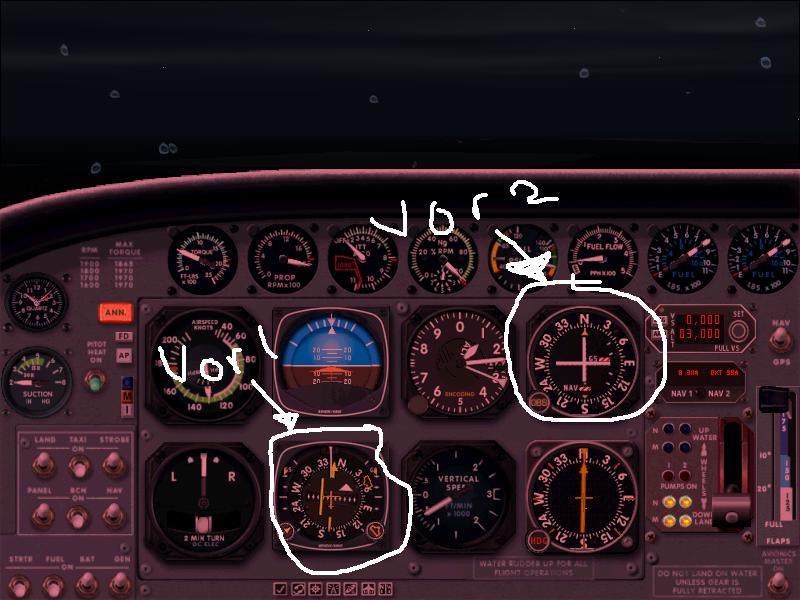
However some planes, like the cessna caravan amphibian has Its Vor 1 indicator
located in its compass. I think you should use the Vor 2 indicator in the Cessna
caravan for ILs, and possibly VOR1 for Vor navigation.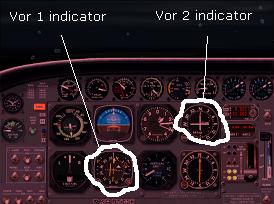 |
| How do I optimise
the graphics on fs2002? |
Optimising graphics on fs2002 is quite important. You
need to get the balnce right between performance and graphics. If you have a poor
perfomance pc, you should optimise your graphics so that they are not so good, but your pc
runs smoothly.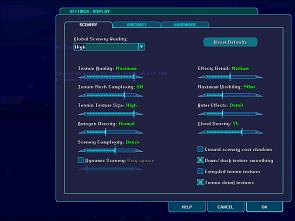
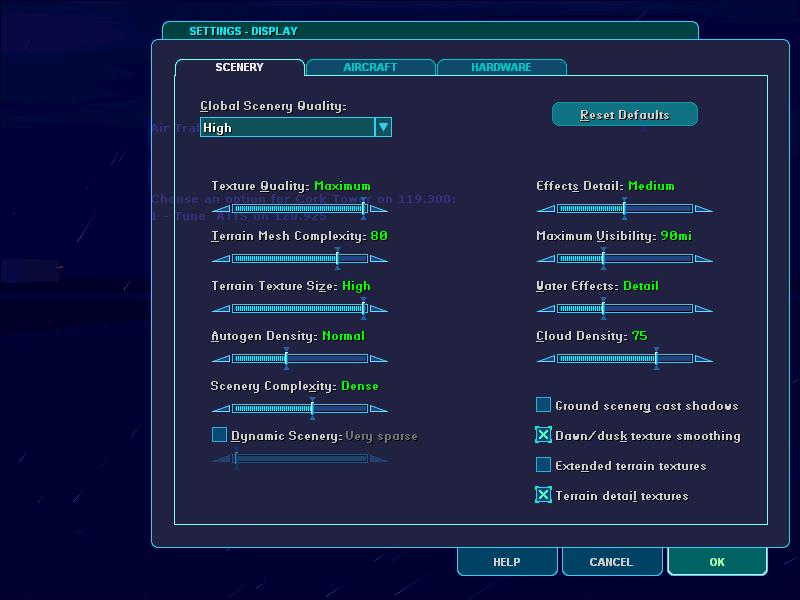
To set the quality of graphics so that your pc runs smoothly go to "options,
settings, display" from the taskbar. Change them to suit your needs. If you make a
mistake simply click on "reset defaults". |
| I seem to get allot of questions
about system requirements. Lots
of people seem to have trouble with fs2002 and it crashes allot. |
Here are the system requirements, according to Microsoft.
 |
Windows 98/
Me/ 2000/ XP |
|
If you have windows 98
or Me you need 64MB (At least) Of ram. |
|
If you have Windows
2000/XP you need 128 Mb (at least) of ram. |
|
You need at least a 300Mhz
Processor |
|
A hard drive with at
least 750MB free space |
|
8Mb 3D Video
card |
If this is all Jargon goobledy gook, don't
worry. I think if your computer does not have the requirements fs2002 does not
install, so if you have installed fs2002 this is unlikely to be the problem.
If your computer crashes once in a while, don't worry. However if it crashes so often
that it is ruining your game play then you obviously have a problem. The easiest option is
to go to Microsoft Product Support Services. Look in the back of
your book you got free with fs2002 (p 28) for more information or,
It may help to optimise your graphics, or
Click here for
support Info Online |
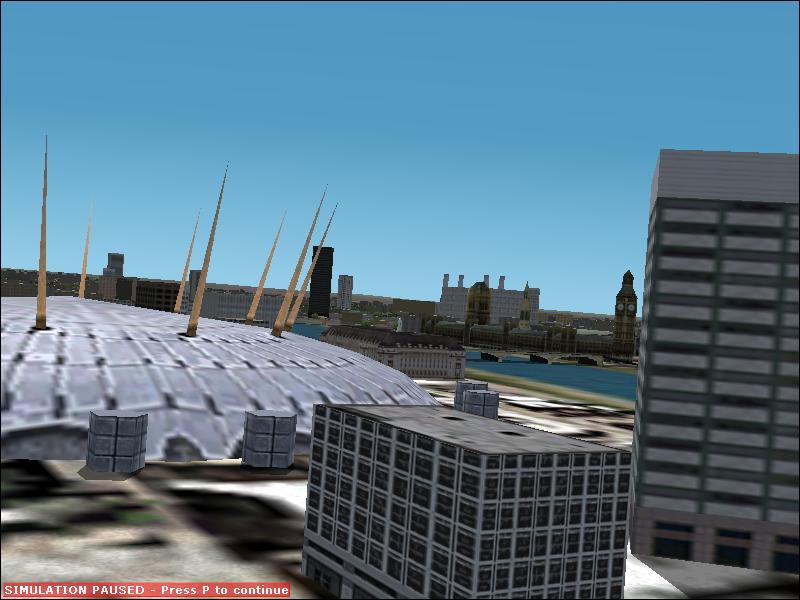
Can someone tell Microsoft that the
Dome which no longer operates is
not opposite the houses of parliament but out in Greenwich just before the City Airport.
"Mind you maybe it should be opposite the 'Houses of Parliament' Both are
failures!!!!!!!!!!!!! The London eye is not included in the scenery which is nearer
Parliament. |
I live close to London, but don't know it that well. See
what you think, does this image look different
from real life? Its likely that Microsoft did make some mistakes, its understandable
seeming as there was so much data. I think the building scenery on fs2002 is quite poor.
But the sunsets and fabulous nature scenery make up for it. |
When I create a flight
plan FS2002 prints out a spreadsheet showing
waypoints etc. I created a short one. Start; a VOR
xmtr and End. I am not
sure where to get the frequencies to enter into my Nav radio. Am I missing something...or
am I doing something totally wrong? |
to look at the flight plan (once you have made it), go to
"flights" then "navigation log" from the main menu bar when you are in
the flight. Vor stations and Nbd stations will have a frequency next to them, other things
like airports wont. If you haven't done a flight plan then go the map, search for the
Vor(or NBD) station you wish to travel to, double click on it and it brings up a box
showing its frequency. |
| I am having trouble with the
instrument rating test on fs2002. |
I have completed the first test, I have attempted many
times to do the instrument rating. I just cant do it! There is very little communication
between fs2002 and you, meaning you don't know what to do. I spent about 4 hours in total
trying to do this, when you fail and start off at the start you get just a little bit
annoyed. When that woman tells you have to take the tests again, you just want to throw
your screen out of the window. Move on and try the next test. |
| How do you get a better view in
fs? |
Easy, press "Alt Enter", that gives you a full
screen. It makes fs fun smoother too. |
| I am taking my fs 2002 tests,
where are the flight maps? |
If you have just started you will find that you can find
maps in your flight sim 2002 Directory in the folder "charts", if you are taking
the lessons go into the folder lessons, if you want the charts for the flights go into the
folder "flights". Important: Microsoft left some of the
charts out for the lessons. To get these charts go here. |
| Where can I get more fonts
from? |
Go to the fs 2002 directory, then go into the folder
fonts. Select them all and copy them ("Ctrl C"), then go to your start menu, go
to help and search for "adding fonts", find the brief description which has
something to do with adding fonts. Eventually you will find the option for the fonts
folder, go into that folder and paste ("Ctrl V") the fonts into there. There you
go! |
| How do you reverse planes? |
To reverse planes in fs2002, press "shift p" |
| I am taking the fs2002 tests,
any advice? |
Good luck, they are quite hard and when taking the first
test, remember when you make your turn which is more than 30 degrees, you must not change
your altitude more or less than about 100 feet and you must keep your speed much the same
as when you started. When you have done the test, feel good about your self. You should
feel very good if you managed to get through those tests with out smashing your screen,
and you only shouted and cursed at the instructor 5 or fewer times. |
Non-flight sim Q's
(crap in other words)
|
| How much traffic do you get a
day? |
If you are interested click here. You can easily get
me more traffic by Telling a friend, and look I even have the form for you to do it on the
left! |
| Can I write an article to go on
your site? |
Yes! Providing I like it. To be honest I want an editor
that uses the fs zone or something or another. I have never flown on the internet with
other people. I doubt any one would want to through. |
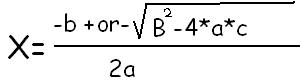
| What's your favourite all time
equation? |
|
| Why does your site close down
from time to time? |
This is a big problem for me, geocities only allows me a
small amount of data to be transferred per hour. When I use too much up, the account
closes down. Sorry! |
| What's your name? |
Colin (you might have guessed that by the name of this
web site!) |
| Why did you make this site? |
I realised that there wasn't really much info on learning
how to fly in flight simulator on the internet. The documents that come with flight sim
2002 are good, but there is too much! Flight simulator is a game, and like all games, it
is better to master them than to use the cheats. Too many people don't
know how to really fly in flight sim, being able to fly is far better than downloading
planes. |
| Where about's do you live |
In some place under London (England), in the merry garden
of England. |
| What's your favourite web site? |
I have a few, 2 of them I cant say, but 1 is very good, www.howstuffworks.com. Its great for knowing well,
how stuff works. |
| What's with the joedoggyuk
name? |
I didn't start this web site with the intention of it
being about flight simulator 2002. It had a very different purpose, one which I am quite
embarrassed about! You can tell by the name I didn't like this Joe. |
| Can I get listed in your
credits page? |
Sure! Just email me with what you want it to say (no I
will not mock jimmy) |