What's this all about then?
NBD's are radio stations at a certain point with
a certain frequency. Unlike Vor navigation or anything else, using
NBD stations is something easily done! NBD stations act like a big
magnet, and your ADF (standing for Auto directional finder) tells you
which direction to point your aeroplane at. So lets straighten up okay, NBD's are
stations and ADF is the gauge we use direct us to that NBD station.Using the ADF, as easy
as pie! Vor navigation or anything else, using
NBD stations is something easily done! NBD stations act like a big
magnet, and your ADF (standing for Auto directional finder) tells you
which direction to point your aeroplane at. So lets straighten up okay, NBD's are
stations and ADF is the gauge we use direct us to that NBD station.Using the ADF, as easy
as pie!
Using the ADF Is as easy
a pie!
All you have to in an aeroplane is
follow the direction the needle points to. Think about it like this, you have a
compass, to get to magnetic north all you  have
to do is follow that needle in the right direction. NBD stations are just
like that, except they are at a different place, rather than the north pole. I never though there would be any comparison between Grand
theft auto and flight sim, but there is. You can follow the arrow to find Jimmy to give
him a taxi ride, its practically the same! But, and yes there is a
but unfortunately, they only work within a radius of about 30 miles. So you could not use
it to navigate from Heathrow to new York, but you could use it with many other NBD
stations. have
to do is follow that needle in the right direction. NBD stations are just
like that, except they are at a different place, rather than the north pole. I never though there would be any comparison between Grand
theft auto and flight sim, but there is. You can follow the arrow to find Jimmy to give
him a taxi ride, its practically the same! But, and yes there is a
but unfortunately, they only work within a radius of about 30 miles. So you could not use
it to navigate from Heathrow to new York, but you could use it with many other NBD
stations.
A few examples, and a
picture of what your ADF looks like.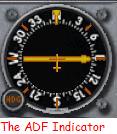
First of all, do not think that you can use ADF
with the VOR 1 Indicator. No No! Completely different. The image on the right shows you
the piece of equipment you need to use.
Find out our NBD's
information.

Double clicking on the NBD station which you want to go to gives you the following info
on its frequency, Frequency-414.0.
Once you know the frequency, tune it into the radio (take a look at the image of the
radio stack).

Using ADF
Using ADF is simple, treat it like a compass and
follow the arrow (as if you were going north).
I have made a few simple examples as usual, with a little explanation.
First
example
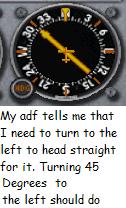
In this case all I need to do to to head towards the NBD station is turn left about 50
degrees.
Second
example
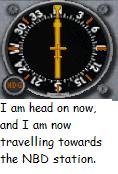
When I turn left 50 degrees I will be on course. Now I am heading straight for the NBD
station. When I get at my NBD station I should see the airport and be able to land. The
ADF feature is pretty cool, but you cant use it too land in poor weather conditions, like
the ILS.
|
