Lining up for Landing. |
By now you have probably tried to land, and possibly landed once or twice perfectly. When you don't land right it gets frustrating. You have probably wondered, "just how do you land in fog so thick you can't even see your hand in front of you?". Or you might have wondered how do land as soft as a feather. I will tell you!
| Vasi Lights |
Okay, where do I start? Well I will start by by talking about the VASI. VASI= Visual approach slope indicator. Thanks Jan for that, you are now a famous woman and soon you shall have people pleading for your signature... for you were mentioned on the infamous colin's flight simulator web page.
|
|
|
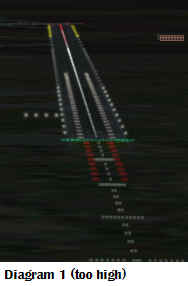
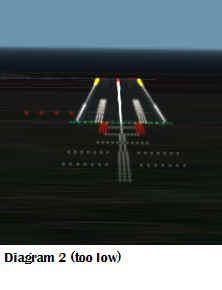
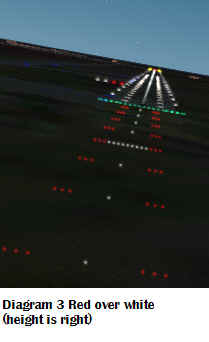
In diagram1 you can see 4 lights on the left of the runway, these are called vasi lights, and from these we can tell if we are too high for that runway, too low or at just the right height. Do you want to know the rule, okay. If you get all of those lights white(white over white), your too high. If you get all of those lights red (red over red), uh oh, your too low and need to climb. However, and this is what we are after, if you get 2 red lights and 2 white lights bingo(red over white)! your on at the right height. So looking at those 3 diagrams you should be able to say, oh yea diagram 1 is too high (white over white), diagram 2 is too low (red over red), and diagram 3 is at the right height (red over white). This is useful so that you can tell that either your too low or too height, and you can act from it. Clever, yes?
Note: To all those clever people, you will have noticed that some runways don't have vasi lights, I will get on to that later. Also notice that in these diagrams there are 4 lights, I didn't mention that you can get 3 red lights and 1 white light. In that case you are a bit to low but not that low. So the advantage of this is you can tell earlier if your a bit too high/low. Also some smart person has realised that in diagram 1 and 3, I am not lined up, yes true, but I am at the right height. I just couldn't be bothered getting it perfect for you guys, soz.
| The 3-D prospective. |
This can be useful in 2 situations. 1- your a fair bit away from the runway and you can't see the vasi lights or 2-the runway doesn't have vasi lights. This is really simple, when you are too high the runway seems to go inwards towards the end, and when your too low the runway seems to go out towards the end. When your at the right altitude the runway doesn't go in or out and stays straight all along.
| How's that useful? |
If you know that you are too high/low you can act on this to be at the right height. If you have the right height on the way in on the landing, you can make a smooth decent so your at the right height. When you reach the runway threshold you want to be at the right height.
Lining up.
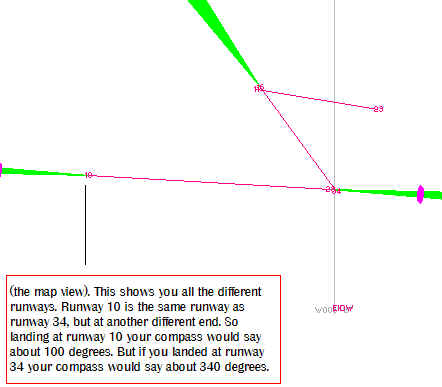
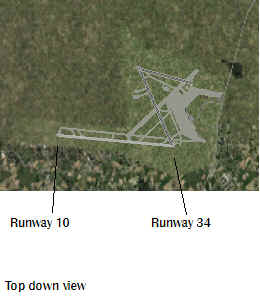
Umm, yes well there aren't really many tricks for this, you should be able to tell by looking out the window weather your on target. Of coarse you could use ILS, very cool, but I will get on about that later. For now lets talk about being able to land by looking out the window. There isn't really any cool tips on this, just making sure your going the right way and your heading straight for the runway. How do you know if your heading the right direction, well it shouldn't take a rocket scientist but there is 1 way. Looking at the GPS or the map system you can zoom in on the runway your going to land on and see what number is next to it. I am going to look at Dublin airport, look at the 2 diagrams 4 and 5. Diagram 4 is the satellite top down view, diagram 5is the map view. Airports decided that at each runway there should be a number so that you can talk about that end. They decided that number should be the direction of that runway in degrees rounded to the nearest 10 degrees, and they thought to make it simpler remove the "0" at the end. So if the runway was in the direction of 100 degrees, it would be shortened to runway 10. However I said that they round headings to 10 degrees, so 95 degrees or 104 degrees would be runway 10. Take this into account!
| Diagram
4
|
Diagram
5
|
The GPS can be a pretty cool rough guide as to where about you are, and you can look around you and decide what adjustments to be made so that you face the runway. I was really impressed by how easy it was with the map and the GPS, it really cuts down all the trivial stuff. As you can tell, trying to explain that was pretty boring. Yes, true, but this stuff comes in useful when using air traffic control.
Windy conditions.
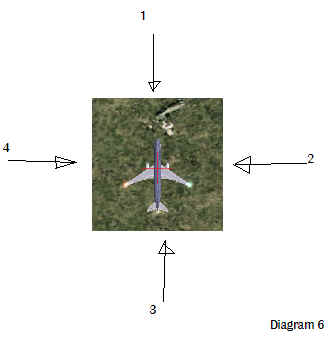
No one likes wind, it doesn't have much use other than kites and drying clothes. It's a pain on Microsoft flight simulator 2002, but it can be interesting. I mean, if everything was that easy, I would soon be board. So lets start off by talking about what wind does to your aircraft and how to solve it. Diagram 6 shows a picture of an aircraft, where the arrow points, imagine that that is the way the wind is coming from. I have numbered them so you can associate the direction with what it will do to your aircraft.
 |
|
This section is not nearly as exciting as the ILS! section.

Copyright © 1997-2002 Colins Flight simulator 2002 Web page.