Setting up DDR/ITG at Home
After recently playing In the Groove and failing Anubis five times in one day, I decided it was time to start practicing at home. However, in my pursuit to do so, I encountered a few problems.
First of all, the computer I play on is quite old (and quite bad, since it's an emachine), and frequently skipped when playing Stepmania. For example, when I was playing "A", I had a full-perfect combo all the way up to the freeze arrows in the middle of the song. However, after the freeze, the program skipped, and it did not read the arrows as I pressed them, preventing me from getting a AAA. I did later get it, but it was frustrating to see that I had the chance to get a perfect score, but my dinosaur of a computer was the only thing standing in my way.
Secondly, I always slid around along the pad when I was playing. It frequently shifted, causing me to miss notes because I could not look down and see where the pad had moved to.
Finally, because I think In The Groove is a lot more physically demanding than DDR was, I needed a bar. I proposed the idea of constructing one with foam and PVC pipes, but my parents readily shot that down. I needed to find a way to fix this problem so that I would be able to effectively practice.
Here's the solution I arrived at.

COMPUTER
In order for Stepmania to run smoothly on my computer, all I did was lower the sound and graphical qualities to the bare minimum (this is done by selecting options at the start menu, and editing the Sound Options and Graphics Options categories). Even though I may not get the best quality picture and sound, the program hasn't skipped since, and I'm more than willing to make that trade.

PAD
As for the pad, since it wouldn't stay in place, I grabbed some duct tape. I cut nine different 7-inch strips, and attached them to the bottom of my pad. Now it stays in place very well, although if I ever have to move the pad, I have to clean up whatever the duct tape leaves behind.
BAR
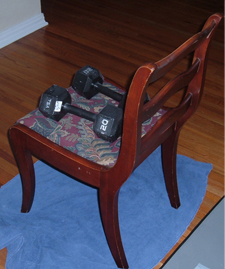
For those of you who do not use the bar playing ITG, more power to you, but I certainly need it if I plan to pass the songs that are 10 feet and above any time soon. So, I just grabbed the first thing I could think of to hold onto, and since there are five or six chairs right next to where I play, I used on of those. I was forced to put the towel down because if I scratch the wooden floors, I will die, and I certainly don't that. The chair I'm using is a little lower than an arcade bar, but I couldn't find anything better, so I'll make do with what I have. The only problem I ran into was keeping the chair still. When playing, it would always slide back and tilt slightly forward. Since my dad had kept an old set of weights he doesn't use anymore, I grabbed those to see what I could do. To fix the sliding, I placed the weights in two places: two weights on top of the chair, and two weights EXACTLY behind the two legs closest to the pad. The two weights on top help to keep the chair from tilting forward while I lean on it, and they are placed in the direction shown because if the chair did lean forward, they wouldn't simply roll off and hit the back of my legs. The two placed being the first two legs of the chair are to keep it from sliding back. However, I suggest you use heavier weights here, because I'm using two 20 lb weights, and the chair still slides back a little. However, after a bit of experimenting, I added two 10 lb weights behind those two 20 lb weights, and the chair has stopped moving entirely.
 As you can see in this picture, I am not entirely finished constructing a completely arcade-like environment inside my home. As I make more progress, I will continue to update this site. If you have better supplies available, by all means, make use of them. If you have better ideas than what I have thought up, please let me know. My email is here. Any questions or feedback are also welcomed and encouraged. I hope this site was useful for you, and happy playing.
- fractien