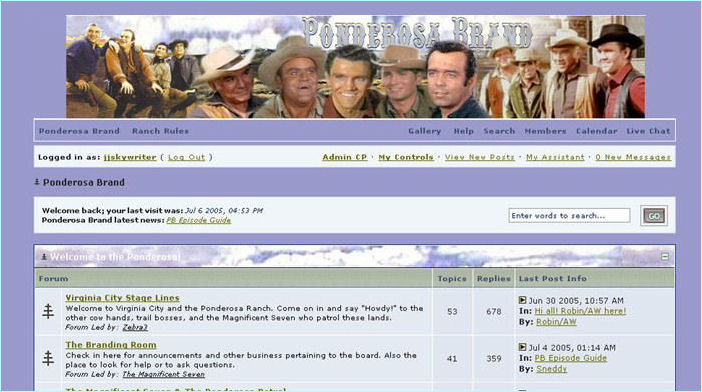
As you can see from the screencapture I
did there is a lot that can be done on a
board and for the most part many alluring
fanbased sites are equiped with Message
forums as people love to chat about their
favourite anything.
I'm going to cite the image starting at
the top and going down just touching on
the important things...
The Banner (Which advertises the site's name)
The Banner (Eyecatching Graphic that gives the name of the site)
Link Bar (Lists links to other parts of the site like the rules and gallery)
Login Bar (Shows if you are logged in and your personal settings)
The Header (Shows last login time the board's highlight ticker and search box)
The Discussion Forums (The different Topics people can discuss and debate)
Though message forum software is very similar the
cost factor and support is the major difference. A
message board is a lot of fun to have if you have
people helping you run it. It brings in a lot of people
to your site but it gets hard trying tohandle a lot of
people's needs and requests all by yourself.
When you're readyto make the board match your fandom
and you get bold enough you can attempt playing around
with the CSS (cascading style sheets) which is the coding
sheets to the theme that allows for you to change anything
on the site. Though they appear similar to HTML most style
sheets are written in a very user friendly computer code called PHP.
Cascading Style Sheets are used in theming or skinning
as it is better known almost all aspects of site plugins
such as image galleries, libraries, forums and blogs.
Besides the skin set you have a lot of other things
to deal with so again I advise a couple extra admins to
get the board set-up before launching. In the long
run it's a great help.
If you have any questions please feel free
to email me at Ponderosa Brand...