CSS Margin and Padding properties
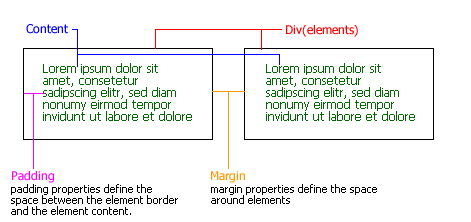
Margin and Padding are the two most commonly used properties for spacing-out elements. A margin is the space arround the elements and padding is the between the element border and the content. The bellow diagram will help you to get a clear idea on this.
Padding
.abc {padding: 15px; border: 1px solid black; }
The above class '.abc' will create a padding of 15 pixels on every side: top, right, bottom, and left.
.def {
padding-top: 0px;
padding-right: 2px;
padding-bottom: 10px;
padding-left: 20px;
border: 1px solid red;
}
The above class '.def' will create a padding of 0px from top, 2px from right, 10px from bottom and 20px from left. And you will get a border of 1px solid red in color.
You can do the same with the following code too.
.def {padding: 0px 2px 10px 20px; border: 1px solid red;}
Margin
.abc {
margin: 10px;
}
The above class will add a 10px margin for four sides.
If you are particular to any of the sides, you can go for any of the bellow accordingly.
margin-top
margin-right
margin-bottom
margin-left