








|
|
|
|
|
|
|
|
|
|
Adobe Acrobat Reader download instructions:First, you must have Adobe Acrobat reader installed on your computer. If you do, click on the first link on the blackboard to the right. It might take a little while on slower computers, but the file will load and you'll be able to print it out. <Currently unavailable. To request a copy of the 2003-2004 Membership Form, please contact [email protected].>
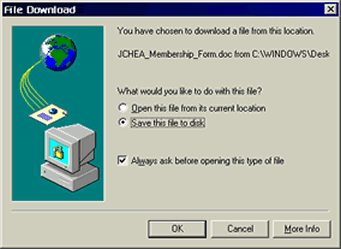
Download instructions for Microsoft Word:If you have Microsoft Word and you would rather use that, click on the bottom link. If you're using a Windows-based computer, the frame should go blank and you'll see a message, which looks something like this: |
|
||||||||||||||||||
|
|
|||||||||||||||||||
| What would you like to do with this file? The first option will Open this file from its current location. You could do that if you want, and run it directly from this website under the web browser program. Most modems take a lot of time to do that. The second option is better, and as you can see, Windows thinks so too. Save this file to disk. By "disk" is doesn't mean a floppy disk; it means the computer's hard disk. So what you would do is download the file directly to your own computer, and then open it whenever you want. E-mail the webslinger if you have any questions. |
|||||||||||||||||||
|
|||||||||||||||||||