
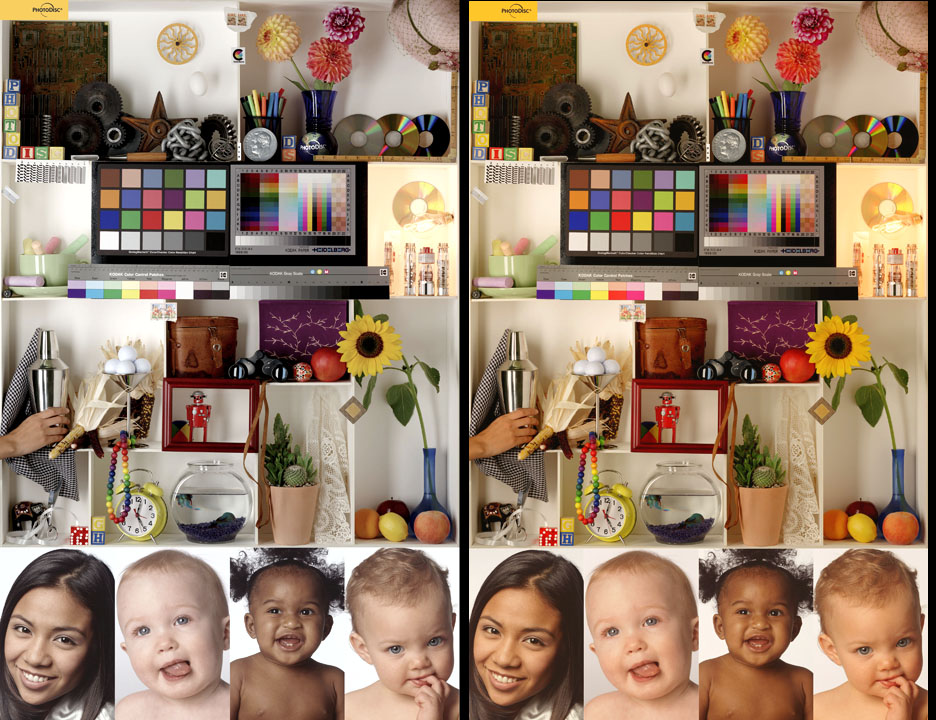
Do you wonder why your photographic prints do not look like the same print on your monitor?
Do you wonder why the same photographic print looks funny with one paper and fine with another?
READ ON AND LEARN!
If you are not using the correct color profiles for your printer, ink and paper, your photographs will NEVER look like you want them to.
Compare the two pictures above. Results seem familiar? These were printed on different papers using generic profiles. The colors should be identical, they are not. With my profiles, they are!
With this set of OVER 200 custom color profiles for the Epson 2200, you can print correct color photographs from ANY application and have them look like a professional printed them! (These are not collected from the internet; most
free profiles are generic and very poor. These are all my work, custom built from each type of paper)
They work on Mac or Windows!
"For the Epson 2200, this is your guy!"- Dayton, OH
"An excellent collection of profiles. I can't believe the amount of work that must have gone into creating them." - Cleveland, OH
"I now get the exact color on any of the inkjet papers I use " - Phoenix, AZ
"You simply cannot print photogtraphs without this set!" - Newark, NJ
"More accurate than the manufacturer supplied profiles." -Colorado Springs, CO
"A great deal at an amazing low price. Anyone else charges twice this for a single profile." - Miami, FL
" Profiles & customer service are 110%!" - Salem, OR
"I only needed three profiles, this was the best and cheapest way to get them" - Denver, CO
"So Easy to use, and a HUGE difference in my prints!" - Los Angeles, CA
"He even helps with selecting the right paper for the right print! Awesome service!" - Chicago, IL

The cost of the CD is a fraction of the cost of the papers required to create the color profiles.
What you get:
1. A CD with the ICC color profiles for the inkjet papers listed below (over 200 at this time) and complete installation and usage instructions.
2. 1 year free updates ? as I develop more color profiles, I email them to my subscriber list. I am constantly adding new profiles, so this subscription is well worth the money!
3. 5 free color profiles ? If you mail me the paper, I will develop the ICC color profile and get it back to you.
What is a color profile?
An ICC color profile tells the printer driver or color managed application how to translate the colors you see on the screen to a specific printer paper on a specific printer. Without these profiles, your prints are not coming out like the image on the screen. Sound familiar?
What happens if I don't have them?
Without these profiles, your application and printer driver do not know how the specific paper reacts to the ink, and therefore use a generic mapping of the colors, resulting in very incorrect color representation in your print. While the subject of color management is a huge one, without these profiles you will not be able to print what you see on the screen with any accuracy.
How do I use color profiles?
With this CD, you copy the 200+ profiles into a directory, select all of the .ICC files and left-click. Select the option Install ICC Profiles and Windows installs all of the profiles into the correct directory for use by any color managed application. The Mac has slightly different installation instructions, but still very simple. Full Instructions are supplied with the profile set.
What about calibrating and profiling my monitor?
Yes and yes! You MUST calibrate and profile your monitor in order for ANY print on your screen to even come close to printing correctly. Fortunately, you can do this cheaply and get pretty close. To get exact, you will have to get a product like Monaco OptixPro or something similar. In order to get accurate prints, Photoshop has to translate the colors on the display to an internal gamut using the monitor profile, then convert from the internal gamut to the paper, again using the correct profile for the paper you are using. Without a monitor profile, the print profiles I offer will guarantee you the exact color representation on any paper, all wrong the exact same way.
That said, there are many ways to calibrate a monitor without a lot of time and expense. It is not possible to profile a printer and different paper without spending a ton of time and buying the equipment.
YOU NEED THIS CD!
To find more information about calibrating and profiling your monitor, GOOGLE "monitor calibration". Also, if you are a Photoshop user, you should have installed a product called Adobe Gamma, which you will find in your control panel. It can do the job as well.
Pigment vs. dye-based inks?
Dye based inks are formulated with chemicals and water to generate the colors. These chemicals fade and the water evaporates with age, causing fading of the print. Pigment inks are created with pigments and do not fade or evaporate. They also produce a rich and deep color for prints. The age of a dye-based photo is estimated at 10 years before the print fades. The age for pigment-based ink is 90+ years before any fading is evident. Most printer ink is dye-based. The higher-end inks from Epson (as supplied with the 2200) and others are now pigment-based. Print paper formulated for dye-based inks often will not work with pigment inks. Make sure you check!
Will these profiles work with the standard Epson ink that comes with the printer?
Yes. The Epson 2200 ink is pigment and is compatible with the Lyson Cavepaint ink. Cavepaint has a wider color gamut, which means the Epson ink gamut is contained within the Cavepaint gamut. These profiles work extremely well with the Epson pigment inks.
1. Over 200 Custom Color Profiles for the Epson 2200 Printer using Standard Epson 2200 pigment Ink or Lyson CavePaint pigment ink.
Easily installed for use with ANY application, these profiles are accessed through the standard Epson printer driver. If you use Photoshop or any other color-managed application, these profiles are automatically available in your work flow once you install them.
2. One year subscription for new profiles as I create them.
I am constantly adding new profiles as I receive new paper from manufacturers. With your purchase you will receive, via email, all new profiles I create for one year.
3. Five custom profiles from your paper
These profiles automatically adjust your printer to output correct color on different types of paper. Used with any application, Photoshop (color managed) or the Mac, this is the only way to insure that what you see on the screen is what is printed on paper.
Order by using the Paypal buttons at the top of this page.,
OLMEC Gloss 260 (thicker gloss, nice color)
OLMEC Satin 260 (thicker satin, nice color)
Ilford (very nice medium-priced paper)
Smooth Pearl
Galerie Smooth Heavyweight Matte
Galerie Smooth High Gloss
Galerie Smooth Pearl Paper 280 gsm
Galerie Smooth Pearl Paper 250 gsm
Galerie Smooth Multi-Use
Galerie Smooth Fine Art
Illuminata
Ultrasmooth 300
iNKWorks
Artist Canvas Inkjet Fabric (excellent product!)
Heavy
Arches
Infinity Smooth 230
Infinity Textured (rough) 230
Arcsoft
Premium Matte Scrapbook
Bergger
Fine Art Smooth (excellent matte warm tome)
Fine Art Textured
Boise
White x-9000 20lb (white printer paper, not great for photos)
Breathing Color (New manufacturer, excellent paper!)
Sterling
Brilliance 2 Canvas
Brilliance Canvas
Elegance 310g
Concorde
Rag 180
Crane
Museo (wonderful paper, cooler tone matte)
Epson (good low-cost photo papers)
Enhanced Matte
Premium Bright White (white printer paper)
Premium Luster (Epson?s best, semi-gloss)
Photo Glossy Paper
Hahnemuhle
Photo Matte 170
Photo Rag 188
Photo Rag 308
Photo Rag 460 (very thick, excellent color response)
William Turner 310
German Etching 310
Torchon 285
Artist Proof (thin for trial prints, great color)
A. Duerer 21 OGSM
Cold Press Art 315
Phota Fibra-Print 280
Soft Textured Art 315
Watercolor Rough 310
Linen Texture 250 (not great with Photochrome ink)
Artist's Waterproof Canvas (not great with Photochrome ink)
Photo Rag Warm Tone 300 (excellent matte paper)
Picture Rag Warm Tone 190
Picture Rag Cool Tone 190
Picture Rag Cool Tone 300
Chrome Ultra-Glossy
Photo Chrome RC Luster (excellent semi-gloss)
PrintPlus Double-sided Matte 80Lb
Artist Classic 210
Instant Dry Gloss 271
Instant Dry Oyster 271
Matte Plus 245
Museum Classic 310
Parchment Classic 285
Portrait Classic 300
Japanese Inkjet Papers (from Digital Art Supplies)
(these are rather amazing rice-papers that are coated to allow photochrome ink to bond with the surface. Excellent range of paper to use for artistic or nature photos. Black and white or grey-scale work is unbelievable with these papers. Do NOT try to use them without these ICC profiles, their color response is all over the map)
Bamboo (not great color response, but workable)
DAS Koto Neiro
DAS Peacock Buff (muted color response)
DAS Rush (muted color response)
DAS Warahan-shi
Harukazi (very muted colors)
Kinwashi (amazing texture and color range)
Kozo Shi Light (very thin and delicate, good color)
Kozo Shi Regular
Shiramine White
Shitoku White
Yanagi Gray (amazing texture)
Premium Satin (bright, maybe too bright)
Everyday Matte
Premium Glossy
Professional Glossy (best they offer, good color)
Photo Glossy
Photo Matte
Photo Silk (very nice silk, excellent color)
Photo Canvas Cover (not best with Photochrome ink)
Somerset Enhanced Velvet 225
Lumijet
Radiant White 290
Museum Parchment 210 (fun mild texture, great color)
Classic Velour 290
Flaxen Weave 205
Woven Fibre 200
Masters Canvas 350 (Excellent canvas, excellent color)
Glossy 2-sided 260
Portfolio Art 2-sided 216
Portfolio Genuine Pearl 265
Portfolio Matte 2-sided 185
Portfolio Ultra-Gloss 260
Portfolio Velvet 2-sided 180
Royal Canvas Lustre
Royal Plush 310
Royal Renaissance 309
Royal Tuscany 300
Royal Velvet 300
Micro-Ceramic
Luster (Very nice paper!)
Misc
770-HGC (Matte paper)
Mitsubishi
Mirror Gloss
PhotoGloss Heavyweight (Excellent gloss paper!)
Moab
Kokopelli Photo Gloss 10mil
Entrada Fine Art Bright White 190gsm
Entrada Fine Art 300 gsm
Oriental
Graphica Fiber-Based (FB) Glossy 320gsm
Osprey
Giclee (Great feel, nice color)
Archival Quality Gloss 265 (Excellent color)
Archival Quality Satin 265 (Excellent product!)
Photo Gloss
Photo Matte
Elite Linen Textured 250
Elite Pic Rag Cool Tone 190
Elite Temp
Elite Velvet 250
Elite Velvet 335
Elite Pictorial Rag Cool Tone 300
Elite Pictorial Rag Warm Tone 190
Elite Pictorial Rag Warm Tone 300
Elite Velvet Extreme 500
Adamant Archival
Photo Luster
Photo Velvet
Textured PE 225
Velvet PE 225
Premium Polysilk Fabric (excellent color for a thin fabric)
Premium Watercolor Card Stock (not great for Photochrome ink)
Professional High Gloss White Film (Very nice film white)
Premium Canvas
Premium Photo Glossy (nice color response)
Linen 225
Linen 300
Velvet 225
Velvet 300
DuoPrint Glossy 190
DuoPrint Matte 130
High Glossy 163
68lb Ultra Pro Gloss
66lb Polar Satin C1S 235 gsm 10 mil
62lb UltraPro Satin
76lb LuxArt 285 gsm .017
Aurora Art C1S
64lb Dourian Art 2-sided 240 gsm
60lb River Linen 220 gsm
60lb Polar Matte C1S 225 gsm
65lb Red River Premium Matte C2S 244 gsm
50lb Premium Matte C2S 190 gsm
76lb Red River Premium Matte C1S 285 gsm
47lb Red River Premium Matte C1S card
45lb Zeppelin Semi-gloss Coated 2-sides
62lb Green Pix 235 gsm
37lb Premium Matte C1S
32lb Red River Premium Matte C1S
32lb Red River Premium Matte Coated 2-side
Order by using the Paypal buttons at the top of the page.
Please check my EBay rating under jerwin. I have over 360 positive feedback scores.
Questions? Please email me with them.
[email protected]
