Tips and Tricks for Using DVD Remake
|
In this section: |
Usually getting a DVD down to around 6GB before encoding will produce good results.
DVDs have the opening video and the closing video in each PGC for each episode. If all of the episodes are located in one VTS, this is not needed. By substituting the opening and ending video back to the first episode you can make it so each episode plays it's video, but only one set is stored on the DVD .i.e. Relinking.
Sometimes a DVD has different Opening or Closing video. Please do not relink these because they are unique video and probably have something to do with that particular episode.
NOTE: It can only be done when all the video is in one VTS.
If the episodes are in separate VTS's, the process is not so simple and will not be explained in this guide.
In this picture, Cell 7 is the opening video for the 2nd episode. I'm going to substitute it for the opening video in the first episode. This means that instead of storing the video, it will link back and play whatever video I insert, then play the next command.
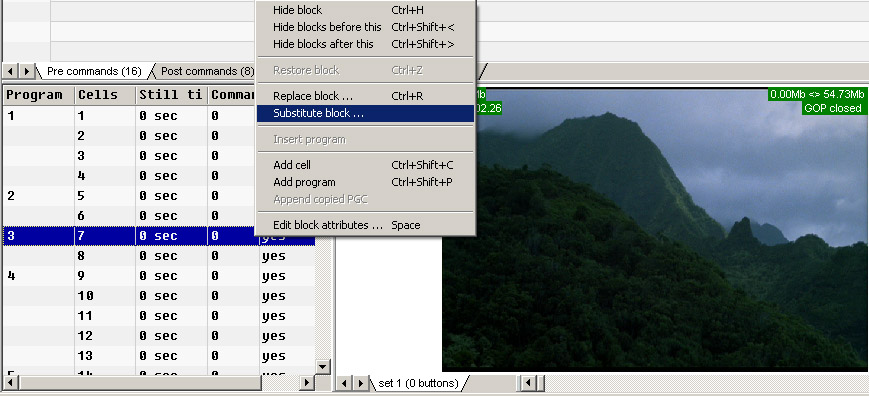
When you click Substitute Block, a window will pop up that shows the ENTIRE video chain of the VTS that you are currently in. Select the video you want it substituted with, in this case the 1st opening video and hit Ok. This will link to that video, then go back to the 2nd episode.
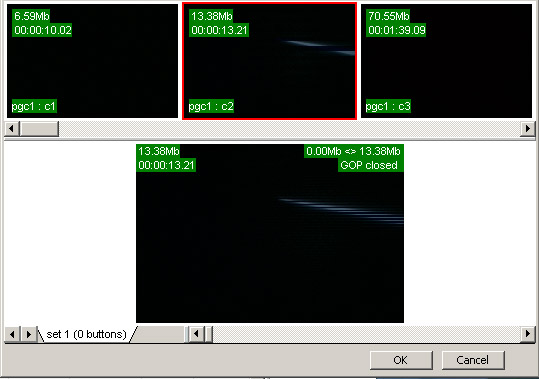
You can do this for each opening video and closing video. Only one opening video and one closing video will be needed for this method.
If your DVD is barely over the minimum for a DVD5 and has angles, it is still possible to relink opening and ending video while not having to encode. This method sometimes generates errors, so the output DVD should be watched in its entirety before you add it to your collection.
Getting Raw Opening and ending video
Substituting your Raw video for your angled video.