JAL Computing
|
|
| Call a Console Application From a Multi-Threaded C# ApplicationIn this article, you will learn about:
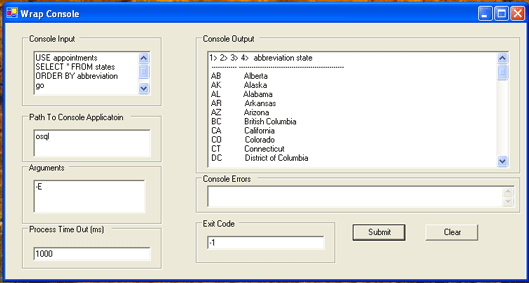
You can add a graphical user interface to a command line "Console Application" using Windows Forms Programming and the System.Diagnostic.Process class like this:
Unfortunately, this turns out to be a non-trivial project. My goal was to write a generic Windows Form application that could call a console application using System.Diagnostic.Process, passing in args and cin and reading cout and cerr. To avoid blocking I/O I had to use threads to write to cin and read cout and cerr. Unfortunately, when the console application exits, the threads are still reading cout and cerr, truncating the output. My solution is to first call myProcess.WaitForExit(waitForExitTime). Once the console application exits or times out, I call a private function WaitForThreadExit(waitForThreadTime). This private function waits until all three threads have completed or timed out. When the client tells myThreadedProcess to start, the client would block until the console application is closed. This is thread safe, but makes the GUI unresponsive. To increase the responsiveness of the caller, I decided to launch the console application in an asynchronous worker thread. The client must pass an event of type ThreadedProcessEventHandler to the StartInThread method. The StartInThread method will use this event to notify the caller when the worker thread is done. The StartInThread method should only be invoked once. The delegate looks like this: public delegate void ThreadedProcessEventHandler(object worker, ThreadedProcessEventArgs e); If the callback is to a Windows Form application, then the event handler method must call BeginInvoke to marshal the call to the main WinForms thread. If the caller is a free threaded application (not WinForms) the event handler method must be thread safe. A Matter of ThreadsAccording to MSDN: "Windows Forms uses the single-threaded apartment (STA) model because Windows Forms is based on native Win32 windows that are inherently apartment-threaded. The STA model implies that a window can be created on any thread, but it cannot switch threads once created, and all function calls to it must occur on its creation thread. Outside Windows Forms, classes in the .NET Framework use the free threading model." However, Willy Denoyette [MVP] argues that "Windows forms are not STA
threaded, Windows forms have thread affinity. That means the handles (HWND) of
windows controls should only be used by code running on the thread that created
the control (the window handle). Whenever you need to access a control from
another thread, you need to marshal the call (using Control.Invoke or
BeginInvoke) to make sure the code runs on the UI thread that owns the HWND of
the control. I reckon that the safe statement is to simply say that WinForms is not free threaded. Here are some links that may be helpful: Multi-threaded
Windows Form Example A C# Console ExampleFirst, here is a simple non threaded C# project that calls the command line executable IPCONFIG.exe with the argument "/all". It redirects cout and stores the result in a string. Alternatively, you can redirect cout to a StreamReader and read input line by line. Underneath, the magic is done with un-named pipes. This non-threaded approach may be best if you do not need access to cin and cout, or read both cout and cerr. usingSystem; using System.Diagnostics; using System.IO; namespace TestProcess { /// <summary> /// Summary description for Class1. /// </summary> class Class1 { /// <summary> /// The main entry point for the application. /// </summary> [STAThread] static void Main(string[] args) { //// TODO: Add code to start application here// Process myProcess = new Process(); ProcessStartInfo myProcessStartInfo = new ProcessStartInfo("IPCONFIG.exe" ); myProcessStartInfo.UseShellExecute = false; myProcessStartInfo.RedirectStandardOutput = true; myProcessStartInfo.Arguments= "/all"; myProcess.StartInfo = myProcessStartInfo; myProcess.Start(); //StreamReader myStreamReader = myProcess.StandardOutput; //string output = myStreamReader.ReadLine(); string output = myProcess.StandardOutput.ReadToEnd(); // block until exe exits myProcess.WaitForExit(); Console.WriteLine(output); // release resources myProcess.Close(); Console.ReadLine(); } } } Pretty cool! If you want to redirect cerr, cout and cin, you should use separate threads as discussed in this article. Note: You can only call executables (.exe) if you set UseShellExecute to false. To run a dll when UseShellExecute is false, you can use "rundll32" to do this as in: Process myProcess = new Process();
ProcessStartInfo myProcessStartInfo =
new ProcessStartInfo("rundll32.exe" );
myProcessStartInfo.UseShellExecute = false;
myProcessStartInfo.RedirectStandardOutput = true;
myProcessStartInfo.Arguments= "url.dll ,FileProtocolHandler www.microsoft.com";
myProcess.StartInfo = myProcessStartInfo;
myProcess.Start();Warning: If you try to start the process "http://www.microsoft.com" from a [MTAThreaded] application with UseShellExecute set to true, your [MTAThreaded] application will throw an exception. Calls to an out of process COM server are adapted to the callers threading model. C++ ConsoleServerBefore diving into writing a multi-threaded application that redirects cerr, cout and cin, create a C++ Win32 console application called ConsoleServer. In Visual Studio 2003 do this as: File --> New --> Project... and choose Win32 --> Win32 Console. Name the project ConsoleServer. Add #include <string> to the stdafx.h header file as: // stdafx.h : include file for standard system include files, #include <iostream>#include <tchar.h> // TODO: reference additional headers your program requires here #include <string> Add using namespace std; and the following code to _tmain in the ConsoleServer.cpp file as: // ConsoleServer.cpp : Defines the entry point for the console application. using namespace std int _tmain(int argc, _TCHAR* argv[]) { // TODO: Please replace the sample code below with your own. string inString; while(getline(cin,inString)) { if (inString == "q") { break; } cout << inString << endl; cerr << inString << endl; } return 0; } Note: cout is buffered so you need to flush the buffer with endl or flush. Compile the project and copy the ConsoleServer.exe to the bin/Debug folder of the multi-threaded C# application that follows. You can also download the project here. Using Delegates and EventsIn the ThreadedProcess application that follows, I used delegates and events to notify the client that the contained process has closed. Using delegates and events is not very straight forward, so I will walk you through this. Thanks to Bruno Jouhier [MVP] and Jason Black [MSFT] for their help in implementing a callback to a Windows Form application from a worker thread. A delegate defines a Type with a given signature. When you declare a delegate the compiler auto magically generates a class definition that inherits from System.MulticastDelegate with a constructor that that takes an instance target and method pointer as arguments. If the target is null, then the method is static. The class provides methods Invoke, BeginInvoke and EndInvoke that match the delegate prototype. In other words, the class encapsulates a type safe function pointer to "some" method. Here is the declaration of a delegate that takes two arguments. This declaration is part of the ThreadedProcessClass namespace. public delegate void ThreadedProcessEventHandler(object worker, ThreadedProcessEventArgs args); The prototype takes a reference to the sender and a ThreadedProcessEventArgs object as an argument. args is an immutable object and hence inherently thread safe. This "Args" class is used to return values to the client. It is declared as: // immutable class used as return value in threadpublic class ThreadedProcessEventArgs : EventArgs { private string consoleOutput; private string consoleError; private int exitCode; // constructor public ThreadedProcessEventArgs(string consoleOutput,string consoleError,int exitCode) { this.consoleOutput= consoleOutput; this.consoleError= consoleError; this.exitCode= exitCode; } // properties public string ConsoleOutput{ get {return consoleOutput;}} public string ConsoleError { get {return consoleError;}} public int ExitCode {get {return exitCode;}} } In the client Windows Form project, declare an event as: // declare event handler of type ThreadedProcessEventHandler defined in ThreadedProcess classpublic event ThreadedProcess.ThreadedProcessEventHandler threadedProcessEventDispatcher; This declares an event variable threadedProcessEventDispatcher of type ThreadedProcessEventHandler. The event "expands" the ThreadedProcessEventHandler type to include "add" and "remove" methods for registering listeners or subscribers to the ThreadedProcessEventHandler. The event keyword also adds a static method that maps all ThreadedProcessEventHandler calls to the threadedProcessEventDispatcher. The threadedProcessEventDispatcher is used to register methods that are interested in handling an event of type ThreadedProcessEventHandler using the += notation. The event keyword is analogous to a property for an instance field. Just as you can add get and set semantics to an instance field, you can add Add, Remove and Call semantics to a delegate using the event key word. In this project only a single method, Form1_OnThreadedProcessEvent, registers an interest in a ThreadedProcessEventHandler event. Here is the [STAThread] aware method Form1_OnThreadedProcessEvent: // WinForms is based on native Win32 STA code
so that worker thread cannot In the forms constructor, register this Form1_OnThreadedProcessEvent method with the threadedProcessEventDispatcher: public Form1(){ // // Required for Windows Form Designer support // InitializeComponent(); // TODO: Add any constructor code after InitializeComponent call // // add listener to receive ThreadedProcessEventHandler from ThreadedProcess.StartInThread // eventually handle event in Form1_OnThreadedProcessEvent method threadedProcessEventDispatcher +=new ThreadedProcess.ThreadedProcessEventHandler(Form1_OnThreadedProcessEvent); } Note: The constructor for the auto generated class ThreadedProcessEventHandler takes two arguments, a target and a method pointer. In the above line only one argument is passed to the ThreadedProcessEventHandler! This works only because the C# compiler generates the correct call to the constructor for you. In the private void buttonSubmit_Click(object sender, System.EventArgs e) method, pass the threadedProcessEventDispatcher of type ThreadedProcessEventHandler to the StartInThread method: ThreadedProcess process = new ThreadedProcess();process.Path= pathToExe; process.Args= arguments; process.WaitForExitTime= waitForExitTime; process.WaitForThreadTime= waitForThreadTime; process.ConsoleInput= consoleInput; process.StartInThread(threadedProcessEventDispatcher); When the worker thread is done it fires off the event, notifying the client that it is done as in: public void StartInThread(ThreadedProcessEventHandler callhome){if (callhome == null) {throw new ArgumentNullException();} ... callhome(this,new ThreadedProcessEventArgs(this.ConsoleOutput,this.ConsoleError,this.ExitCode)); } Admittedly this is an unusual way to write a method call! It is up to the compiler to recognize that callhome is a delegate and generate a call to the target instance using the method pointer by calling Invoke. Note: As best as I can tell the compiler does something like this
behind the scenes: So you pass a variable threadedProcessEventDispatcher that refers to an "expanded" ThreadedProcessEventHandler. When the worker thread is done, it fires an event of type ThreadedProcessEventHandler which is intercepted by the threadedProcessEventDispatcher. The event is then dispatched to the only registered listener, Form1_OnThreadedProcessEvent. All of this is done in a type safe manner using a "type safe function pointer" or delegate. More about delegates here. Using Delegates AloneI must admit that the concept of using delegates _and_ events seems like a bit of overkill. It seems to me that it is much simpler just to declare the delegate, pass the Form1_OnThreadedEvent to the delegate constructor and pass the instance of the delegate to StartInThread. Besides, that would have saved me a lot of explaining! public
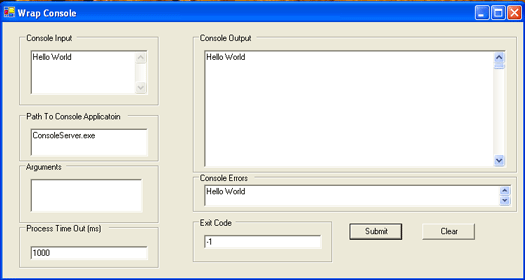
ThreadedProcess.ThreadedProcessEventHandler testIt; Using ThreadsIn this project, three I/O threads (cin_thread, cerr_thread, and cout_thread) are launched to write and read asynchronously to the console application. First, three I/O methods are created. Each of these methods will be launched in a separate background thread. Here is the cout_thread method: private void cout_thread(){ try { // if process does not exit normally, will // throw exception on close while(!myProcess.HasExited) { your_cout.WriteLine(my_cout.ReadLine()); } your_cout.WriteLine(my_cout.ReadToEnd()); } catch (Exception e) {} finally { notifyCoutDone(); } } The cout_thread method loops until the console application exits and then reads to the end of the buffer. If the worker thread times out, the console application will be "forced" to quit. This results in an exception being thrown in the try clause, causing the cout_thread method to exit! In other words, there is no reason to call abort on this thread if the process fails to exit in a timely manner. No matter what, the notifyCoutDone() method will be called. The notifyCoutDone() method is used to flag the successful exit of the cout_thread. To start the cout_thread in a separate thread, create a new Thread, set the IsBackground property to true and then call Start(). // launch thread threads in background for asynchronous I/Othread_cout= new Thread(new ThreadStart(this.cout_thread)); thread_cout.IsBackground= true; thread_cout.Start(); Finally, launch the ThreadedProcess.Start_thread() method in a worker thread to avoid "blocking" the GUI. Here is the helper class that launches the worker thread. //ASSERT only call this method once per instance public void StartInThread(ThreadedProcessEventHandler callhome) { if (callhome == null) {throw new ArgumentNullException();} // block here to avoid concurrency conflict // eg two threads trying to call StartInThread simultaneously lock(this) { if (isStarted) {throw new Exception("Thread is running.");} this.isStarted= true; } this.callhome= callhome; // launch console app in new thread Thread thread_start= new Thread(new ThreadStart(Start_thread)); thread_start.IsBackground= true; thread_start.Start(); } The only unusual code is the call to lock. lock essentially wraps the "critical" section of code in try/finally, Monitor.Enter() and Monitor.Exit(). Even if two threads try to enter this section of code almost "simultaneously", only one thread can execute the "locked" section of code at a time. In essence, threads that try to call this section of code must queue up to enter the "critical" code section. Without a lock, it is possible for two threads to "simultaneously" enter the "critical" section of code. Both threads could read the value of isStarted as false before either thread can set the isStarted flag to true. This would defeat the purpose of the flag, allowing two threads to start a console application. Each thread would be trying to read and write to a single set of instance variables. Not a very pretty sight to contemplate! The lock code expands to: Monitor.Enter( this);try { if (isStarted) {throw new Exception("Thread is running.");} this.isStarted= true; } finally { Monitor.Exit(this); } Calls to this section of code block on the call to Monitor.Enter(this). Only one thread can obtain a lock on this. Any other thread that wishes to enter this section of code must wait until the active thread releases the lock on this. Once the code is executed, the lock on this is released. The use of finally insures that the lock is released before the thread exits the code block, even if an exception is thrown in the try clause. The WaitForThread MethodThe remainder of the ThreadedProcess class code is pretty self explanatory except perhaps the WaitForThreadExit method. The WaitForThreadExit method runs in a loop checking to see if the three I/O threads have exited. If the threads have exited the loops breaks. If the waitForThreadTime is exceeded the also method exits. In order to improve the responsiveness of this method, I decided to run the loop every waitForThreadTime/10 milliseconds. Typically the I/O threads have exited 100 milliseconds after the process exits. If the process does not exit, then the method blocks for the full waitForThreadTime. private void WaitForThreadExit(int waitForThreadTime){ if (!isStarted || isClosed) {throw new Exception("Internal logic error.") ;} int elapsedTime=0; // exit if all I/O threads have returned or when times out while (elapsedTime <= waitForThreadTime) { elapsedTime+= waitForThreadTime/10; Thread.Sleep(waitForThreadTime/10); if (isCinDone && isCerrDone && isCoutDone){break;} } System.Console.WriteLine(elapsedTime); } There is really no reason to break this code out into a separate method except for code reading clarity. This method only works appropriately if it is called in a worker thread that can sleep and block without interfering with the user interface. If this method was invoked by a GUI thread, consider using a timer. Wrap Console ProjectHere is the generic GUI application in action.
ThreadedProcess ProjectHere is the source code for the ThreadedProcessEventArgs and ThreadedProcess classes. You can download the fully functioning project from a link at the end of this article. // *** THREADED_PROCESS_EVENT_ARGS CLASS ***
//
// immutable class used as return value in thread
// thread safe to pass, exit and forget
public class ThreadedProcessEventArgs : EventArgs
{
private string consoleOutput;
private string consoleError;
private int exitCode;
// constructor
public ThreadedProcessEventArgs(string consoleOutput,
string consoleError,
int exitCode)
{
this.consoleOutput= consoleOutput;
this.consoleError= consoleError;
this.exitCode= exitCode;
}
// get only properties
public string ConsoleOutput { get {return consoleOutput;}}
public string ConsoleError { get {return consoleError;}}
public int ExitCode {get {return exitCode;}}
} // end ThreadedProcessEventArgs //
// *** THREADED_PROCESS CLASS ***
//
// reusable class that launches a console application in a worker thread
// implementing threaded I/O (cout, cerr, cin)
// uses event of type threadedProcessEventHandler to callback client
// a WinForms client must call BeginInvoke to marshall event to main WinForms thread
public class ThreadedProcess
{
// public delegate used to send cerr, cout, and exitCode back to caller
public delegate void ThreadedProcessEventHandler(object worker, ThreadedProcessEventArgs e);
// client passes delegate to StartInThread, setter throws if callhome == null
private ThreadedProcessEventHandler callhome;
private Process myProcess = new Process();
private int waitForThreadTime= 1000;
private int exitCode=-1;
private int waitForExitTime= 1000;
private string path= "";// internal flags // args may be null private string args= null; private bool isCoutDone= false; private bool isCerrDone= false; private bool isCinDone= false; private bool isClosed= false; private bool isStarted= false; private StreamReader my_cout; private StreamReader my_cerr; private StreamWriter my_cin; private Thread thread_cout; private Thread thread_cin; private Thread thread_cerr; private StringWriter your_cout= new StringWriter(); private StringWriter your_cerr= new StringWriter(); private StringReader your_cin= null; // public Properties
public string Args
{
set {this.args= value;}
get{return this.args;}
}
public string Path
{
set {if (value != null) {path= value;}}
get{return path;}
}
// takes an external immutable string, but uses text
// internally as StringReader
// so encapsulates conversion
public string ConsoleInput
{
set
{
if (value == null) {value="";}
this.your_cin= new StringReader(value);
}
}
public int WaitForThreadTime
{
set {if (value >0) {this.waitForThreadTime= value;}}
get{return this.waitForThreadTime;}
}
public int WaitForExitTime
{
set {if (value >0) {this.waitForExitTime= value;}}
get{return this.waitForExitTime;}
}
// return error string if process not done
// externally appears as string
// internally implemented as StringWriter
public string ConsoleOutput
{
get {
if (!isStarted)
{
return "Process not started.";
}
else if (!isClosed)
{
return "Threads are not done reading.";
}
else {return your_cout.ToString();}
}
}
public string ConsoleError
{
get {
if (!isStarted)
{
return "Process not started.";
}
else if (!isClosed)
{
return "Threads are not done reading.";
}
else {return your_cerr.ToString();}
}
}
// caller could poll for IsClosed, but not recommended
public bool IsClosed
{
get {return isClosed;}
}
// console application exit code
// -1 --> Process did not exit normally, had to force close
// 0 --> Process did exit normally
// 1 --> Process exited, but signalled error
public int ExitCode
{
get {
if ((isStarted) && !isClosed)
{
return -1;
}
else return exitCode;
}
}
// I/O threads call these methods on exit
// set flags to true, default is false
private void notifyCoutDone() {isCoutDone= true;}
private void notifyCerrDone() {isCerrDone= true;}
private void notifyCinDone(){isCinDone= true;} // launch these I/O methods in separate threads
// methods call Notify()when done
private void cout_thread()
{
try
{
// if process does not exit normally, will
// throw exception on close
while(!myProcess.HasExited)
{
your_cout.WriteLine(my_cout.ReadLine());
}
your_cout.WriteLine(my_cout.ReadToEnd());
}
catch (Exception e) {}
finally {notifyCoutDone();}
}
private void cin_thread()
{
try
{
// if process does not exit, will
// throw exception on close
while(!myProcess.HasExited)
{
my_cin.WriteLine(your_cin.ReadLine());
}
}
catch (Exception e) {}
finally {notifyCinDone();}
}
private void cerr_thread()
{
try
{
// if process does not exit, will
// throw exception on close
while(!myProcess.HasExited)
{
your_cerr.WriteLine(my_cerr.ReadLine());
}
your_cerr.WriteLine(my_cerr.ReadToEnd());
}
catch (Exception e) {}
finally {notifyCerrDone();}
}
// not thread safe
// ASSERT process is started, but not closed
// code broken out for clarity only
// ? must run in separate thread or will sleep I/O threads
private void WaitForThreadExit(int waitForThreadTime)
{
if (!isStarted || isClosed) {throw new Exception("Internal logic error.") ;}int elapsedTime=0; // exit if all I/O threads have returned or when times out
while (elapsedTime <= waitForThreadTime)
{
elapsedTime+= waitForThreadTime/10;
Thread.Sleep(waitForThreadTime/10);
if (isCinDone && isCerrDone && isCoutDone)
{
break;
}
}
System.Console.WriteLine(elapsedTime);
}
// ASSERT callhome != null
// ASSERT isStarted != true;
// Class is not thread safe, so throw exception if already started
// Method is thread safe in that it will only launch once even
// if two threads try to call this method "simultaneously"
// Launch process in a worker thread so that method does not block
// Need to use event to asynchronously notify client when
// worker thread is done
// If client is WinForms, client must call BeginInvoke in event handler
public void StartInThread(ThreadedProcessEventHandler callhome)
{
if (callhome == null) {throw new ArgumentNullException();}
// block here to avoid concurrency conflict
// eg two threads trying to call StartInThread simultaneously
lock(this)
{
if (isStarted) {throw new Exception("Thread is running.");}
this.isStarted= true;
}
this.callhome= callhome;
// launch console app in new thread
Thread thread_start= new Thread(new ThreadStart(Start_thread));
thread_start.IsBackground= true;
thread_start.Start();
}
private void Start_thread()
{
ProcessStartInfo myProcessStartInfo =
new ProcessStartInfo(path);
myProcessStartInfo.UseShellExecute = false;
myProcessStartInfo.RedirectStandardOutput = true;
myProcessStartInfo.RedirectStandardError= true;
myProcessStartInfo.RedirectStandardInput= true;
myProcessStartInfo.CreateNoWindow= true;
if (this.args != null)
{
myProcessStartInfo.Arguments= args;
}
myProcess.StartInfo = myProcessStartInfo;
try
{
myProcess.Start();
}
catch(Exception ex)
{
this.your_cout.WriteLine("");
this.your_cerr.WriteLine(ex);
this.isClosed= true;
//callhome should never be null
callhome(this,new ThreadedProcessEventArgs(this.ConsoleOutput,
this.ConsoleError,
this.ExitCode));
return;
}
// redirect cin, cout, cerr
my_cout= myProcess.StandardOutput;
my_cerr= myProcess.StandardError;
my_cin= myProcess.StandardInput;
// launch thread threads in background for asynchronous I/O
thread_cout= new Thread(new ThreadStart(this.cout_thread));
thread_cout.IsBackground= true;
thread_cin= new Thread(new ThreadStart(this.cin_thread));
thread_cin.IsBackground= true;
thread_cerr= new Thread(new ThreadStart(this.cerr_thread));
thread_cerr.IsBackground= true;
thread_cout.Start();
thread_cerr.Start();
thread_cin.Start();
// wait until process exits or times out
myProcess.WaitForExit(waitForExitTime);
if (myProcess.HasExited) {exitCode= myProcess.ExitCode;}
// else {exitCode= -1;} // timed out
// wait until all three I/O theads exit or they time out
this.WaitForThreadExit(this.waitForThreadTime);
myProcess.Close();
isClosed= true;
// pass this since multiple threads may be calling home
// caller can lock and invoke on this (free threaded caller)
// or caller can call BeginInvoke to marshal call to main thread
// (single threaded apartment)
//setter throws if callhome == null
callhome(this,new ThreadedProcessEventArgs(this.ConsoleOutput,
this.ConsoleError,
this.ExitCode));
}
// constructor
public ThreadedProcess()
{
}
} // end ThreadedProcess
Download the ProjectYou can download the project here. Have fun! |
Send mail to [email protected]
with questions or comments about this web site. Copyright © 2001, 2002, 2003,
2004, 2005, 2006, 2007, 2008, 2009 ©
|