Javascript
Sub-Menus variáveis-automáticos utilizando javascript
JSP
JSP - Mecanismo simplificado de login
JAVA - Dicas de Programação
Ler arquivo texto como randômico
Acesso ao Banco de Dados Oracle
Concatenação de caracteres de valor "binário"
Tratamento de matrizes (Arrays)
Identificação de usuário em rede Windows com JSP
Identificação de usuário em rede Windows com JAVA
Método Split em objetos String
Memória total e disponível da JVM
Formatação de Números como Moedas
Programação de Threads
Para permitir que os programas em JAVA utilizem threads separadas e possam ser executados de forma simultânea em um ambiente multiprocessado ou utilizar o acesso ao disco, por exemplo, de forma mais eficiente:
Programa: thread.java
Utilização: java thread
class thread implements Runnable {
int iDent ;
public void
run() {
System.out.println( iDent ) ;
}
public
thread( int id ) {
this.iDent = id ;
}
public
static void main( String args[] ) {
int
axCtProc = 0 ;
while (
axCtProc++ < 10 ) {
thread ith = new thread( axCtProc ) ;
Thread tth = new Thread( ith ) ;
tth.start()
;
}
}
}
Ler Diretório
Programa LerDir.java
Utilização: java LerDir “c:\.” ou java LerDir “c:\temp”
import java.io.*;
class LerDir {
public
static void main(String[] args) {
try {
File path = new File( args[ 0 ] );
String[] list = path.list();
for(int i = 0; i < list.length; i++) {
System.out.println( list[i] );
}
}
catch(Exception e) {
e.printStackTrace();
}
}
}
Utilizando os objetos
BufferedReader e FileReader; utilização: java LeArqTexto “arquivo.log”:
Programa LeArqTexto.java
import java.io.*;
class LeArqTexto {
public
static void main(String[] args) {
try
{
System.out.println( "Lendo o arquivo: " +
args[ 0 ] ) ;
BufferedReader bfin = new BufferedReader( new
FileReader( args[0] ) ) ;
int
axCt = 0 ;
String axLin ;
while ( ( axLin = bfin.readLine()) != null ) {
System.out.println( axLin ) ;
axCt ++ ;
}
bfin.close() ;
System.out.println(
"Arquivo " + args[ 0 ]+ " possui " + axCt + "
linhas" ) ;
} catch ( Exception e
) {
System.out.println(
"Erro ao manipular o arquivo: " + args[ 0 ] ) ;
}
}
}
Utilizando a classe FileWriter:
import java.io.* ;
class grvarq {
public
static void main( String args[] ) {
File f = new File( "teste" ) ;
try
{
FileWriter testeout = new FileWriter( f );
for ( int i = 1 ; i < 10 ; i++ ) {
testeout.write( i + "teste\n" ) ;
}
testeout.close() ;
}
catch ( Exception e ) {
System.out.println( "Erro ao tentar
abrir o arquivo como saida." ) ;
System.out.println( e ) ;
}
}
}
Ler arquivo texto como randômico
Leitura de um arquivo texto de forma randômica, acessando byte a byte.
O arquivo a ser lido deve ser passado como primeiro parâmetro da chamada.
O segundo parâmetro é o byte a ser lido.
import java.io.* ;
class learquivo
{
public
static void main( String args[] ) {
try
{
byte[] bfr = new byte[1] ;
String axS = new String( " " ) ;
File df = new File( args[0] ) ;
long mr ;
long axIr ;
mr = Long.parseLong( args[1] ) ;
System.out.println( "Tamanho do arquivo:
" + df.length() ) ;
System.out.println(
"Parametro informado: " + mr ) ;
RandomAccessFile raf = new RandomAccessFile( df , "r" ) ;
if ( mr > df.length() ) {
System.out.println(
"Leitura fora do arquivo." ) ;
} else {
axIr = mr ;
raf.seek( axIr ) ;
raf.read( bfr ) ;
int axCr = bfr[ 0 ] ;
while ( axIr > 0 && axCr != 10 )
{
raf.seek( axIr-- ) ;
raf.read( bfr ) ;
axCr = bfr[ 0 ] ;
System.out.println( axCr ) ;
}
for ( long i = axIr ; i < df.length() ;
i++ ) {
raf.seek( i ) ;
raf.read( bfr ) ;
System.out.print( (char)bfr[0] ) ;
}
}
raf.close() ;
}
catch ( NumberFormatException ne ) {
System.out.println(
"Formato incorreto do parametro." ) ;
} catch
( FileNotFoundException fe ) {
System.out.println(
"Arquivo não encontrado." ) ;
}
catch ( Exception ge ) {
System.out.println( "Erro nao esperado:" ) ;
ge.printStackTrace() ;
}
}
}
Acesso ao Banco de Dados Oracle
É necessário possuir o driver “oracle.jdbc.driver.OracleDriver” acessível.
import java.sql.*;
class dbAccess {
public static void main (String args [])
throws SQLException {
Class.forName(
"oracle.jdbc.driver.OracleDriver" );
DriverManager.registerDriver (new
oracle.jdbc.driver.OracleDriver());
Connection conn =
DriverManager.getConnection ("jdbc:oracle:thin:@hostname:1526:orcl",
"scott", "tiger");
// @machineName:port:SID, userid, password
Statement stmt = conn.createStatement();
ResultSet rset =
stmt.executeQuery("select BANNER from SYS.V_$VERSION");
while (rset.next())
System.out.println
(rset.getString(1));
// Print col 1
stmt.close();
}
}
Dados de Login do Windows
Obter informações do usuário através da chamada pelo navegador utilizando informações do Windows
<%@ page contentType="text/html;
charset=iso-8859-1" language="java" import="java.sql.*"
errorPage="" %>
<%!
String
domain;
String
remoteHost;
String
username;
%>
<%
String auth =
request.getHeader("Authorization");
if (auth == null)
{
response.setStatus(response.SC_UNAUTHORIZED);
response.setHeader("WWW-Authenticate", "NTLM");
response.flushBuffer();
return;
}
if (auth.startsWith("NTLM "))
{
byte[] msg =
new sun.misc.BASE64Decoder().decodeBuffer(auth.substring(5));
int off = 0,
length, offset;
if (msg[8] ==
1)
{
byte z = 0;
byte[] msg1
= {(byte)'N', (byte)'T', (byte)'L', (byte)'M', (byte)'S',
(byte)'S', (byte)'P', z,(byte)2, z, z, z, z, z, z, z,
(byte)40, z, z, z, (byte)1, (byte)130, z, z,z, (byte)2,
(byte)2, (byte)2, z, z, z, z, z, z, z, z, z, z, z, z};
response.setContentLength(0);
response.setHeader("WWW-Authenticate", "NTLM " + new
sun.misc.BASE64Encoder().encodeBuffer(msg1));
response.sendError(response.SC_UNAUTHORIZED);
response.flushBuffer();
return;
}
else if (msg[8]
== 3)
{
off = 30;
length =
msg[off+17]*256 + msg[off+16];
offset =
msg[off+19]*256 + msg[off+18];
remoteHost
= new String(msg, offset, length);
length =
msg[off+1]*256 + msg[off];
offset =
msg[off+3]*256 + msg[off+2];
domain =
new String(msg, offset, length);
length =
msg[off+9]*256 + msg[off+8];
offset =
msg[off+11]*256 + msg[off+10];
username =
new String(msg, offset, length);
}
}
%>
<html>
<head>
<title>Untitled Document</title>
<meta http-equiv="Content-Type"
content="text/html; charset=iso-8859-1">
</head>
<body>
Usuário: <%=username%> <BR>
Estação: <%=remoteHost%> <BR>
Domínio: <%=domain%>
<BR>
</body>
</html>
Acesso SQL Server
Criação e Consulta de tabela utilizando JAVA
Programa geracli.java:
import java.sql.*;
public class geracli {
public
geracli() throws Exception {
String
axServer = "jdbc:microsoft:sqlserver://servername:1433" ;
DriverManager.registerDriver(new
com.microsoft.jdbc.sqlserver.SQLServerDriver());
Connection conn = DriverManager.getConnection( axServer ,
"scott" , "tiger" );
Statement stm01 = conn.createStatement() ;
stm01.execute(
"USE OcorrenciasDesenv ;" ) ;
try {
stm01.execute( "DROP table tab_cli;" ) ;
} catch
( Exception e ) {
System.out.println( e.getMessage() ) ;
}
stm01.execute(
"CREATE TABLE tab_cli ( codcli int not null, " +
" nomecli varchar( 40 ), " +
" tipocli varchar( 10 ), " +
" constraint cliid_pk primary key ( codcli ) ) ;"
) ;
stm01.execute( "insert into tab_cli values ( 1, 'Cliente 01', 'tipo 01' ) " ) ;
stm01.execute( "insert into tab_cli values ( 8, 'Cliente 08', 'tipo 02' ) " ) ;
stm01.execute( "insert into tab_cli values ( 12, 'Cliente 12',
'tipo 03' ) " ) ;
System.out.println(
"Tabela tab_contas criada com sucesso!" ) ;
stm01.close() ;
}
public
static void main( String args[] ) {
try {
geracli spnew = new geracli() ;
}
catch( Exception e ) {
System.out.println( "Erro." + e.getMessage() ) ;
}
}
}
Para compilar:
javac -classpath
../lib/mssqlserver.jar:../lib/msbase.jar geracli.java
Para executar:
java -classpath ../lib/mssqlserver.jar:../lib/msbase.jar:../lib/msutil.jar:. geracli
Programa consultacli.java:
import java.sql.*;
public class consultacli {
public
consultacli() throws Exception {
String
axServer = "jdbc:microsoft:sqlserver://servername:1433" ;
DriverManager.registerDriver(new
com.microsoft.jdbc.sqlserver.SQLServerDriver());
Connection conn = DriverManager.getConnection( axServer ,
"scott" , "tiger" );
Statement stm01 = conn.createStatement() ;
stm01.execute(
"USE OcorrenciasDesenv ;" ) ;
String axQry =
"select * from tab_cli" ;
ResultSet rs = stm01.executeQuery( axQry ) ;
int axCols =
rs.getMetaData().getColumnCount() ;
while (
rs.next() ) {
for ( int ixCp = 1 ; ixCp <= axCols ; ixCp++ ) {
System.out.println( rs.getString( ixCp ) ) ;
}
}
System.out.println( "Tabela tab_contas consultada com
sucesso!" ) ;
stm01.close() ;
}
public
static void main( String args[] ) {
try {
consultacli spnew = new consultacli() ;
}
catch( Exception e ) {
System.out.println( "Erro." +
e.getMessage() ) ;
}
}
}
Para compilar:
javac -classpath ../lib/mssqlserver.jar:../lib/msbase.jar:. consultacli.java
Para executar:
java -classpath ../lib/mssqlserver.jar:../lib/msbase.jar:../lib/msutil.jar:. consultacli
Concatenação de caracteres de valor "binário"
import java.io.*;
public class concchar {
public
static void main( String args[] ) {
int
tamst = args[0].length() ;
int
h = tamst & 0xFF00 ;
h =
h >> 8 ;
int
l = tamst & 0x00FF ;
String result = (char) h + "" + (char) l + args[0] ;
//
Grava em um arquivo texto
try
{
FileWriter arquivo = new FileWriter("teste.txt") ;
arquivo.write(result
+ "") ;
arquivo.close()
;
}
catch ( Exception e ) {
// Tratamento de erro de arquivo
}
}
}
Tratamento de matrizes (Arrays)
Para criar uma matriz e definir a quantidade de elementos, utilizar o identificador de matriz "[]" após o nome da variável ou objeto sendo declarado, seguido por "new" e novamente o tipo de variável com o identificador de matriz identificando a quantidade de elementos.
Ex.: int mt[] = new int[5] ;
O exemplo acima cria a matriz "mt" com 5 elementos, sendo endereçaveis de 0 a 4, ou seja de mt[0] a mt[4].
Exemplo de aplicação de matrizes.
O exemplo a seguir permite carregar os quatro elementos fornecidos como parametro em uma matriz numérica, verificando se os valores fornecidos são numéricos e em seguida soma os mesmos e mostra o total.
class Mtz {
public
static void main( String args[] ) {
int
mt[] = new int[5] ;
int tot
= 0 ;
try {
for
( int i=0 ; i <= 4 ; i++ ) {
mt[ i ] = Integer.parseInt( args[ i ] ) ;
}
for
( int i = 0 ; i <= 4 ; i++ ) {
tot += mt[ i ] ;
}
System.out.println( "Total: " + tot ) ;
} catch
( ArrayIndexOutOfBoundsException ae ) {
System.out.println( "===> Numero incorreto de elementos!" )
;
System.out.println( ae ) ;
} catch
( NumberFormatException ne ) {
System.out.println( "===> Somente valores numericos
inteiros!" ) ;
System.out.println( ne ) ;
}
}
}
Neste outro exemplo de
tratamento de matrizes, uma matriz é inicializada e tem seus valores
modificados conforme uma condição, ou seja, dentro de um contexto inferior ao
da inicialização:
class matriz {
public
static void main( String args[] ) {
String[] teste ;
if (
false ) {
teste
= new String[] { "primeiro item (true)", "segundo item
(true)" } ;
} else {
teste = new String[] { "primeiro item
(false)", "segundo item (false)" } ;
}
System.out.println( "Item 1: " + teste[ 0 ] ) ;
System.out.println( "Item 2: " + teste[ 1 ] ) ;
}
}
Exemplo em que uma matriz (ArrayList)
tem seus elementos adicionados:
labsun02> cat
matrizAdd.java
import java.util.* ;
class matrizAdd {
ArrayList
teste ;
matrizAdd()
{
// List
teste = new ArrayList() ;
teste =
new ArrayList() ;
teste.add( "1" ) ;
teste.add( "2" ) ;
teste.add( new Date() ) ;
teste.add( new Lancamento() ) ;
Lancamento
l2 = new Lancamento() ;
l2.Data = 2 ;
l2.Valor = 2 ;
teste.add( l2 ) ;
System.out.println( teste.size() ) ;
for (
int i = 0 ; i < teste.size() ; i++ ) {
System.out.println( (teste.get( i )).getClass() ) ;
}
}
static void
main( String args[] ) {
matrizAdd
mm = new matrizAdd() ;
}
}
class Lancamento {
int Data ;
int Valor ;
Lancamento() {
Data = 0 ;
Valor = 0 ;
}
}
Identificação de usuário em rede Windows com JSP
<%@ page contentType="text/html;
charset=iso-8859-1" language="java"
import="java.sql.*" errorPage="" %>
<%!
String domain;
String
remoteHost;
String
username;
%>
<%
String auth =
request.getHeader("Authorization");
if (auth == null)
{
response.setStatus(response.SC_UNAUTHORIZED);
response.setHeader("WWW-Authenticate", "NTLM");
response.flushBuffer();
return;
}
if (auth.startsWith("NTLM "))
{
byte[] msg =
new sun.misc.BASE64Decoder().decodeBuffer(auth.substring(5));
int off = 0,
length, offset;
if (msg[8] ==
1)
{
byte z = 0;
byte[] msg1
= {(byte)'N', (byte)'T', (byte)'L', (byte)'M', (byte)'S',
(byte)'S', (byte)'P', z,(byte)2, z, z, z, z, z, z, z,
(byte)40, z, z, z, (byte)1, (byte)130, z, z,z, (byte)2,
(byte)2, (byte)2, z, z, z, z, z, z, z, z, z, z, z, z};
response.setContentLength(0);
response.setHeader("WWW-Authenticate", "NTLM " + new
sun.misc.BASE64Encoder().encodeBuffer(msg1));
response.sendError(response.SC_UNAUTHORIZED);
response.flushBuffer();
return;
}
else if
(msg[8] == 3)
{
off = 30;
length =
msg[off+17]*256 + msg[off+16];
offset =
msg[off+19]*256 + msg[off+18];
remoteHost
= new String(msg, offset, length);
length =
msg[off+1]*256 + msg[off];
offset =
msg[off+3]*256 + msg[off+2];
domain =
new String(msg, offset, length);
length =
msg[off+9]*256 + msg[off+8];
offset =
msg[off+11]*256 + msg[off+10];
username =
new String(msg, offset, length);
}
}
%>
<html>
<head>
<title>Untitled Document</title>
<meta http-equiv="Content-Type"
content="text/html; charset=iso-8859-1">
</head>
<body>
Usuário: <%=username%> <BR>
Estação: <%=remoteHost%> <BR>
Domínio: <%=domain%>
<BR>
</body>
</html>
Identificação de usuário em
rede Windows com JAVA
Pagina de acesso
(exemplo1): userObj.jsp
========================================
<%@ page
contentType="text/html; charset=iso-8859-1" language="java"
import="java.sql.*" errorPage="" %>
<%
util.UsuarioRede oUser = new util.UsuarioRede( request ,
response ) ;
util.Usuario oSUser =
new util.Usuario( oUser.getUser() ) ;
%>
<html>
<head>
<title>Untitled Document</title>
<meta http-equiv="Content-Type"
content="text/html; charset=iso-8859-1">
</head>
<body>
Usuário..:
<%=oUser.getUser()%> <BR>
Nome......:
<%=oSUser.getNome()%><BR>
</body>
</html>
Pagina de acesso
(exemplo2): userNew.jsp
========================================
<%@ page import="util.*" %>
<html>
<body>
Usuário: <%=
new Usuario( new UsuarioRede( request ,
response).getUser() ).getNome()
%>
</body>
</html>
Módulo util.UsuarioRede.java
========================
package util ;
import javax.servlet.*;
import javax.servlet.http.*;
public class UsuarioRede {
private String
remoteHost ;
private
String domain ;
private
String username ;
private
boolean bErro ;
private
String axDescErro ;
public
UsuarioRede( HttpServletRequest req, HttpServletResponse resp )
{
remoteHost = "" ;
domain = "" ;
username = "" ;
bErro
= false ;
axDescErro = "" ;
String auth =
req.getHeader("Authorization");
if
(auth == null)
{
resp.setStatus(resp.SC_UNAUTHORIZED);
resp.setHeader("WWW-Authenticate", "NTLM");
try
{
resp.flushBuffer();
}
catch ( java.io.IOException ioe ) {
bErro = true ;
axDescErro = ioe.getMessage() ;
}
return;
}
if
(auth.startsWith("NTLM ")) {
try
{
byte[] msg = new
sun.misc.BASE64Decoder().decodeBuffer(auth.substring(5));
int off = 0, length, offset;
if (msg[8] == 1) {
byte z = 0;
byte[] msg1 = {(byte)'N', (byte)'T', (byte)'L', (byte)'M', (byte)'S',
(byte)'S', (byte)'P', z,(byte)2,
z, z, z, z, z, z, z,
(byte)40, z, z, z, (byte)1,
(byte)130, z, z,z, (byte)2,
(byte)2, (byte)2, z, z, z, z, z,
z, z, z, z, z, z, z};
resp.setContentLength(0);
resp.setHeader("WWW-Authenticate", "NTLM " + new
sun.misc.BASE64Encoder().encodeBuffer(msg1));
resp.sendError(resp.SC_UNAUTHORIZED);
resp.flushBuffer();
return;
}
else if (msg[8] == 3) {
off = 30;
length = msg[off+17]*256 + msg[off+16];
offset = msg[off+19]*256 + msg[off+18];
remoteHost = new String(msg, offset, length);
length = msg[off+1]*256 + msg[off];
offset = msg[off+3]*256 + msg[off+2];
domain = new String(msg, offset, length);
length = msg[off+9]*256 + msg[off+8];
offset = msg[off+11]*256 + msg[off+10];
String axTCod = new String(msg, offset, length);
for ( int i = 0 ; i < axTCod.trim().length() ; i = i + 1 ) {
String axChar = axTCod.substring( i , i + 1
) ;
if (
"abcdefghijklmnopqrstuvwxyz".indexOf( axChar ) >= 0 ) {
username = username +
axChar ;
}
if (
"ABCDEFGHIJKLMNOPQRSTUVWXYZ".indexOf( axChar ) >= 0 ) {
username = username + axChar ;
}
if ( "0123456789".indexOf( axChar
) >= 0 ) {
username = username +
axChar ;
}
}
}
}
catch ( java.io.IOException se ) {
bErro = true ;
axDescErro = se.getMessage() ;
}
catch ( Exception e ) {
bErro = true ;
axDescErro = e.getMessage() ;
}
}
}
public
String getHost() {
return ( remoteHost ) ;
}
public
String getDomain() {
return
( domain ) ;
}
public
String getUser() {
return
( username ) ;
}
public
boolean getErro() {
return
( bErro ) ;
}
public
String getDescErro() {
return
( axDescErro ) ;
}
}
Modulo util.Usuario.java
======================================
package util ;
import java.sql.* ;
public class Usuario {
private
String axNome ;
private
String axLogin ;
private
String axEmpresa ;
private
String axTelefone ;
private
boolean axErro ;
private
String axDescErro ;
private
String axBase = "MeuDB.." ;
private
String axConn = "jdbc:microsoft:sqlserver://server:1433" ;
public
Usuario( String axIdUsuario ) {
axErro = false ;
axDescErro = "" ;
String axQuery ;
axNome = "" ;
axLogin
= "" ;
axEmpresa = "" ;
axTelefone = "" ;
try
{
DriverManager.registerDriver(new
com.microsoft.jdbc.sqlserver.SQLServerDriver());
Connection connection = DriverManager.getConnection(
axConn,"john","swordfish" );
Statement statement = connection.createStatement() ;
axQuery = "select * from " + axBase + "TAB_USUARIOS WHERE
login = '" + axIdUsuario + "'" ;
ResultSet rset = statement.executeQuery( axQuery ) ;
if ( rset.next() ) {
axNome = rset.getString( "nome" )
;
axLogin = rset.getString( "login" ) ;
axEmpresa = rset.getString( "empresa" )
;
axTelefone = rset.getString(
"telefone" ) ;
} else {
axErro = true ;
axDescErro = "Usuario nao
encontrado." ;
}
} catch ( Exception e ) {
axDescErro = e.getMessage() ;
axErro = true ;
}
}
public
boolean getErro() {
return axErro ;
}
public
String getMsgErro() {
return ( axDescErro ) ;
}
public
String getNome() {
return
( axNome ) ;
}
public
String getLogin() {
return ( axLogin ) ;
}
public
String getEmpresa() {
return ( axEmpresa ) ;
}
public
String getTelefone() {
return
( axTelefone ) ;
}
}
Como dividir o conteúdo de um objeto String utilizando caracteres separadores.
import java.io.* ;
class testeSplit {
public
static void main( String args[] ) {
String
in = "123;456;789" ;
String[] sp = in.split( ";" ) ;
int inn
= sp.length ;
System.out.println( in ) ;
System.out.println( inn ) ;
for (
int ix = 0 ; ix < inn ; ix++ ) {
System.out.println( sp[ ix ] ) ;
}
try {
FileWriter
fw = new FileWriter( "teste.txt" ) ;
fw.write(
"teste\n" ) ;
fw.close()
;
} catch
( Exception e ) {
System.out.println(
"Encontrado erro: " + e.getMessage() ) ;
}
}
}
Para obter a quantidade de memória total e livre na JVM, utilizando a classe Runtime:
class memoria {
public
static void main( String args[] ) {
Runtime rt = Runtime.getRuntime() ;
System.out.println( "Memoria total: " + rt.totalMemory() ) ;
System.out.println( "Memoria livre: " + rt.freeMemory() ) ;
}
}
Para formatar datas:
import java.util.* ;
import java.text.SimpleDateFormat ;
import java.text.DateFormat ;
class dataconv {
public
static void main( String args[] ) {
DateFormat myformat1 = new SimpleDateFormat( "yyyy.MM.dd" ) ;
try
{ // DateFormat can parse dates too
Date leapday = myformat1.parse( args[ 0 ] ) ;
System.out.println( "Data correta!!!" ) ;
System.out.println( leapday ) ;
}
catch ( Exception e ) {
System.out.println( "Data incorreta..." ) ;
}
DateFormat myformat2 = new SimpleDateFormat( "yyyy.MM.dd
hh:mm:ss" ) ;
try
{ // DateFormat can parse dates too
Date leapday = myformat2.parse( args[ 0 ] ) ;
System.out.println( "Data correta!!!" ) ;
System.out.println( leapday ) ;
}
catch ( Exception e ) {
System.out.println( "Data incorreta..." ) ;
}
DateFormat myformat3 = new SimpleDateFormat( "yyyy.MMMM.dd
hh:mm:ss" ) ;
try
{ // DateFormat can parse dates too
Date leapday = myformat3.parse( args[ 0 ] ) ;
System.out.println( "Data correta!!!" ) ;
System.out.println( leapday ) ;
}
catch ( Exception e ) {
System.out.println( "Data incorreta..." ) ;
}
DateFormat myformat4 = new SimpleDateFormat( "yyyy.MMM.dd
hh:mm:ss" ) ;
try
{ // DateFormat can parse dates too
Date leapday = myformat4.parse( args[ 0 ] ) ;
System.out.println( "Data correta!!!" ) ;
System.out.println( leapday ) ;
}
catch ( Exception e ) {
System.out.println( "Data incorreta..." )
;
}
}
}
/*
Z:\java\data>java
dataconv "2004.01.23 23:23:45"
Data correta!!!
Fri Jan 23 00:00:00 BRST
2004
Data correta!!!
Fri Jan 23 23:23:45 BRST 2004
Data incorreta...
Z:\java\data>java
dataconv "2004.jan.23 23:23:45"
Data incorreta...
Data incorreta...
Data correta!!!
Fri Jan 23 23:23:45 BRST
2004
Z:\java\data>java
dataconv "2004.feb.23 23:23:45"
Data incorreta...
Data incorreta...
Data incorreta...
Z:\java\data>java
dataconv "2004.fev.23 23:23:45"
Data incorreta...
Data incorreta...
Data correta!!!
Mon Feb 23 23:23:45 BRT
2004
*/
Convertendo long para date:
import java.util.* ;
import java.util.Date ;
import java.text.* ;
class verdata {
public static void
main( String args[] ) {
Date
agora = new Date() ;
System.out.println( agora ) ;
DateFormat df = new SimpleDateFormat( "dd;MM;yy" ) ;
try
{
long din = Long.parseLong( args[ 0 ] ) ;
System.out.println( df.format( new Date( din ) ) );
Date dtref = new Date(
876193200000L ) ;
System.out.println( dtref ) ;
}
catch ( Exception e ) {
System.out.println(
"Erro: " + e ) ;
}
}
}
Formatação de Números como
Moedas
package util;
import java.text.NumberFormat;
import java.util.*;
public class Currency {
private
Locale locale;
private
double amount;
public
Currency() {
locale
= null;
amount
= 0.0;
}
public
synchronized void setLocale(Locale l) {
locale
= l;
}
public
synchronized void setAmount(double a) {
amount
= a;
}
public
synchronized String getFormat() {
NumberFormat
nf = NumberFormat.getCurrencyInstance(locale);
return
nf.format(amount);
}
}
Exemplo 1:
import java.text.NumberFormat;
import java.util.Locale;
public class DecimalFormat1 {
public static void main(String args[]) {
// Obtem o formato default
NumberFormat fmt1 = NumberFormat.getInstance();
System.out.println(fmt1.format(1234.56));
// Define o formato para o Locale German
NumberFormat fmt2 =
NumberFormat.getInstance(Locale.GERMAN);
System.out.println(fmt2.format(1234.56));
}
}
Exemplo 2:
import java.text.* ;
import java.util.* ;
class numero {
public static void main( String args[] ) {
double db = 12312.123 ;
DecimalFormat df = new DecimalFormat() ;
df.getInstance( Locale.GERMAN ) ;
System.out.println( db ) ;
System.out.println( df.format( db ) ) ;
}
}
Exemplo 3:
import java.text.DecimalFormat ;
import java.util.Locale ;
class numeroF {
public static void main( String args[] ) {
double nbdb = -76.17D ;
long nblg = -14 ;
DecimalFormat df = new DecimalFormat() ;
df.getInstance( Locale.GERMAN ) ;
System.out.println( "Testes de formatacao com
milhar" ) ;
df.applyPattern( "#,##0.00C ; #,###.00D" ) ;
System.out.println( nbdb ) ;
System.out.println( df.format( nbdb ) ) ;
System.out.println( nblg ) ;
System.out.println( df.format( nblg ) ) ;
}
}
Veja também:
http://www.portaljava.com/home/modules.php?name=Content&pa=showpage&pid=41
Exemplo 3:
Utilizando a versão 1.2.2 do JDK:
import java.text.* ;
import java.util.* ;
class numero {
public static void main( String args[] ) {
double db = 12312234234D ;
long lg = 123234234 ;
DecimalFormat df = new DecimalFormat() ;
df.applyPattern( "#,##0" ) ;
DecimalFormatSymbols dfs = new DecimalFormatSymbols(
Locale.GERMAN ) ;
System.out.println( db ) ;
System.out.println( df.format( db ) ) ;
System.out.println( lg ) ;
System.out.println( df.format( lg ) ) ;
df.setDecimalFormatSymbols( dfs ) ;
System.out.println( db ) ;
System.out.println( df.format( db ) ) ;
System.out.println( lg ) ;
System.out.println( df.format( lg ) ) ;
}
}
/*
Resultado da execução:
1.2312234234E10
12,312,234,234
123234234
123,234,234
1.2312234234E10
12.312.234.234
123234234
123.234.234
*/
Sub-menus variáveis
utilizando javascript
Cria ou não um sub-menu conforme o item do combo selecionado.
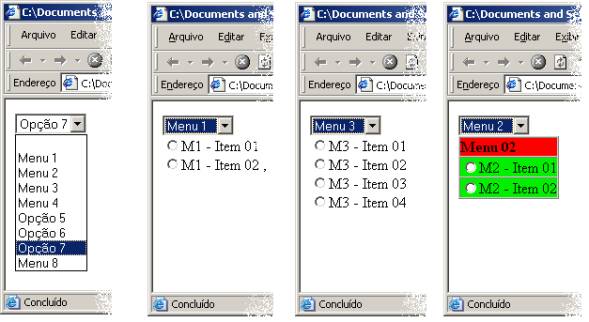
<html>
<body>
<DIV
id=masterdiv>
<SELECT class=cz2 id=tipoerro
onchange="LiMenu( this.value )" size=1 name=tipoerro>
<OPTION selected></OPTION>
<OPTION value=1>Menu
1</OPTION>
<OPTION value=2>Menu
2</OPTION>
<OPTION value=3>Menu
3</OPTION>
<OPTION value=4>Menu
4</OPTION>
<OPTION value=5>Opção
5</OPTION>
<OPTION value=6>Opção
6</OPTION>
<OPTION value=7>Opção
7</OPTION>
<OPTION value=8>Menu
8</OPTION>
</SELECT>
<DIV class=submenu id=M1
name="M1">
<INPUT type=radio value=M1_1
name=massa>M1 - Item 01<BR>
<INPUT type=radio value=M1_2
name=massa>M1 - Item 02 ,
</DIV>
<DIV class=submenu id=M2
name="M2">
<table border=1 cellpadding=0 cellspacing=0>
<tr><td
bgcolor=#FF0000#><b>Menu 02</b></td></tr>
<tr><td
bgcolor=#00FF00#><INPUT type=radio value=alt name=massa>M2 - Item
01</td></tr>
<tr><td
bgcolor=#00FF00#><INPUT type=radio value=ade name=massa>M2 - Item
02</td></tr>
</table>
</DIV>
<DIV class=submenu id=M3
name="M3">
<INPUT type=radio value=alt
name=massa>M3 - Item 01<BR>
<INPUT type=radio value=inc
name=massa>M3 - Item 02<BR>
<INPUT type=radio value=exc
name=massa>M3 - Item 03<BR>
<INPUT type=radio value=ade
name=massa>M3 - Item 04
</DIV>
<DIV class=submenu id=M4
name="M4">
<Strong>Sub Menu
M4</strong><br>
<INPUT type=radio value=alt
name=massa>M4 - Item 01<BR>
<INPUT type=radio value=ade name=massa>M4
- Item 02
</DIV>
<DIV class=submenu id=M8
name="M8">
<Strong>Sub Menu
M8</strong><br>
<INPUT type=radio value=alt
name=massa>M8 - Item 01<BR>
<INPUT type=radio value=ade
name=massa>M8 - Item 02
</DIV>
<DIV class=submenu id=subNull
name="subNull">
</DIV>
</DIV>
<SCRIPT
type=text/javascript>
if
(document.getElementById)
{
document.write('<style
type="text/css">\n')
document.write('.submenu{display:
none;}\n')
document.write('</style>\n')
}
function
LiMenu( nOpt ) {
if ( nOpt == 1 ) SwitchMenu( nOpt,'M1' ) ;
if ( nOpt == 2 ) SwitchMenu( nOpt,'M2' ) ;
if ( nOpt == 3 ) SwitchMenu( nOpt,'M3' );
if ( nOpt == 4 ) SwitchMenu( nOpt,'M4' ) ;
if ( nOpt == 5 ) SwitchMenu(
nOpt,'subNull' ) ;
if ( nOpt == 6 ) SwitchMenu(
nOpt,'subNull' ) ;
if ( nOpt == 7 ) SwitchMenu(
nOpt,'subNull' ) ;
if ( nOpt == 8 ) SwitchMenu( nOpt,'M8' ) ;
}
function
SwitchMenu(namesrc,obj){
if(document.getElementById){
var el = document.getElementById(obj);
var ar2 =
document.getElementById("masterdiv").getElementsByTagName("div");
//DynamicDrive.com change
if(el.style.display !=
"block"){ //DynamicDrive.com change
for (var j=0; j < ar2.length;
j++){
if ((ar2[j].className=="submenu") &&
(ar2[j]["name"] != namesrc) &&
((ar2[j]["name"].indexOf(namesrc)==-1)||(ar2[j]["name"].indexOf(namesrc)!=-1
&& ar2[j]["name"].length > namesrc.length)))
//DynamicDrive.com change
ar2[j].style.display =
"none";
}
el.style.display =
"block";
}else{
for (var j=0; j<ar2.length;
j++){
if
((ar2[j].className=="submenu") && (ar2[j]["name"]
!= namesrc)) //DynamicDrive.com change
ar2[j].style.display =
"none";
}
}
}
}
</SCRIPT></body>
</html>
St01> cat testeSt.java
class testeSt {
public static void main( String args[] ) {
String axEnt = args[ 0 ] ;
String axValor = axEnt.substring( 0 , axEnt.length() - 1 )
;
String axTipoV = axEnt.substring( axEnt.length() - 1,
axEnt.length()) ;
System.out.println( axValor ) ;
System.out.println( axTipoV ) ;
}
}
/*
Exemplo de uso:
java testeSt 123456C
123456
C
*/
st01> cat testeMat.java
import java.util.* ;
class testeMat {
public static void main( String args[] ) {
List teste = new ArrayList() ;
teste.add( "1" ) ;
teste.add( "2" ) ;
teste.add( new Date() ) ;
teste.add( new Lancamento() ) ;
Lancamento l2 = new Lancamento() ;
l2.Data = 2 ;
l2.Valor = 2 ;
teste.add( l2 ) ;
System.out.println( teste.size() ) ;
for ( int i = 0 ; i < teste.size() ; i++ ) {
if ( teste.get( i ) instanceof Lancamento ) {
Lancamento lm = (Lancamento)teste.get(i) ;
System.out.println( lm.Data + " / " + lm.Valor ) ;
} else if ( teste.get( i ) instanceof String ) {
System.out.println( "String: " +
teste.get( i ) ) ;
} else {
System.out.println( teste.get( i ) ) ;
}
}
}
}
class Lancamento {
int Data ;
int Valor ;
Lancamento() {
Data = 0 ;
Valor = 0 ;
}
}
st01> java testeMat
5
String: 1
String: 2
Thu Feb 09 09:30:05 GMT-02:00 2006
0 / 0
2 / 2
st01> cat TesteHash.java
import java.util.Hashtable ;
import java.util.Enumeration ;
class TesteHash {
TesteHash() {
System.out.println( "Teste Hash" ) ;
Hashtable ht = new Hashtable() ;
ht.put( "1", "Teste 01" ) ;
ht.put( "2", "Teste 02" ) ;
ht.put( "3", "Teste 03" ) ;
ht.put( "4", "Teste 04" ) ;
Enumeration en = ht.keys() ;
while ( en.hasMoreElements() ) {
String chave = (String)en.nextElement() ;
System.out.println( chave ) ;
System.out.println( ht.get( chave ) ) ;
}
}
static void main( String args[] ) {
TesteHash th = new TesteHash() ;
}
}
st01> java TesteHash
Teste Hash
4
Teste 04
3
Teste 03
2
Teste 02
1
Teste 01
z>type server.java
import java.io.*;
import java.net.*;
public class server {
public static void main(String args[]) {
// declaration section:
// declare a server socket and a client socket for the
server
// declare an input and an output stream
ServerSocket echoServer = null;
String line;
BufferedReader is;
PrintStream os;
Socket clientSocket = null;
// Try to open a server socket on port 9999
// Note that we can't choose a port less than 1023 if we
are not
// privileged users (root)
try {
echoServer = new ServerSocket(2222);
}
catch (IOException e) {
System.out.println(e);
}
// Create a socket object from the ServerSocket to listen
and accept
// connections.
// Open input and output streams
try {
clientSocket = echoServer.accept();
is = new BufferedReader( new InputStreamReader( clientSocket.getInputStream()
) ) ;
os = new PrintStream(clientSocket.getOutputStream());
// As long as we receive data, echo that data back to
the client.
while (true) {
line = is.readLine();
if ( line.indexOf("QUIT") != -1 ) {
os.println( "Ok" );
System.out.println( "Fim da mensagem"
) ;
}
os.println(line);
System.out.println( line ) ;
}
}
catch (IOException e) {
System.out.println(e);
}
}
}
labsun01> cat
cliente.java
import java.io.*;
import java.net.*;
public class cliente {
public static void main(String[] args) {
// declaration section:
// smtpClient: our client socket
// os: output stream
// is: input stream
Socket smtpSocket = null;
DataOutputStream os = null;
DataInputStream is = null;
// Initialization section:
// Try to open a socket on port 25
// Try to open input and output streams
try {
smtpSocket = new Socket(args[0], 6666 );
os = new
DataOutputStream(smtpSocket.getOutputStream());
is = new DataInputStream(smtpSocket.getInputStream());
} catch (UnknownHostException e) {
System.err.println("Don't know about host:
hostname");
} catch (IOException e) {
System.err.println("Couldn't get I/O for the
connection to: hostname");
}
// If everything has been
initialized then we want to write some data
// to the socket we have opened a connection to on port 25
if (smtpSocket != null && os != null && is
!= null) {
try {
// The capital string before each colon has a
special meaning to SMTP
// you may want to read the SMTP specification,
RFC1822/3
os.writeBytes("HELLO\n");
os.writeBytes("MAIL From:
[email protected]\n");
os.writeBytes("RCPT To: [email protected]\n");
os.writeBytes("DATA\n");
os.writeBytes("From:
[email protected]\n");
os.writeBytes("Subject: testing\n");
os.writeBytes("Hi there\n"); // message
body
os.writeBytes("\n.\n");
os.writeBytes("QUIT\n");
// keep on reading from/to the socket till we receive
the "Ok" from SMTP,
// once we received that then we want to break.
String responseLine;
while ((responseLine = is.readLine()) != null) {
System.out.println("Server: " +
responseLine);
if (responseLine.indexOf("Ok") != -1)
{
break;
}
}
// clean up:
// close the output stream
// close the input stream
// close the socket
os.close();
is.close();
smtpSocket.close();
} catch (UnknownHostException e) {
System.err.println("Trying to connect to
unknown host: " + e);
} catch (IOException e) {
System.err.println("IOException: " + e);
}
}
}
}
JSP - Mecanismo simplificado de login
Arquivo index.jsp
=================
<HTML>
<HEDD>
<TITLE>Introductions</TITLE>
</HEAD>
<BODY><%
session.putValue( "usuario" , null ) ;
if ( request.getParameter( "name" ) != null )
{
session.putValue( "usuario" , request.getParameter(
"name" ) ) ;
response.sendRedirect("menu");
}
%>
<FORM METHOD=GET ACTION="index.jsp">
Digite
o nome do usuário:
<INPUT TYPE=TEXT NAME="name"><P>
<INPUT TYPE=SUBMIT VALUE="OK">
</FORM>
</BODY>
</HTML>
Arquivo
teste.jsp (menu)
========================
<html>
<head>
<title>Pagina de teste</title>
</head>
<body>
Esta
é uma página JSP.<BR>
<%
String
axUsuario = (String) session.getAttribute( "usuario" ) ;
if ( axUsuario.length()
== 0 ) {
out.print( "Nao existe usuario cadastrado" ) ;
response.sendRedirect("index.jsp");
}
out.print( "Usuario corrente: " + session.getAttribute(
"usuario" ) ) ;
%>
<BR>
<a href="index.jsp">Saida</a>
</body>
</html>
Polimorfismo - exemplo
simplificado.
Neste
exemplo, uma classe FG, como em figura geométrica, e criada como abstrata possuíndo
o método “area()”. As classes Círculo e Quadrado herdam a classe FG possuíndo
cada qual o seu método próprio para cálculo da área. Diversos objetos FG são
adicionados a um ArrayList do tipo List e, ao serem extraídos é possível
recuperar a área de cada um sem ser necessário verificar qual figura geométrica
está armazenada.
import java.util.* ;
class exemploPoli {
public static void main( String args[] ) {
List l = new ArrayList() ;
l.add( new Circulo( 10 ) ) ;
l.add( new Quadrado( 5 ) ) ;
l.add( new Circulo( 8 ) ) ;
l.add( new Quadrado( 6 ) ) ;
for ( int i = 0 ; i < l.size() ; i++ ) {
System.out.println( ((FG)l.get(i)).area() ) ;
}
}
}
abstract class FG {
abstract double area() ;
}
class Circulo extends FG {
double raio ;
public Circulo( double axraio ) {
raio = axraio ;
}
public double area() {
return ( raio * raio * 3.1415 ) ;
}
}
class Quadrado extends FG {
double lado ;
Quadrado( double
axlado ) {
lado = axlado ;
}
double area( ) {
return( lado * lado ) ;
}
}
/*
Z:\java\Poli>java exemploPoli
314.15000000000003
25.0
201.056
36.0
*/