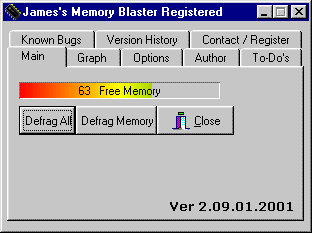
| James's Memory Blaster is a small Windows utility that displays the amount of available physical memory, (RAM). It can also free memory, either by Right clicking the icon in the Sys tray, or by setting a minimum memory threshold that activates the program automatically. In addition, a utility is provided to allow users to free memory after an application exits. |
| When used with sensible settings, and in conjunction with other system "tweaks", many users report that James's Memory Blaster helps improve the reliability of their computers, particularly on systems that do not have a lot of memory to begin with. |
| There is a popular misconception that maintaining lots of free RAM improves the performance and reliability of a computer. James's Memory Blaster can be used to achieve this goal, but this is, in the author's opinion, a misuse of the program. |
| TO-DO: |
| I have yet to add registry entries for James's Memory Blaster. Email:[email protected] |
| Clocks |
 |
 |
 |
 |
|
|
 |
|
| Right Click images for bigger images |
| Version 2 now available |
| Well here are a few clocks that I have done for fun. There is no support for these, nor is there any setup as well. to install just unzip and create a short cut to them to start them. Have Fun |
| Click images to download the clock you want. |
| Registered users need only download the new version. |
| Whats New: 1. added Automatic save aptions 2.Disclaimer window added. 3. Double click on Sys tray icon fixed 4.Now works with NT. 5. now works with ME. 6. optimize code for faster operations |