How to Speed-up your Connecting time
To Speed-up the time it takes for DUN (Dial Up Networking) to establish
a connection with your ISP (Internet Service Provider):
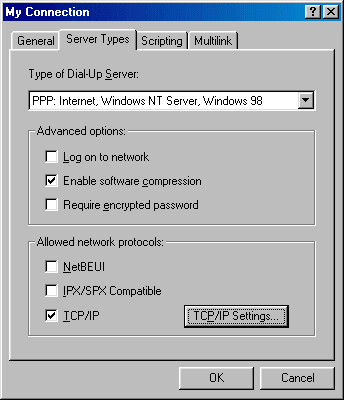
- Select your connection in DUN (Start > Programs >
Accessories > Communications > Dial-Up Networking)
- Right-click your connection and choose Properties
- On the Server Types Tab, under Advanced Options, make
sure that the check-box for Log on to network is unchecked
- Under Allowed network protocols select only TCP/IP
What to do when you get disconnected frequently?
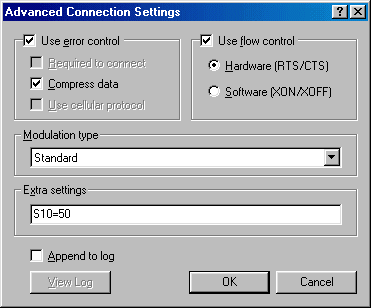
If you get disconnected frequently, try this extra modem setting:
- Go to Modems in Control Panel (Start > Settings
> Control Panel)
- From Modems select Properties, select the
Connection Tab, click the Advanced button
- In the Extra settings dialogue box, enter S10=50
This will force the modem to stay connected without a carrier, up to 5
seconds.
Increase Modem Speed in Windows 98
In Windows 98, your modem may seem to work fine, but the true fact is,
the baud rate for you COM Port doesn't allow you to reach top-speed. To
improve your port's speed:
- Click Start, Select Settings > Control Panel, open
System
- Click the Device Manager tab, and click on the "+" sign next
to Ports (COM & LPT)
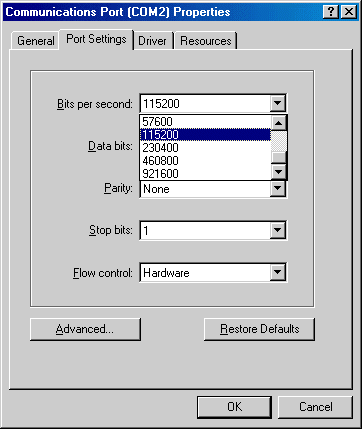
- Select the port your modem uses, click Properties, then click
the Port Settings tab, and set the Bits per second to
115200 bps, that way you won't have a sort of filter on the Port.
115200 bps is the maximum setting for a "Standard" COM port. If you
encounter problems, try setting this value lower. With System
Monitor you can check if there are any problems. System Monitor
(sysmon.exe) can be Installed by starting the Add/Remove Programs
Properties in Control Panel, select the Windows Setup
tab, double click on the System Tools entry and select System
Monitor
(If you are not sure which COM port your modem uses, click on the "+"
sign next to the Modem Icon in Control Panel and select your Modem.
Click on Properties and choose the Modem Tab. Here you
will see the COM port used by your modem)
- For most Modems you can use Hardware in the Flow
control drop-down box
The Maximum speed at which Windows 98 communicates with the modem is
set in Control Panel > Modems, click the Properties
button on the General tab. Windows 98 selects a
conservative default speed, to prevent data loss on slower
computers. So if you are using a fast computer (defined by MS as a 80486
or Pentium), set a faster speed here. If applications report data errors,
lower your speed.
In Windows 98 Microsoft opted for some limited support of the setting
known as MaxMTU in Windows 95.
- Select your Dial-Up Adapter from Network in Control
Panel
- Click Properties and select the Advanced tab
- In the selection box on the left, select IP Packet Size
- Now you can select a setting in the Value drop-down box,
choices are: Automatic, Large, Medium and Small
- The settings Large, Medium and Small will put a IPMTU value
in the registry entry for your Dial-Up Adapter of respectively 1500,
1000 or 576
It is not widely known, but the serial ports on motherboards and add-in
cards that use some specific I/O controllers will support operation at
speeds greater than 115200 bps:
- ALI:
M1543(Aladdin V south bridge)
Serial ports provided by these chips will run at 230400 and 460800
bps.
- NS:
PC87308
PC87307 / 87317
PC97307 / 97317
PC87309
PC87338
Serial ports provided by these chips will run at 230400 / 460800 /
921600 bps.
- SMC:
37C665IR / 666IR
37C669 / 669FR,37N769
37B72x / 77x / 78x / 80x,37C67x / 68x / 93x / 93xAPM / 93xFR,37M60x
/ 61x,37N958FR
Serial ports provided by these chips will run at 230400 and 460800
bps.
- WinBond:
W83877TF (TF only, A/F/AF not supported)
W83977F /AF /TF / ATF
Serial ports provided by these chips will run at 230400 / 460800 /
921600 bps.
All they need is the proper software to enable and program these high
speed modes.
For Win95/98, getting greater than 115Kbps requires two parts:
- Executing a small program at boot time to enable the high speed mode
- An updated serial.vxd that knows how to program the high
speed rate
The file SHS17.ZIP from http://hp.vector.co.jp/authors/VA004958/over115K/index_e.html
provides all you need to determine if your serial ports are compatible
and, if so, to take advantage of the high speed operation that these chips
support.
|