
James's Web Page

 Resume Resume |
Lesson
Plan |
Virtual
Library |
Projects |
James Edward Clark
8142 East 6th Street ~ Tucson, Arizona, 85710
~ United States of America
Home Phone (520)-722-7082 ~ Email [email protected]
P E R S O
N A L
I am a recent graduate of college looking for a career in teaching.
I believe I am a positive influence for students and committed to invest
my time into student growth and development.
E D U C A
T I O N
High School Diploma, Ray High School, 1987
Associate of Arts, Northland Pioneer College,
May 2000
Bachelor of Science in Education, Northern Arizona
University, Dec. 2002
E M P L O
Y M E N T
Electrician, Complete Electric 1998- 2000
I worked as an electrician to help put me through school at Northland Pioneer
College. My skills increased and I worked by completely wiring new houses
and old houses as needed. I also installed ceiling fans, light fixtures,
switches, receptacles, and breakers w/ panel and worked with the phone
wiring/ troubleshooting. I finished working at Complete Electric when we
moved to Tucson.
Pool Technician, Crown Pools 2000- Current
To help move me through school at Northern Arizona
University, I worked at Crown pools. The skills I brought and use
are to include: pool pump repair and installation; Pool filter repair and
installation; Pool tile repair and installation; electrical; plumbing etc.
of pools as needed.
C O M P U T
E R S K I L L
S
I worked with both IBM and Mac computers. Extensive
knowledge in all windows applications i.e. 95, 98, 2000, NT, etc. Worked
with Some Software including Power Point, Works and Word operations,
Microsoft Excel, Access, Publisher and programming methods. Also
have knowledge in some repair and finding computer problems. Furthermore
I have Knowledge in the use of the Internet for its use for research and
school tools. My experience in computers started about 12 years ago
and continuing to learn.
I N T E R
E S T S &
A C T I V I T I E
S
I love to watch and coach football and have been
coaching youth football for several years. I also play tennis and maybe
interested in coaching and teaching tennis one day.
Lesson Plan
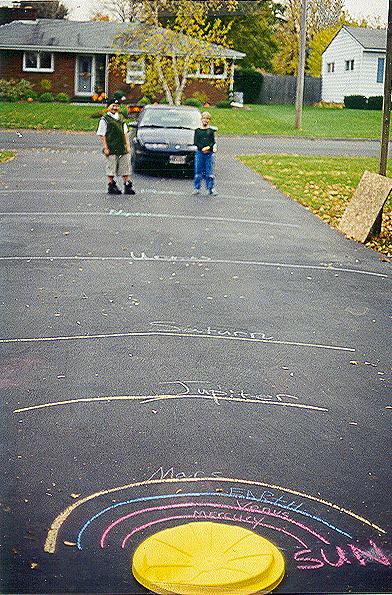
Solar System on Distance scale
Purpose / Goal and / or Behavior Objectives:
Pre-Assessment:
Must know basic aspects of planets and solar
system.
Anticipatory Set: Yesterday we made models of planets; today we will see how far, to scale, they are away from each other using astronomical units.
Materials:
Clay models
Meter or yardstick
Table of astronomical units
Specific Objectives:
Understand astronomical units and distance between
planets.
Procedures:
1. Anticipatory set
2. Explain what a astronomical unit is. (Average
distance between sun and earth).
3. Computer lab to find scale of planets.
4. Have students take clay models outside and
start at one end of playground.
5.. Place mercury at 4 inches or centimeters,
depending on what you want to use, away from the sun model.
6. Continue with all planets.
7. Have students stand by the planets to see
the relationship in distance between planets.
8.. After all planets, gather all students, discuss
what has happened. Have them compare and think of the scale of all planets.
9. Gather all materials and go inside.
10. Discuss lesson and opinion of it.
Evaluation:
I will assess them by their involvement in lesson.
Mark down who hasn’t participated properly.
Remediation: Peers and peer group first will try to help understand concepts. One on with teacher to help student(s) who have problems understanding.
Enrichment:
Have students to scale other stars or moons,
asteroids belt.
Assessing the Lesson:
See procedure 9.
 |
Pluto Neptune Uranus
Saturn
Jupiter
Mars
|
Closure:
Close with discussion on unit so far and tomorrows
lesson.

A link to the NAU library at the Cline Library.
Flagstaff, AZ - http://www.arizona.edu/shared/libraries.shtml#libraries
A link to the ASU library (main campus) -
http://www.asu.edu/lib/
A link to the U of A library - http://www.nau.edu/library/
A link to articles about telecommunication crimes
- http://www.rcmp-grc.gc.ca/html/cpu-cri.htm
A link to Assistive technology in the K-12 classroom
- http://www.bcpl.lib.md.us/~adorich/index.htm
A link to articles about copyright laws -
http://www.fplc.edu/tfield/copynet.htm
A link to articles about freedom of speech via
the Internet - http://www.ciec.org/
A link to technology in the curriculum - http://edweb.gsn.org/stories.intro.html
Lesson plans, general teaching sites and tools
to aidin teaching. http://www.ed.gov/databases/ERIC_digests/index
A website built by teachers for teachers.http://dnie.com/
This website offers weekly lesson plans intended
for using newspapers and other public information periodicals for educational
purposes.http://www.proteacher.com/
This site offers interaction for the student
and teacher. Teachers can communicate with one another to generate
ideas for their classroom in Social Study, Math etc. Parents can
voice their opinions and visit with other parents, teachers, and children.
Students can get extra help on homework.http://www.dogpile.com
This search engine is grea When you find the
right words, you can search over 300,000,000 search engines at one time.
This site has been a big help with every class that I needed to find information
quick and fast.http://quest.arc.nasa.gov/
It has great lesson Science plans for teachers and parents.http://dir.lycos.com/Reference/Education/
Answers any question about education.http://www.education-world.com/
Lots of info. for teachers to use http://www.educationindex.com/
Annotated guide to the best links on the web
for educators.http://wwww.google.com Search
engine
EVENING CLASS
This is a link to an introduction for a thematic
unitshowing what would be involved to colonize Mars. It is targeted for
5th and 6th graders http://www.alternative
parenting.com/lesson_plans/K_through_3/science_nature/dinosaurs.htm
Easy to create, Easy to update websites for Educators. teacherweb.com/
This article described the bodies of the solar system. http://www.lessonplanspage.com/ScienceSSMars1IntroSolar56.htm
Other Web sites for teachers
http://www.abcteach.com/
http://www.lessonplans.com/
http://www.historychannel.com/tdih/index.html
http://www.discovery.com/stories/science/sciencetitanic/sciencetitanic.html
http://www.scholastic.com/index.asp
http://www.abcteach.com/Portfolios/portfolioTOC.htm
http://www.siteforteachers.com/search.cgi?c=computers&sp=internet
www.teachnet.com/lesson.html
http://www.crayola.com/index.cfm
http://www.gamekids.com/
http://www.teach-nology.com/teachers/
http://www.proteacher.com/030000.shtml

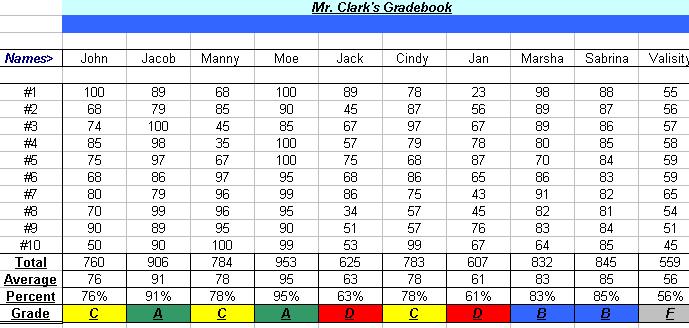
Projects that I did for Mrs.Susan K. Jahns Class at NAU in ETC 447 Technology in the Classroom include the following:
Copy/Paste
Self Portrait
Newsletter
Gradebook
Database
Storyboard
Powerpoint

 Dallas
Cowboys Football
Dallas
Cowboys Football


