Here are some ActiveControl examples, they will help you learn more about ActiveControl and how to use it and give you some ideas for your own projects.
ActiveControl = Sets the control that has focus on the form.
Example 1:
Borland has this example in the Delphi help files:
The following event handler responds to timer events by moving the active control one pixel to the right:
procedure TForm1.Timer1Timer(Sender: TObject);
begin
Timer1.Interval := 100;
if ActiveControl <> nil then
ActiveControl.Left := ActiveControl.Left + 1;
end;
You can add a Panel to your form, then click on Form1 and go to the
Object Inspector and change the Form1 ActiveControl property to Panel1.
Also add a TTimer and add the code above.
Make sure Panel1 is on the left of Form1.
Run the project and you should see Panel1 move across your screen to the right.
Example 2:
Start a new project.
Add two TMemo components to Form1.
Add two buttons and then add this code to each button:
procedure TForm1.Button1Click(Sender: TObject);
begin
Form1.ActiveControl := Memo1;
end;
procedure TForm1.Button2Click(Sender: TObject);
begin
Form1.ActiveControl := Memo2;
end;
Run the project and click on Button2, you will notice that Memo2 has focus and the caret is visible.
Next click on Button1, you will notice that Memo1 has focus and the caret is visible in Memo1 now.
By clicking on each button you are changing the ActiveControl.
Example 3:
You have a form with three TEdit components and the first is for the user to add his/her name, the second for their address, the third the users town.
If the users forgets to fill out Edit1 then you can use this code to prompt them to do so, if they try to close the form.
procedure TForm1.FormCloseQuery(Sender: TObject; var CanClose: Boolean);
begin
if Edit1.Text = '' then // If Edit1 is empty
then
begin
ShowMessage('Please
enter your name in Edit1!');
CanClose := False;
// Stop the form from closing
ActiveControl := Edit1;
end;
end;
After they add some text to Edit1 the form will close.
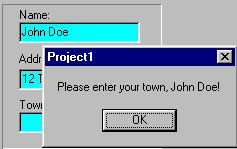
Another example is if they enter their name and address, but not their town then you can add this code which is more personal:
procedure TForm1.FormCloseQuery(Sender: TObject; var CanClose: Boolean);
begin
if Edit3.Text = '' then
begin
ShowMessage('Please
enter your town in Edit3, ' + Edit1.Text + '!');
CanClose := False;
ActiveControl := Edit3;
end;
end;
Here is a screen shot of what happens if they don't fill in Edit3: