|
Creating links within Cards
|
|
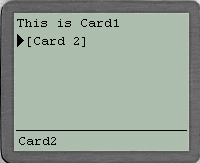
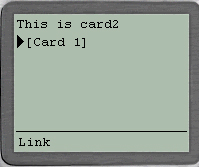
The code below shows 2 cards within a deck , in other words 2 display areas within
a page ...........
|
<?xml version="1.0"?>
<!DOCTYPE wml PUBLIC "-//WAPFORUM//DTD WML 1.1//EN"
"http://www.wapforum.org/DTD/wml_1.1.xml">
<wml>

<card id="card1" title="Welcome">
	<p> This is Card1<br/>
		<a href="#card2" title="Card2">Card 2</a>
	</p>
</card>

<card id="card2" title="Card 2">
	<p> This is card2  <br/>
		<a href="#card1">Card 1</a><br/>
	</p>
</card>

</wml>
|
|
Running the code
|
1) save the above file as cards.wml in E:\wml\ Directory
2) Open UPSDK Browser, which will be a shortcut created during installation
3) Type in the URL file://e:/wml/cards.wml next to GO Button Text Box, Hit Enter ..........
4) Always remember whenever u make changes to the wml script, u must click on Edit Clear Cache to View New Screen and Re-Enter URL
|
|
What Next ? Content formatting using tables
|
|
Reach me!
|
|
|
Java, J2EE, J2SE and all Java-based marks are trademarks or registered trademarks of Sun Microsystems, Inc.
in the United States and other countries. 
|




 If you like this article and/or code