| S |
truts Fundamentals |
|
|
I am thinking of Creating the most Simplest Struts Application Possible ..........
|
|
|
Ok Mate thinkin how to Start , Well its not Rocket Science , Here we go ......
TARGET : We will give a Simple Text Box in index.jsp where the User will Enter Student Name ,
If the Student name is Entered as "James" then we will display a Message This is James Smith
and take the user to "jamesfound.jsp" [Assuming that the user was Successfull in Entering user name]
However if the user Enters some other name then we will display a Message I dont know this Student
and take the user to "notjamesfound.jsp" [Assuming that the user name Entered was a Failure ]
Download the Source Code
|
|
|
What the Hell is MVC , why Should we Use it ??????
|
|
|
 |
If u are someone like me u would ask the same question, why the Hell should we use
MVC Architecture ? whats so great about it and whats wrong in using our old coding techniques like putting all in same JSP,
I mean u call image tag , break tag , form tag etc and also connecting to database, setting sessions , displaying resultsets,
even using some stupid so called BUSINESS LOGIC ,
but Mate wait .. MVC Guys have something to say......
Give them a chance to Speak before ur Justify ur own coding Techniques
|
|
|
|
MODEL VIEW CONTROLLER ARCHITECTURE
|
|
Model : Represents Data Objects , Its what the user Manipulates and Presents to the User,
for example All the student addresses are stored in my student database , and u click on Select all records I will show u all records but still
hide my gal friends record as i dont want u to get her address n phone number . 
View : Serves as Screen Representation of model , It is an Object of current state of Data,
for example No Matter what data i present it to u , u always have the Options to use a Web Browser, WAP Browser, Swing GUI or anything, u will still
get the same data, Same Model Just Different Views
Controller : Controller component is the one responsible for manipulating the model or Data Object 
for example Once u login should u be given the right to view student records or not, is decided by the controller , and which records should be displayed is decided by the model
|
|
|
Advantages of Using MVC - 5 R Theory by James :-)
|
|
1. Reliability : Now think A designer a Creative Species on this earth
is someone who decides to change his design every 2 days where as a programmer may not be required to change his code every 2 days
So Split them and their work , that is View Code Split n Seperate from Controller Code, To be more precise the Simple JSP, HTML and Image Components
which are assets of a Designer are Split across with Java Class Files / Servlets of a Programmer
2. Re-Usablity :
The Same Java Code which connects to Database and Throws student records at the user can be used by different View like
Web Browser, WAP Browser, Swing Application , so we are talkin about code re-use ..
3. Reduced Development Costs :
All [Designers and Developers] are not paid equally for equal work we all know that and let us face it , A company may feel
A designer must be paid more than a Developer where as someother company may feel other wise, so when u are doing a project on hourly basis
and Time is Money why to waste one persons time to something less important, u know what i mean.. why to pay the developer money
which the designer can do it at a lower cost or vise-versa
4. Rapid Development :
Above Explanation holds good here..
5. Reduced Mantainance :
So Every time u change u r java code , wheather u like it or not u have to blody recompile the java code and yuk restart that Tomcat Server,
where as the change in JSP or Image may not require to do so. So it becomes important when that u avoid restarting ur Server just to see a change in image or some text
|
|
|
| Directory Structure |
I assume that u have ur tomcat 4 installed in D:\Tomcat\webapps directory,
Under D:\Tomcat\webapps create a directory
jamesapp whose tree view is show as below
+---jamesapp
      +---META-INF
      +---WEB-INF
             +---lib
             +---classes
             �   +---subclassdir
             +---src
             �   +---subclassdir
D:\Tomcat\webapps\jamesapp> will have JSP Files index.jsp, foundjames.jsp, notfoundjames.jsp
D:\Tomcat\webapps\jamesapp\META-INF> will have MANIFEST.MF
D:\Tomcat\webapps\jamesapp\WEB-INF> will have XML and TLD Files such as struts-config.xml , web-xml , struts-html.tld, struts-bean.tld
D:\Tomcat\webapps\jamesapp\WEB-INF\classes\subclassdir> has Properties and .class Files like ApplicationResources.properties, LookupAction.class, LookupForm.class
D:\Tomcat\webapps\jamesapp\WEB-INF\src\subclassdir> has Java Source Code LookupAction.java , LookupForm.java
|
| D:\Tomcat\webapps\jamesapp\WEB-INF\classes\subclassdir\ApplicationResources.properties |
This file lists the Messages to be Displayed in our Application
|
ApplicationResources.properties
|
|
|
app.title=James Smiths First Struts Application
msg.succ=This is James Smith
msg.fail=I dont know this Student
|
Please Note 1 : To call this file we need to line below in our struts-config.xml
<message-resources parameter="subclassdir.ApplicationResources"/ >
Just Before
</struts-config >
Please Note 2 : Say for example If we want to Show the Page Title inside for our JSP using Taglibs
and values within ApplicationResources.properties file then the JSP must have code something like this
<%@ taglib uri="/WEB-INF/struts-bean.tld" prefix="bean" % >
<title > <bean:message key="app.title" /> </title >
|
| D:\Tomcat\webapps\jamesapp\foundjames.jsp : Demo of How the ApplicationResources.properties is used |
The lines in Bold is show to get the title and success message from ApplicationResources.properties file
But Remember Every time u change something in that ApplicationResources.properties file, Tomcat must be re-started to reflect the changes
with in the JSPs
|
foundjames.jsp
|
|
|
 <%@ taglib uri="/WEB-INF/struts-bean.tld" prefix="bean" %>
 <html>
 <head>
    <title><bean:message key="app.title" /></title>
 </head>
 <body>
<Center><font face='verdana'><bean:message key="msg.succ" /></font></CENTER><br><br>
   <table  border="0" cellspacing="0" cellpadding="0" align=center>
     <tr>
       <td>
         <font face='verdana'> You Entered Student Name as :<%= request.getAttribute("studname") %></font>
       </td>
     </tr>
     <tr>
       <td> </td>
     </tr>
   </table>
 </body>
</html>
|
We will also write the code which handles , when the user Enters some other name other than james,
this will be directed to notfoundjames.jsp ,
Just Note the one below calls msg.fail label in the ApplicationResource File
|
notfoundjames.jsp
|
|
|
<%@ taglib uri="/WEB-INF/struts-bean.tld" prefix="bean" %>
<html>
  <head>
     <title><bean:message key="app.title" /></title>
  </head>
  <body>
<Center> <font face='verdana'><bean:message key="msg.fail" /> </font></CENTER><br><br>
    <table border="0" cellspacing="0" cellpadding="0" align="center">
      <tr>
        <td>
     <font face='verdana'>You Entered Student Name as  : <%= request.getAttribute("studname") %></font>
        </td>
      </tr>
      <tr>
        <td> </td>
      </tr>
    </table>
  </body>
</html>
|
|
| D:\Tomcat\webapps\jamesapp\index.jsp |
The index.jsp is the first jsp file which gets loaded on the url http://localhost:8080/jamesapp
u can see that we have <html:form action="Lookup" name="lookupForm" type="subclassdir.LookupForm" >
which indicates that the Action is named as lookupForm and it inturn looks up a Java class present in subclassdir.LookupForm or to be precise
D:\Tomcat\webapps\jamesapp\WEB-INF\classes\subclassdir\LookupForm.class File
input type = text is written here as <html:text property="studname" / > and
input type = submit is written as <html:submit / >
|
index.jsp
|
|
|
<%@ page language="java" %>
<%@ taglib uri="/WEB-INF/struts-html.tld" prefix="html" %>
<%@ taglib uri="/WEB-INF/struts-bean.tld" prefix="bean" %>
<html>
  <head>
     <title><bean:message key="app.title" /></title>
  </head>

  <body>
      <html:form action="Lookup" name="lookupForm" type="subclassdir.LookupForm" >
      <table width="45%" border="0">
        <tr>
          <td><font face='verdana'>Student Name:</td><td><html:text property="studname" /></font></td>
        </tr>
        <tr>
          <td colspan="2" align="center"><html:submit /></td>
        </tr>
      </table>
    </html:form>
  </body>
</html>
|
|
| D:\Tomcat\webapps\jamesapp\WEB-INF\struts-config.xml |
struts-config.xml Shows where or which JSP the file must be farwarded if its Successfull
and where if there is a failure , In Our case on Success that is if the user Enters name as "James" we farward to
jamesfound.jsp and if the user enters someother name we throw him to notjamesfound.jsp
This file also lets us know where the form-beans is located ,
infact form-bean is a java class
[D:\Tomcat\webapps\jamesapp\WEB-INF\classes\subclassdir\LookupForm.class ] responsible for getter and setter methods which extends ActionForm ,
that is to store the values and retrieve the values ..
|
struts-config.xml
|
|
|
<?xml version="1.0" encoding="ISO-8859-1" ?>
<!DOCTYPE struts-config PUBLIC
          "-//Apache Software Foundation//DTD Struts Configuration 1.1//EN"
          "http://jakarta.apache.org/struts/dtds/struts-config_1_1.dtd">
<struts-config>

  <form-beans>
    <form-bean name="lookupForm"
      type="subclassdir.LookupForm"/>
  </form-beans>

  <action-mappings>
    <action path="/Lookup"
      type="subclassdir.LookupAction"
      name="lookupForm" >
      <forward name="success" path="/foundjames.jsp"/>
      <forward name="failure" path="/notfoundjames.jsp"/>
    </action>
  </action-mappings>
  <message-resources parameter="subclassdir.ApplicationResources"/>
</struts-config>
|
|
| D:\Tomcat\webapps\jamesapp\WEB-INF\web.xml |
web.xml in our case tells that once a form is submitted by using a submit button
the action name is to be followed by do , that is after form submit u will see URL as Lookup.do
where Lookup is the name given in action="Lookup" attribute of form tag
and other thing in web.xml file is
once the user clicks on http://localhost:8080/jamesapp it redirects or welcomes with index.jsp file
|
web.xml
|
|
|
<?xml version="1.0" encoding="ISO-8859-1"?>
<!DOCTYPE web-app
  PUBLIC "-//Sun Microsystems, Inc.//DTD Web Application 2.2//EN"
  "http://java.sun.com/j2ee/dtds/web-app_2_2.dtd">
<web-app>
  <servlet>
    <servlet-name>action</servlet-name>
    <servlet-class>org.apache.struts.action.ActionServlet</servlet-class>
    <init-param>
      <param-name>config</param-name>
      <param-value>/WEB-INF/struts-config.xml</param-value>
    </init-param>
    <load-on-startup>1</load-on-startup>
  </servlet>

  <servlet-mapping>
    <servlet-name>action</servlet-name>
    <url-pattern>*.do</url-pattern>
  </servlet-mapping>

  <welcome-file-list>
    <welcome-file>index.jsp</welcome-file>
  </welcome-file-list>

  <taglib>
    <taglib-uri>/WEB-INF/struts-html.tld</taglib-uri>
    <taglib-location>/WEB-INF/struts-html.tld</taglib-location>
  </taglib>
</web-app>
|
|
| D:\Tomcat\webapps\jamesapp\WEB-INF\src\subclassdir\LookupForm.java |
LookupForm.java extends ActionForm and this class has mainly gettter and setter methods , with a reset method
to bring things back to null,
|
LookupForm.java
|
|
|
package subclassdir;

import javax.servlet.http.HttpServletRequest;
import org.apache.struts.action.ActionForm;
import org.apache.struts.action.ActionMapping;

public class LookupForm extends ActionForm
{
	private String studname = null;
  	public void setstudname(String studname)
  	{
            System.out.println("Inside setstudname");
            this.studname = studname;
  	}
  	public String getstudname()
  	{
            System.out.println("Inside getstudname ");
            return (studname);
  	}
  	public void reset(ActionMapping mapping, HttpServletRequest request)
  	{
             this.studname = null;
  	}
}
|
D:\Tomcat\webapps\jamesapp\WEB-INF\src\subclassdir\LookupAction.java extends Action has execute method
which decides weather the operation was success or failure and returns the status to struts-config.xml file ,
which inturn redirects to corresponding JSP file
|
LookupAction.java
|
|
|
package subclassdir;

import java.io.IOException;
import javax.servlet.ServletException;
import javax.servlet.http.HttpServletRequest;
import javax.servlet.http.HttpServletResponse;
import org.apache.struts.action.Action;
import org.apache.struts.action.ActionForm;
import org.apache.struts.action.ActionForward;
import org.apache.struts.action.ActionMapping;

public class LookupAction extends Action
{
  public ActionForward execute(ActionMapping mapping, ActionForm form,
  HttpServletRequest request, HttpServletResponse response)
  throws IOException, ServletException
  {
     String target = new String("success");
     System.out.println("Inside execute");
      if ( form != null )
      {
         // Use the LookupForm to get the request parameters
        LookupForm lookupForm = (LookupForm)form;
        String studname = lookupForm.getstudname();
        request.setAttribute("studname", studname);
        if(studname.equalsIgnoreCase("James"))
        {
              System.out.println("OK Mate Found James ");
        }
        else
        {
              System.out.println("I dont know this name :-)  ");
              target = new String("failure");
        }
    }
    return (mapping.findForward(target));
  }
}
|
|
| Compile Java and Copy Class Files |
D:\Tomcat\webapps\jamesapp\WEB-INF\src\subclassdir>
set classpath=D:\Tomcat\weba
pps\jamesapp\WEB-INF\lib\struts.jar;D:\Tomcat\common\lib\servlet.jar
D:\Tomcat\webapps\jamesapp\WEB-INF\src\subclassdir>javac *.java
D:\Tomcat\webapps\jamesapp\WEB-INF\src\subclassdir>copy D:\Tomcat\webapps\jamesapp\WEB-INF\src\subclassdir\*.class
D:\Tomcat\webapps\jamesapp\WEB-INF\classes\subclassdir
|
| Running the Application |
1. Download the Source Code
2. Unzip this to some D:\Temp dir which will create jamesapp directory there , copy and paste jamesapp directory as it is into D:\Tomcat\webapps Directory
3. Start the Tomcat Server by giving command startup in d:\tomcat\bin Directory
4. Click here http://localhost:8080/jamesapp u will be presented with a index.jsp Screen
which shows u TextBox to type Student Name, u enter James then hit submit, i consider it as success and take u to foundjames.jsp with some message given
5. if u enter someother name i will consider it as failure and take u to notfoundjames.jsp |
| When to Re-start the Tomcat Server and when not to Re-Start ???? |
 |
1. U need to restart tomcat server every time u change ur Java code and compile and make a class file out of it
2. U need to restart tomcat server every time u change ur web.xml file
3. U need to restart tomcat server every time u change ur Struts-config.xml file
4. U need to restart tomcat server every time u change ur ApplicationResources.properties file
5. U Dont need to restart tomcat server every time u change ur Image File JPG or GIF
6. U Dont need to restart tomcat server every time u change ur HTML file
7. U Dont need to restart tomcat server every time u change ur JSP file
|
|
D:\Tomcat\bin> SET CATALINA_HOME=D:\TOMCAT
D:\Tomcat\bin> SET JAVA_HOME=D:\JDK1.3.1
D:\Tomcat\bin> SET PATH=%PATH%;D:\JDK1.3.1\bin;D:\TOMCAT\bin
D:\Tomcat\bin> startup
D:\Tomcat\bin> stutdown
|
|
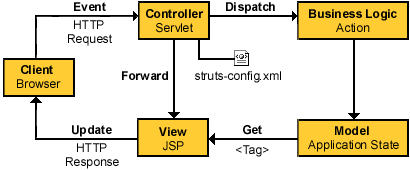
The Struts Implementation of MVC
|
|
1. Client Browser or View Makes a Request
2. Request is Recived by Action Servlet, which acts as a Controller In our case
D:\Tomcat\webapps\jamesapp\WEB-INF\classes\subclassdir\LookupForm.class
3. Action Servlet looks in struts-config.xml and determines the name of Action Class ,
D:\Tomcat\webapps\jamesapp\WEB-INF\classes\subclassdir\LookupAction.class
4. The Action Class performs its logic on Model
5. Once the Action Class has done its work it returns Control Back to ActionServlet , As a part of Return it also sends if the
Operation was Success or a Failure
|
6.Action Servlet takes the Success or Failure from Action Class and It Farwards to corresponding JSP, in our case Success is farwarded to
jamesfound.jsp and failure is farwarded to D:\Tomcat\webapps\jamesapp\notfoundjames.jsp
|
|
My Dream to be your Friend and Create a Group of Intelligent and Understanding Programmers
|
If you like this article and/or code mailme or Join our small Java User Group which is by the Programmers for the Programmers ,
Till we meet next time BYE  Kind Regards - James Smith Kind Regards - James Smith
|
|
Java, J2EE, J2SE and all Java-based marks are trademarks or registered trademarks of Sun Microsystems, Inc.
in the United States and other countries. 
|