
Won Contests Let Us Talk Mail Me Light of Knowledge


J SDK - Easy way to Run Servlets
Easy way to run Servlets using Java Servlet Development Kit from Sun

If you are someone who cannot configure Tomcat or get stuck up with the complexity of J2EE Servlet deployment or Weblogic or WebSphere or face Licensing issues , then there are better and easy ways to overcome this situation. All you wanted to do was run Servlets.

download jsdk.zip ( Java Servlet Development Kit ? ) from sun web site or u can as well do it from this download location of my site jsdk.zip

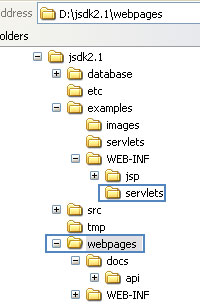
Unzip this zip file say in your D:\ so that u get a directory D:\jsdk2.1 created for you , 3 Folders of our Interest are

If you are a Programmer interested in 1 hour of Practical Session with Solutions to your problems than 100 hour of Theory then this site is for you.
I DONT BELIEVE IN THEORIES MANY OF WHICH SIMPLY DON'T WORK PRACTICALLY !

Proper Dictories to be chosen first


D:\jskd2.1\webpages: Here you will store all your .html and .jpg , .gif , .CSS files etc..
(If u already have downloaded Jewels.zip then u can after unzipping u can place all
your image and html files in this directory)

D:\jsdk2.1\examples\WEB-INF\servlets: Here you will store all your .java files and its
compiled .class files here (If u already have downloaded Jewels.zip then u can after
unzipping u can place all your .java and .class files in this directory)

D:\jsdk2.1\database: This directory u will create, Here you will store all your .mdb
database related files (If u already have downloaded Jewels.zip then u can after
unzipping u can place all your shop.mdb and employee related jpeg files in this directory)

SAFER SIDE

On a Windows 95/98 machine you may see an "Out of Environment Space" error message when starting the server. This is caused by Windows providing too small a space for environment variables. To work around this limitation: Close the DOS window (the error can corrupt its CLASSPATH variable)

Open a new MS-DOS window
Click on the MS-DOS icon at the top-left of the Window
Select the Properties option
Click on the "Memory" tab
Adjust the "Initial Environment" drop-down box from "Auto" to "2816"
Click on OK
Start the server

ENVIRONMENT

If you are windows 98 user edit your c:\Autoexec.bat to look something like this


  SET JAVA_HOME=D:\JDK1.2.1 (Assuming u have installed jdk1.2.1 in this directory)
  SET CLASSPATH=D:\jsdk2.1\sever.jar;servlet.jar
  SET PATH=[All Your others paths];D:\JDK1.2.1\BIN


STARTING AND SHUTTING DOWN YOUR SERVER


  D:\>CD jsdk2.1
  D:\JSDK2.1>startserver

Step 6 :: Setting up ODBC

If you wish to go further and your Application required you to set ODBC
Click on Start -> Settings -> Control Panel -> Administrative tools -> Data Sources (ODBC) -> User DSN -> Add -> Microsoft Access Driver *.mdb -> Finish
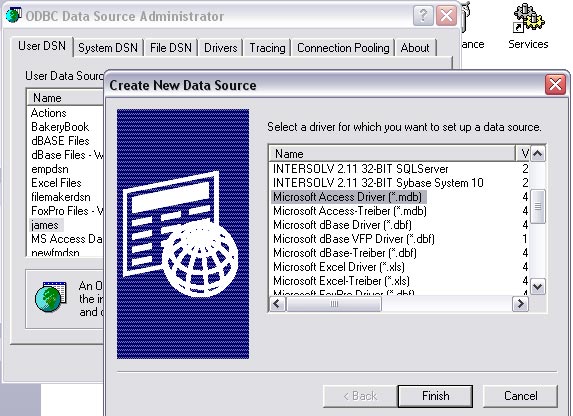
 

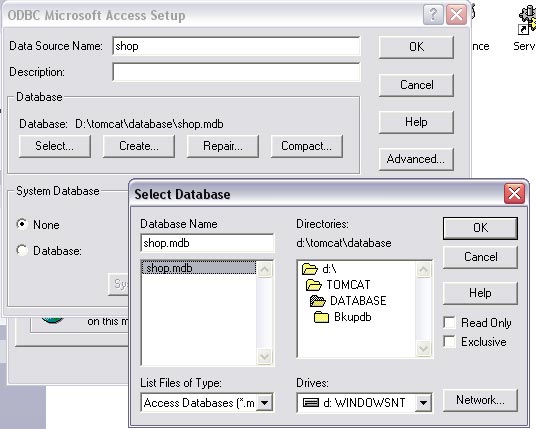
In Data Source name type in Example "shop" -> Select -> Driver D: -> Select the folder where you have your mdb file in my case d:\tomcat\database\shop.mdb -> Click OK -> OK again -> OK once more
 

Step 7 :: Accessing Your Java Files

Now that u have compiled ur index.java file to access the same file open ur internet Explorer type in http://localhost:8080/examples/servlet/index (REMEMBER NO .java or .class at the END of this Line )
by the way index.java is in my Jewels.zip file


 My Dream to be your Friend and Create a Group of Intelligent and Understanding Programmers
     If you like this article and/or code mailme or Join our small Java User Group which is by the Programmers for the Programmers ,
Till we meet next time BYE      Kind Regards - James Smith

  Java, J2EE, J2SE and all Java-based marks are trademarks or registered trademarks of Sun Microsystems, Inc.
in the United States and other countries.