 |
 |
| To Walk-Through |
| How the Heck do I Operate this Stuff? |
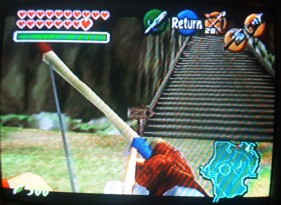
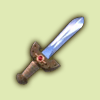
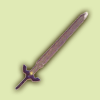
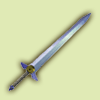
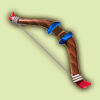
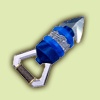
| The Basics Follow the Action Icon (the blue circle at the top of the screen) to push, pull, grab, climb, thow, climb, drop, open, or drop from a ledge. This also allows you to speak to people (you can talk to someone far away by Z-targeting them and pushing A). Press A to roll forward (or in whatever direction you want) to bash into a crate or simply roll downhill faster. Z (the trigger on the back) is your best friend. Z-Targeting an enemy is often the best way to deal with them. When you have two Wolfos attacking you, for example, if you just Z-Target one of them, the other will leave you alone until the first is dead. To get off Z-Target, push Z as you step away from the object. When you are Z-Targeted on an enemy, if you push A and back, you will perform a nice backflip. If you push A and left or right, you will jump to the side. Z not only keeps you focused on your enemies, but also helps you face the correct direction. If you push Z, the camera will turn to face whichever way Link is facing (this is convenient when going around corners). Also, you can hold down Z and move the joystick and Link will run in that direction, but continue facing in the original. Swords Kokiri Sword Tap B once to swing the sword. Tap B repeatedly to unleash a whirlwind of *nearly uncontrolled* attacks. Z-target an enemy, then push A to perform a Jump Attack, which is twice as powerful as a slash, but it takes you a while to get up off the ground. If you get the sword spell from the fairy who lives by Biggoron, you can hold down B to charge up for a Spin Attack (the longer you charge, the more powerful the attack will be, and the more magic you will use up). This sword can only be used by child Link. Master Sword This is exactly the same as the Kokiri Sword, except it is twice as powerful and has a longer reach. This sword can only be used by adult Link. Biggoron Sword This sword kicks. It's freaking huge and freaking powerful. It operates exactly like the Kokiri or Master Swords, but the only downside is you can't use a shield, since it's a two-handed blade. This sword can only be used by adult Link. Shields Deku Shield Push R (on top right) to operate your shield. If you do this while not Z-Targeted, you'll crouch down and only be able to change the direction the shield is pointed with joystick. If you Z-Target and push R, you'll be able to move around as you shield yourself. Keep in mind, this shield can be burned by fire, as it's wooden. It can only be used by child Link. Hylian Shield This shield operates in different ways depending on if you are a child or adult. As a child, you basically curl into a ball under it since it's too big for you (like the Deku Scrub in Majora's Mask). The only reason it's worthwhile to have as a child is in case your Deku Shield is burned up in Dodongo's Cavern, so you'll still have some form of protection. As an adult, the shield operates exactly like the Deku Shield. Mirror Shield Wow, she's a beauty. It operates exactly like the Deku Shield, but it's so much cooler. If you are not Z-Targeted and are standing in rays of light, you can bounce the reflection of the sun (or light-source) onto objects and enemies. The only downside to this baby is that she doesn't bounce the spit wads of the purple water monsters back at them; they just kind of disentigrate on your shield. Go figure. Anyway, this shield can only be used by adult Link. Targeting Tips Fairy Slingshot When you're in the middle of a fight, the best way to deal with this is to Z-Target your enemy and let a Deku Seed loose. The Z-Target will automatically send the projectile at the baddy. When you're aiming for a non-alive object, however, you'll have to do it manually. Press the C button you've designated for the Slingshot, put where you want the seed to go in the middle of the string exactly, pull back with C, then let her loose. Boomerang The Z-Targeting rules are the same for the Boomerang as the Slingshot, but just keep in mind it takes a while for it to come back to you, so act accordingly. For manual targeting, put where you want the boomerang to go just behind the very top of Link's head, then let it loose. It will take some practice to get familiar with it. If you're trying to send the Boomerang around an obstacle, remember that the Boomerang goes straight for a certain distance, then suddenly cuts off to the left or right. Fairy Bow The Z-Targeting is the same as the two above. When aiming manually, though, you'll find it to be a little difficult to get the hang of it. Line up your target just above with the vertical line between blue and white on the bow. In the picture to the right, the arrow, when loosed, would fly directly into the sign (the vertical blue line is lined up with the sign and the sign is just above the arrow). Hookshot and Longshot If you push the designated C button to let the Hookshot loose, then push it again, the Hookshot will immediately retract. The Z-Targeting works exactly like all the above, but there is some lag time between when you let it loose and when it finds its mark. For manual targeting, there is a nice red dot that tells you exactly where the Hookshot will go. If you point it off into empty space and are wondering where your red dot is, chances are your target is out of range. Sometimes it lies, though, and you can still snag it. Sometimes, when you're in a corner or under a ledge, you might think you're aiming for something close by and then actually hit the wall. Just back away from whatever you hit (the ledge, wall, whatever) and try again. |
 |
 |
 |
 |
 |
 |
 |
 |
 |
 |
 |