Latest News
03 / 05 / 2007
Version 1.9 Released
Jake's Alarm Clock Version 1.9 is Released.
01 / 21 / 2007
Version 1.8 Released
Jake's Alarm Clock Version 1.8 is Released.
08 / 17 / 2006
Version 1.7 Released
Jake's Alarm Clock Version 1.7 is Released.
Donations
Thanks to the following people for their recent
donations:
Sal K.
Matt
Per-Olof B.
Josh G.
Brian A.
Kenneth N.
Peter W.
Jeffrey B.
Jimmy L.
Joel F.
Manuel C.
Jerry F.
|
 |
|

|
Jake's Alarm Clock was featured in the June 2004 PC World article "Who Knew Your...PC, Software, Camera, Printer, Network, Drive, Handheld...Could Do That?" on page 101 as a Bonus Tip. |
|
About Version 1.9
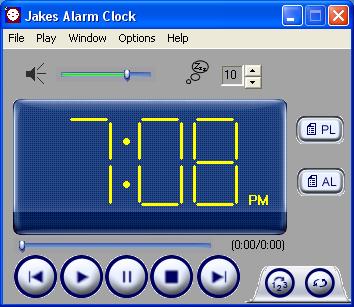
Jake's Alarm Clock is
a Windows compatible alarm clock that plays several
file formats (.mp3, .wav, .wma). It is a fully functinal
media alarm clock and can also be used as the primary
media player for your system. Version 1.9 now gives the user the ability to disable the Snooze dialog box from appearing when an alarm goes off. To do this, the user just has to set his/her alarm to 0 minutes in the main window.
|
|
|
New Features to Version
1.9
Added the ability to disable the Snooze dialog box from appearing when an alarm goes off.
|
|
New Features to Version
1.8
Fixed a major bug in which Jakes Alarm Clock crashed if the path of a song was too long
Added Help.
|
|
New Features to Version
1.7
Added Complex Alarms
|
|
New Features to Version
1.6
Added Weekdays and Weekends to the different types of alarms in the alarmlist
Changed the system tray tooltips
Sticky windows is now an option (enabled after install)
Ability to drag and drop a .m3u playlist
Added the ability to pause the current song
Added the ability to Edit the names of the songs in the playlist (via button or right clicking the playlist entry)
Added the ability to Edit an alarm (via button or right clicking the alarmlist entry)
Fixed the ability to play cd's and several bugs associated with getting cd track information
Now displays the current position and length of the song
Added a scroll bar that displays the current song progress
The user now has the ability to seek (i.e. fast forward/ rewind to a particular time of a song) by draging this scroll bar
New style scroll bars that have tooltips to display the position of the ticmark.
|
|