 CIMOT
– SQL v.1_0
CIMOT
– SQL v.1_0
TUTORIAL
1. INTRODUCING CIMOT-SQL v.1_0
CIMOT-SQL v.1_0 is totally free to use MySQL GUI client program developed using JAVA. It is very easy to use as long as users already know the basic fundamentals of MySQL syntax.
CIMOT-SQL v.1_0 help beginner MySQL users to learn MySQL basic syntax and help to limit typing error in MySQL syntax. For instance if users would like MySQL console client to create a tables holding many fields, let say 10 fields the basic syntax will be just like below;
mysql>create table blablah (one,two,three,four,five,six,seven,eight,nine,ten) values(one varchar(10) not null primary key,two smallint default 0,three mediumint(10),four int(10),five bigint(10),six varchar(10),seven char(10),eight varchar(10),nine nchar(10),ten TIMESTAMP);
Just wonder if we had a typing error in above syntax..than we need to retype the syntax all over again, then after several times in failure, finally we gave up and decide to input the fields in the table one by one just to make sure no typing error occure. Though in CIMOT-SQL v.1_0 we still need to input any syntax in the fields manually but it offers limitation of error in using MySQL keywords, because users no longer need to type available MySQL keywords, it is already done by CIMOT-SQL v.1_0. Below is the syntax that we only need to type if using CIMOT-SQL v.1_0;
create table blablah (one,two,three,four,five,six,seven,eight,nine,ten) values(one varchar(10) not null primary key,two smallint default 0,three mediumint(10),four int(10),five bigint(10),six varchar(10),seven char(10),eight varchar(10),nine nchar(10),ten TIMESTAMP);
The blue syntax is what users only need to type, and the green syntax is what CIMOT-SQL v.1_0 already provide for users, so users is no longer worried in miss typing the MySQL keywords.
CIMOT-SQL v.1_0 also provide result information after syntax had been processed, an internal window will appear slightly after syntax had been successfully processed, or popup window will appear if there is error in processing the syntax.
One other thing is there is also syntax monitor in the program which provide information of the complete syntax that users input and processed, so for beginner MySQL users can learn what is the original syntax that had been input & processed.
CIMOT-SQL v.1_0 is developed in JAVA to use it as an Applet or Stand Alone Application you need to install Java(TM) 2 Runtime Environment in your computer machine. What ever your machine operating system is Java(TM) 2 Runtime Environment make any Java program can be run in your computer machine. If you haven’t install Java(TM) 2 Runtime Environment, download it from;
http://java.sun.com/products/archive/j2se/5.0_03/index.html
After downloading Java(TM) 2 Runtime Environment, install it to your computer machine.
If you choose to use CIMOT-SQL v.1_0 in an Applet, you need to make Java(TM) 2 Runtime Environment enabled in your internet browser, and it is done. Connect your computer to the internet and open this link ;
http://www.jacimot.goldenstudios.or.id/
the link above will bring you directly to CIMOT-SQL v.1_0 Applet. You can start using the Applet after it successfully finished started.
To install CIMOT-SQL v.1_0 as stand
alone application program simply download the program from below link:

This work is licensed under a Creative
Commons Attribution-NonCommercial-NoDerivs 2.5 License.
Choose the archive file between cimot_sql_v_1_0.zip
or cimot_sql_v_1_0.rar, extract the cimot_sql_v_1_0.zip or cimot_sql_v_1_0.rar
to your preferred installation folder, and to start to use it just simply
double click SCIMOT_SQLv_1_0.jar . Do not replace, move or delete mysql-connector-java-3.2.0-alpha-bin.jar
from your installation folder, it is the Java connector driver which is
needed to connect to MysQL server.
The display of CIMOT-SQL v.1_0 is not fancy enough if you looking for well designed good looking GUI application program, as version1.0 is the first release , it is focused in it functionality it self as lightweight GUI application program that can be run anywhere through vary Operating Systems & machine specifications.
Below is the list of process what CIMOT-SQL v.1_0 can do:
1. Can connect to MySQL server anywhere
2. Create new users
3. Give privileges to new users
4. Change host to users
5. Change users name
6. Change users password
7. Change access privileges to users
8. Create new databases
9. Show databases
10. Use databases
11. Delete databases
12. Create databases
13. Show tables
14. Describe tables
15. Change fields name in tables
16. Change fields type in tables
17. Add fields in tables
18. Delete fields in tables
19. Change tables name
20. Delete tables from databases
21. Add fields values in tables
22. Show field values in tables
23. Update fields value in tables
24. Delete fields value in tables
25. Process users
preferred syntax based on executeUpdate and executeQuery method in processing String Statement (for
advance MySQL users)
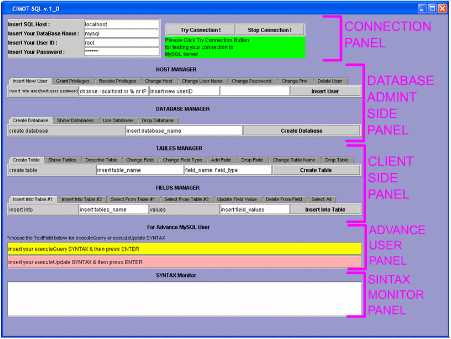
CIMOT-SQL v.1_0
GUI separated into 4 functional different panel, there
are:
CONNECTION PANEL
DATABASE
ADMINISTRATION PANEL / DATABASE SERVER SIDE PANEL
CLIENT SIDE PANEL
ADVANCE USER PANEL
SINTAX MONITOR PANEL
CONNECTION PANEL
In this panel there
are 2 small panel
1.
Connection
Information Panel: 4 text field to input SQL Host Name, DataBase
Name, User ID, & Password
2.
Connection
Tester Buttons Panel :2 button & a info text area
Connection Information Panel
In this panel all information needed
to establish a connection to MySQL server will be
provided by users, the information such as SQL Host Name, DataBase
Name, User ID, & Password must be correctly inserted or connection &
communication error will occure.
Connection Tester Buttons Panel
This panel only for testing users
connection to MySQL server anywhere, based on users
information provided in connection information panel, Instead of users directly
use query panels( database server side panel, client
side panel, & advance user panel ), it is recommended that users to test a
connection using connection button, to test if connection to the SQL Host given
in connection information panel successful or not. There for users not confuse
in the first time why the query given can not be processed if they using query
panels.
If the connection already tested and
successful a pop up window will appear, telling users that connection successful to SQL
Host given in connection information panel. There for there will be no problem
in processing queries in the query panels. And next time users don’t have to do
this connection tester again if the SQL Host connection has been tested, users
can go directly to query panels under this panel.
DATABASE ADMINISTRATION PANEL / DATABASE SERVER SIDE PANEL
This panel will be used for users that
claim him/her self to be database server administrator, there for this panel
query may only used by them, a database
server administrator are any users that have an access to mysql
database, don’t get confuse with “mysql database”
words.. mysql database is really a database in MySQL program, as a mysql
database also have tables in it, and inside the tables stored many important
data values(host names, users id’s, passwords, access privileges & ect).
In this panel there are 8 tabbed panes,
each one of them represent one query syntax sentences. And in each tabbed pane
there are fields that are editable, and not editable, the one that’s not
editable is MySQL keyword for a query.
Insert User Tabbed Pane in Host Manager
Panel



not editable field(s) editable field(s) trigger button
(MySQL syntax) (values of each object query)
For example the original MySQL syntax to create new user is:
mysql>insert
into user(host,user,password) values ( ‘ localhost ’,’ myself ’,password(‘ 1234 ’)
);
mysql>flush privileges;
Those bold
words are the values for editable fields in above tabbed pane, and will be
input manually by users. For the rest words will provided by CIMOT-SQL
v.1_0. CIMOT-SQL v.1_0 will combines
these words to become a syntax sentences. After the trigger button clicked.. CIMOT-SQL v.1_0 will process the syntax as a query
through a connection using connection information in connection information
panel.
CLIENT SIDE PANEL
This panel has the same function with
server side panel, the different is this panel can be
use by client users & database server users. For simple illustration,
imagine you are a database administrator in small size supermarket, the cashier
works in the supermarket is your client users, you may give them an access to
update stock of the item (decrease the stock item value) purchased by
supermarket customers automatically using cashier program used by the cashiers,
and let say every week the purchasing staff is updating the stock of the
item(adding the stock item value), then the purchasing staff also a client
users, let say again one of the cashier is very lazy, then the supermarket
manager must fired this person, your job as a database administrator is to
delete the user ID and Password of this
person from the database, so this user ID can’t connect to supermarket database
using cashier program again, in this case you are server users.
Know imagine if CIMOT-SQL v.1_0 is the
program that each users use for doing their activity of jobs in the
supermarket, then the cashier only using the Fields Manager in Client Side
Panel, because the cashier only can updating(decreasing)
the fields value of the item sold, the purchasing staff is using Tables Manager
to updating new item can be sold in the supermarket, and also using the Fields
Manager to adding the item stock also updating the new item stock value.
Cashier & purchasing staff both doing their activity inside the supermarket
database through fields and tables, and they are not allowed to do other task,
because the database server only give the update privileges access to the
cashier to decrease the stock item, the database server also only give update
& select privileges to the purchasing staff to see available stock left and to
add new items or add items values. The database server activity in giving type
of access privileges & deleting the fired cashier User ID & Password is
done via Host Manager in the server side panel. As a database server
administrator that work in server side you also can use Client Side Panel which
mean you can also updating stock item just like the
cashier and the purchasing staff does.
Let se every process from the
illustration above:
Activity database
server query client
query
 Cashier decreasing stock ->

Purchasing staff adding stock ->
Database administrator
deleting fired chashier
->
User ID & Password if necessary
The illustration
above simply explaining the different task activity between client users and
database server users.
ADVANCE USER PANEL
This panel consist of 2 editable text
field, and used for advance MySQL user in inserting
query, the use of the text field is the same use in MySQL
client console, the syntax must be a complete MySQL
syntax ( MySQL keywords + all the values data).
And to process the query user only to
press ENTER key after finishing the syntax.
SINTAX MONITOR PANEL
This panel only have
1 text area and it is not editable, all complete syntax that successfully processed
will appear in this text area, it is helpful for beginner MySQL
users, so the syntax can be review and beginner users can learn from it. It
function is also as a memory of what tasks already done by users, so users can
review it as well.
Above list is all CIMOT-SQL v.1_0
can do for mean time, for future version release printing feature will be
added, and some other program limitation will be minimized, so users can be
more enjoy using CIMOT-SQL v.1_0.