This tutorial intends to help
you learn the basic techniques employed in the creation of the 3D animation: The
Hunter - Iria the Computer Animation, which was created on a bedroom PC.
In
part 1 we discussed Preparation
In part
2 we will be covering visual planning.
Tutorial
Part 2:
Storyboard
Last
time we looked at how to prepare to do an animation. We covered important aspects
such as deciding what the objectives are, and how to get those objectives down
on to paper.
Once you have your screenplay
(which is what your narrative is - regardless of how rough), you can set about
creating a storyboard.
For The Hunter I
did not create a screenplay, but instead discussed the story and then went straight
to storyboard. This is not good practice.
To
create your storyboard, try to draw each part of each scene that requires a new
image to move the story along.
If you have
a line like this:
Lara looks around as the
security door slams shut and her sidekick gets crushed by it.
You
should concentrate on the important aspects like the door crushing the side kick.
This is because you need to get a feel for the flow of the animation. It would
not be important to draw a separate picture of Lara looking around, unless you
wanted to emphasize this action.
Drawing
a storyboard will help you to visualize how the shots will come together and how
the animation will be edited, well before you have even begun to model.
You will be able also to change the
story at this point so it fits in with what you visualize. I am a
firm believer that what you write cannot convey what you visualize
and so when it comes to converting words into pictures, the pictures
evolve into almost something entirely different.
If for example,
you have written a gun fight, aiming to have a the camera pan down from above,
it may not be so easy to draw what you mean, so you could end up drawing the gunfight
from another angle... thus removing the pan.
This may happen many times when you
are drawing your story board, just as the integrity of your storyboard
may be altered when you start to animate.
To
illustrate this, take a look at some of the storyboards for The Hunter.
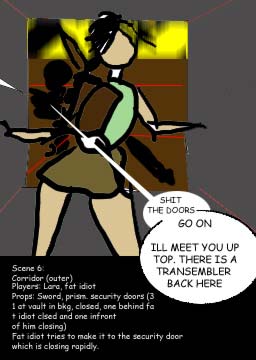
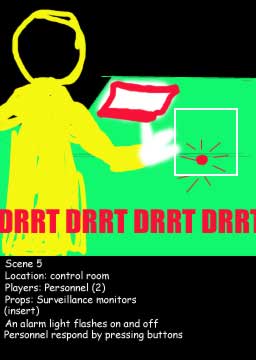
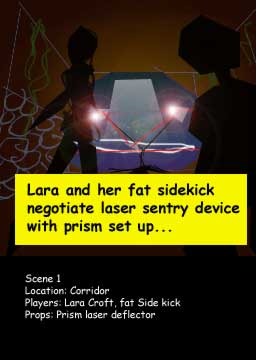
As
you can see, they are very basic and include descriptions of who are in the scenes,
where the scenes take place, what is in the scene and what happens.
These are all important to record,
as it will help you save time when you are building props, environments
and characters.
Next:
Tutorial Part III: Environments
Download
The Hunter (MPEG-4 or MPEG-1) here.
Iria
(c) 2001 BANDAI VISUAL et al
*Miss
Croft is based
on Eidos Interactive's Tomb Raider series