Iuri Wickert
e-mail: i;w;i;c;k;e;r;t@y;a;h;o;o.c;o;m
Programa de Engenharia de Sistemas e Computação, COPPE/UFRJ
Caixa Postal 68511
21945-970 Rio de Janeiro, RJ, Brazil
tel: +55 21 590-2552, fax: +55 21 290-6626
URL: http://www.geocities.com/iwickert
Index
1. Abstract
2. The WISARD net
3. The program
4. Conclusions and acknowledgements
The purpose of PyWISARD is to provide a portable, lightweight, user-friendly implementation of the WISARD weightless neural network, adapted to use binary images as inputs. The user can examine the inner workings of the WISARD net and the graphical interface source code and adapt it to suit her needs, or use it just to learn about weightless neural networks. The main features of this program are:
The WISARD is a popular weightless neural network model. It was developed during the 70s by Aleksander and Stonham (see survey). As more classical neural networks models like backpropagation, it is as a general pattern recognition machine, but using a somewhat different way of representing its acquired internal "knowledge". The weightless neural networks uses explicit storage elements to keep its state, rather than in its inter-element connections, as more conventional networks do.
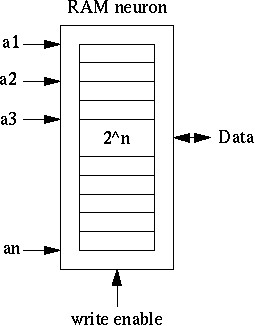
The basic element of a WISARD neural net is the neuron,
or node, which is a simple RAM memory that stores the occurrence of the
patterns ("tuples") it has been presented with. It could be seen that the
RAM neuron is limited to learn binary patterns (which is the memory's address word), its output is also binary, and it does not exhibit generalization:
it cannot accept a tuple which is different from the ones it had learned in
the past. Some advantages the RAM neuron have over conventional neurons are the
"one-shot" training, that is, the ability to learn from a sample on a
single pass, and the persistence of the neuron training, which means that
the training with new samples doesn't break the "knowledge" already stored in it.
One way to overcome the RAM neuron main limitation,
which is the lack of generalization power, is to group RAM neurons in a
tree-like strucuture called Discriminator. The Discriminator achieves its
goal by presenting to each neuron only a (randomly extracted) subset of
the input pattern, and adding up the outputs of its neurons. This sum
can be seen as measure of the recognition confidence of the discriminator.
Therefore, when the discriminator sees a previously learned pattern, its
integer output reach the discriminator's maximum, that is, all its neurons
recognised successfully its input tuples, and when the input pattern is a corrupted
version of a pattern known, some neurons will signalize the recognition
of their tuples, and some not, resulting on a lower level of confidence.
The generalization power is a function of the tuple size: bigger tuples
means that less neurons are nedded to make a discriminator, leading to more
susceptibility to subpattern misrecognition; in opposition, smaller tuples
demands more neurons per discriminator, resulting on a smaller misrecognition
impact in the discriminator output.
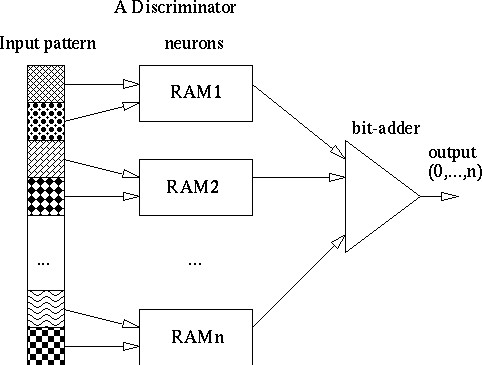
A WISARD neural network consist of a set of discriminators,
each representing a class to be learned/recognised. The winner class for
a given input pattern can be determined using some criteria such as the
greatest sum, a thresholding of the greatest sum, difference between sums,
etc.

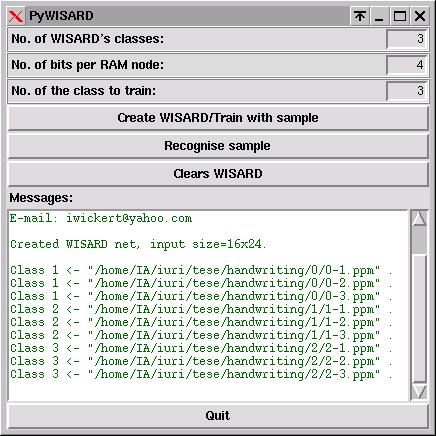
To execute PyWISARD, you must first install a Python interpreter suitable for your platform, available on the Python Language Website, either version 1.5.2 or 2.0. You must choose to install also the respective Tkinter and/or Tcl/Tk libraries, which comes bundled with the Python package, or PyWISARD will not work. After having Python installed, to start PyWISARD, either double-click the "PyWISARD3.pyw" file on a file manager (usually on Windows and Mac, or on a Unix Python-enabled one) or execute the same file on a xterm (Unix), optionally with the image search path as argument. The user interface looks like this:

To train a WISARD, you must first determine the number of classes you want to classify your images into, and the RAM neuron's tuple size. In order to WISARD to use all the pixels on the input image, the whole image size (h x d) must be exactly divisible by the tuple size. The training is done on presenting each class' discriminator to the desired input images: press the "Create WISARD/Train with sample" button and update the "class to train" field to indicate the chosen training class. Observe that all the training images (and the sample ones) must all have the same size. An example of training with scanned digit images looks like:
A minimum training consists of a single training step with a single input image; the WISARD is then already able to recognise sample images. By clicking on the "Recognise sample" button, the user can select a sample image to present to the WISARD; the program then does issue a small report of the WISARD's output per class. Compare the training image directories above with the three recognitions done below (for "0", "1" and "2" digit images, respectively):

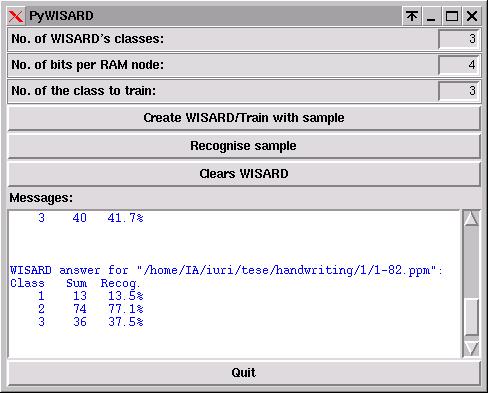
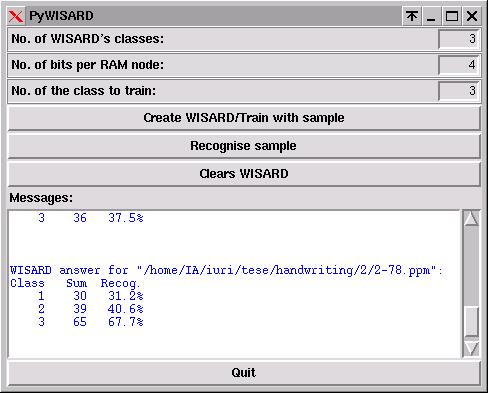
The report shows the number of RAM neurons activated per class (Sum) and the percentual of recognition (Recog.). It's up to the user to analise and verify the WISARD output for the training quality and level of generalization/noise immunity; the program does not attempt to apply any criteria to point a winner class.
To create another WISARD net, using different net parameters
or image size, simply press the "Clears WISARD" button to clear the existing net.
4. Conclusions and acknowledgements
PyWISARD, although not an industrial pattern recognition system, can illustrate the basic properties of the WISARD model and helps to address questions about pattern recognition using weightless neural networks. It can be used also to directly simulate small image-based applications, to evaluate if a WISARD approach is suitable to the problem.
This work was developed under the supervision of
Prof. Felipe França, with financial support from CNPq.