IVWireless.net
Mission Statement
To create a wireless community in Isla Vista using the 802.11b wireless
standard.
What hardware is Required to connect
To connect to the network all that is needed is a 802.11b wireless card.
Don't have one? get one
here.
How to connect to the network
To connect to the network, please do the following:
- The network name to use is "IV" (without the quotes, and
all upper-case).
- Note: Do not use any other name besides "IV"; if you do, you
may get someone else's wireless access point (with poorer reception), or no
access at all.
- The type of network is "802.11 Adhoc"
- You may also need to select an option of the form "peer-to-peer
group", "allow IBSS", "802.11 Adhoc", or "Ad Hoc" (not
"Ad-Hoc Demo"). (The base station is actually running in IBSS mode, rather
than true BSS mode.) Note that "Ad-Hoc Demo" mode will not work,
and should not be used.
(If you're using an Apple Powerbook with an "AirPort" card, you should set
your card to use "Computer-to-Computer" mode - which is apparently the same
thing.)
- Turn off WEP encryption.
- In your network TCP/IP 'control panel', you should not enter an
IP address. Instead, you should check the "Obtain an IP address from a DHCP
server" button. Nor do you need to enter a DNS server. (The base station
should have DHCP and DNS servers.)
- If you're using an "Intel PRO/Wireless" LAN card, you should check
the "Send long preamble headers" checkbox. (This box is unchecked by default.)
- you may need to run winipcfg in order to release an older IP number.
note: if you cannot connect to the wireless network you are probability too
far from the nearest access point and will need to host.
What hardware is Required to Host
To host to the network all that is needed is some sort of router, this can either be a PC or a dedicated box,
and 802.11b card and a Cable, DSL, or some sort of connection.
- note: If you are close enough to another wireless network (access point) you
can share that connection.
With a PC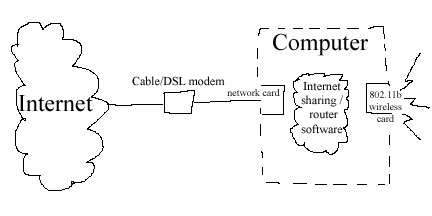
-
802.11b wireless card
- Computer
- Ethernet card.
- Cable or DSL
Without a PC
- 802.11b wireless gateway. you can get one
here.
- Cable or DSL
How to Host on the network
To host a 802.11b wireless gateway, please note
the following:
- The network name to use is "IV" (without the quotes, and
all upper-case).
- No WEP encryption will be used as this is a community network.
- The type of network is "802.11 Adhoc"
- If you are using the wireless gateway or similar device enable DHCP.
- If you are using windows ME or windows 2000 you can use the built in
internet sharing to support a limited amount of users.
- in windows 2000 under Network and Dial-up Connections right-click on
Local Area Connection and goto the Sharing Tab then check Enable Internet
Connection Sharing for this connection
- in windows 98/me you will need to goto the windows CD and find the
Internet Sharing Setup and run it. Then like windows 2000 enable sharing.
- under linux you can set it up like
this.
Optimize your range
- Higher is better, if you are on a two story try putting it there.
- Better yet,
build an antenna and put it on the roof.
- Walls are bad, try to get near a window. Don't place your modem in the
middle of your house.
For information about 802.11b visit these links
802.11b Networking News
802.11 Planet
Other Free Networks
Guerrilla.net
Personal Telco
SF LAN
Seattle Wireless
NYC Wireless
NoCatNet
Other
Wireless Communities
After you setup a Host or Need Help
Please Email: [email protected]
Let me know about your interest, progress, or questions.