UCI (UniCall Interface)
UCI is a C-language API. It lets developers write UNIX and Windows client
programs that use SQL statements to access and manipulate data in UniVerse
and UniData databases.
UniData ODBC accesses UniData data sources through entries in the UCI
configuration file (uci.config) on the client machine. This file contains
connection parameters needed to route requests to the UCI server. When
ODBC attempts to connect to a data source, UniData ODBC reads the UCI
configuration file to determine the host system, DBMS type, server name,
and other optional information.
The following example illustrates the default configuration file shipped with UniData:
[ODBC DATA SOURCES]
DBMSTYPE = UNIVERSE
NETWORK = TCP/IP
SERVICE = uvserver
HOST = localhost
DBMSTYPE = UNIDATA
NETWORK = TCP/IP
SERVICE = udserver
HOST = localhost
In the uci.config file on the client machine, you must define the UCI data
sources to which you want UniData ODBC to connect. You can define the
UCI data sources in either of the following ways:
> Use any text editor to modify the file.
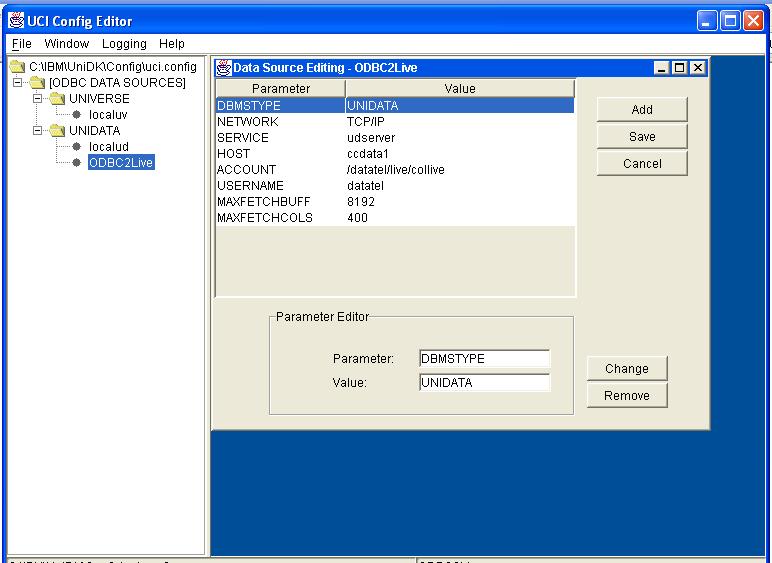
> Use the UCI Config Editor to manage data sources. For information
about defining data sources with the UCI Config Editor, and for
information about parameters in the UCI configuration file, see
Administrative Supplement for Common APIs.
* UniData Documentation: ODBC.pdf
 * UniData Documentation: ODBC.pdf

