


 |
Painting animated cartoon tutorial
|
|
by David Rivera | Xsi animator | www.geocities.com/imagindreams2003 | www.imagindreams.com
|

|
11. After Effects Invoque After Effects (I always wanted to say that! :), Double click into the project manager window, import the "FILE.TGA" you just made in PS. Click the icon marked in red to start a new composition. Make sure you select DV1 720x480 + 24 Fps. and of course check the correct time duration for the desired scene to animate (that´s why LAYOUTS are so important, so you´ll know how much time you got between scenes!!) |
Create a new project, import a bk file
and the FILE.TGA you created in PS. 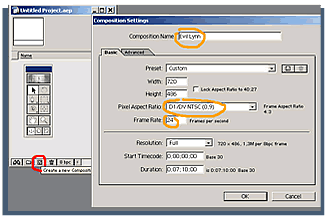 |
|||
| 12. Compose Your TGA file has an alpha channel. It makes it transparent, bring another layer for BK (some other pic, with any format) Drag and drop the BKinto the timeline and adjust it´s size by selecting it, hit "S" (shortcut for Scale) or simply drag handlers with the arrow tool. My bk is already the compo size (720x480). Drag and drop YOPURFILE.TGA so that it is the up most in the timeline |
 |
|||
| 13. Play w/color If you name a TGA file in sequence (A001, A002, A003..) AE will ask you if you want to import it as a sequence and If you´d import it´s alpha channel. One color change to this footage will afect all the sequence ;) Right Click on the layer of your TGA in the timeline, EFFECTS> ADJUST > Hue and saturation. Select channels to taste and keep an eye on evident color lines. |
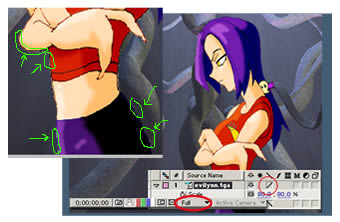
Strange artifacts! No problem; your image is big enough to scale it, do so and all you´ll see it´s beauty. Mark full quality and in the timeline check the quality chekbox for YOURFILE.TGA
|
|||
 Listen along to Tatu - Ya Soshla s Uma -dance mix wile reading this tutorial. You´ll get pretty motivated. Listen along to Tatu - Ya Soshla s Uma -dance mix wile reading this tutorial. You´ll get pretty motivated.Evil Lynn is (C)1996-2003 David Rivera. ImaginDreams is (TM)&(C)1996-2003 David Rivera
|
||||