
Paint Shop Pro Advanced
Week Two - Part 2
Using Blending Modes With Flood Fills
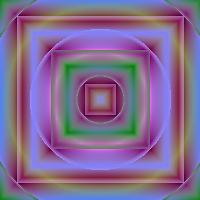
I started with Summer Field gradient, a repeat of 2, center at 50, 50, Paper Texture - None, Match Mode - None.
Fill Style - Rectangular Gradient, Mode - Normal. Left click once.
Change fill style to Sunburst and mode to Multiply. Right click once.
Change fill style to Rectangular and mode to Exclusion. Right click once.

I started with Sunset gradient, a repeat of 0, center at 50, 50, Paper Texture - None, Match Mode - None.
Fill Style - Radial Gradient, Mode - Normal. Left click once.
Change fill style to Sunburst and mode to Soft Light. Left click once.

I started with Sunset Gradient, a repeat of 0, and center at 25, 25. Paper Texture - None, Match Mode - None.
Fill Style - Sunburst Gradient, Mode - Normal. Left click once.
Change the center to 75, 75 and change the mode to Screen. Left click once.
Change the center to 50, 50. Fill Style - Rectangular, Mode - Soft Light. Left click once.

I started with Pink Neon Gradient, a repeat of 0, and center at 50, 50. Paper Texture - None, Match Mode - None.
Fill Style - Rectangular Gradient, Mode - Normal. Left click once.
Change fill style to Sunburst Gradient, Mode to Lighten. Left click once.
Change gradient colors to Electric Stripe, fill style to Rectangular Gradient, Mode to Hue. Left click once.