1. Activate the desired transport button by pressing it once.
2. Hit the "Advanced" button.
3. On the keyboard, press the "Ctrl Assign" key (low "C").
4. Using the numbered keys (or keypad if you have a 49 or 61),
type in "146" --this puts the button into "MIDI CC (on/off)" mode--and then hit "Enter".
5. Hit "Advanced" again and press the "Data 1" key.
6. Type in the CC# number that corresponds to the desired Cubase transport function, listed below:
LOOP (18)
REWIND (19)
FORWARD (20)
STOP (21)
PLAY (22)
RECORD (23)
Hit enter when finished.
Data 2 (minimum value) should be 0 and Data 3 (maximum) should be 127, already.
Don't forget to store your settings.
1. Goto Devices > Device Setup...
2. Click the Add/Remove Tab.
3. Under Device Classes, click on Generic Remote, then click the Add button.
4. Now under Devices on the left column, click on Generic Remote.
5. Delete all the rows in the top box using the Delete button on the right,
now add 6 new blank rows using the Add button on the right.
6. Set up the new blank rows as shown in the picture below to match the settings on your Axiom 25.
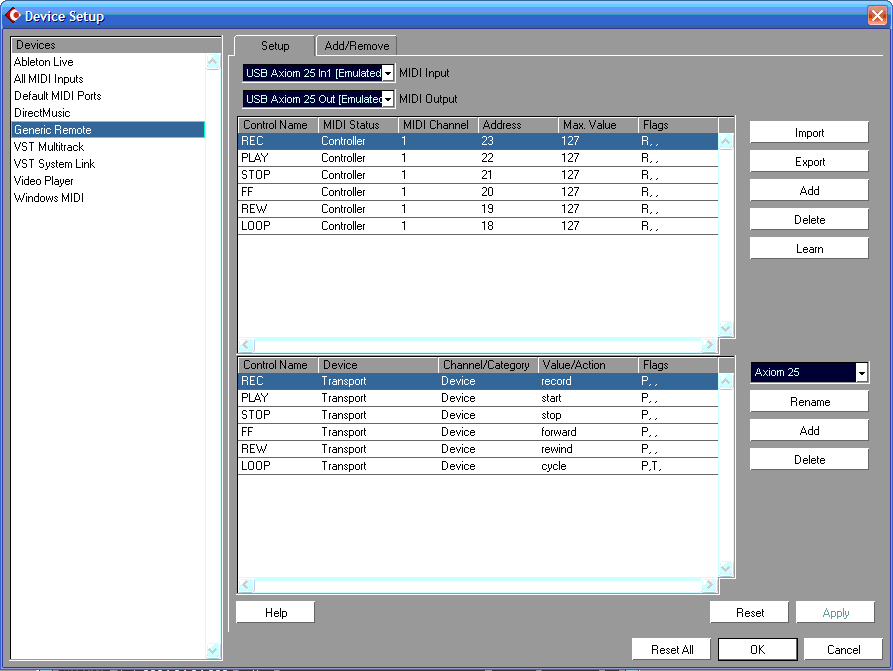
Click Apply, then click Ok.
Now the transport controls on your Axiom 25 should work.