I was inspired to write this DIY(do it yourself) after guy known by name VicR
asked me to tell how i did all that dumping stuff.
Although all that was rather long ago, i will try to reproduce steps and finally
get those classes.
First of all here is the list of tools which i will use and refer to along this
trail.
- JDK & documentation
- Hex editor - i'm personally used to Hiew
- PE viewer/editor(optional) - PE
Tools
- disassambler(optional) - IDA Pro
- debugger(optional) - SoftIce with some memory dump addon
IL2FB.EXE & RTS.DLL
If your copy of IL2 is protected by StarForce(my case) - you won't manage to
see that il2fb.exe is nothing else than just a java starter. In %JAVA_HOME%/src.zip(launcher\java.c)
is source of java.exe, which illustrates how to start JVM. In case of il2fb.exe
it's much simpler. After disassambling we see that 4 classes LDR,
LDRCallBack, RTS, SFSInputStream are loaded with help of RTS_preLoad
imported from rts.dll. Also pay attantion to wierd calls along il2fb looking
like
call dword ptr [ecx+hhhh]
it's just call to env->XXXX, dividing hhhh by 4 we get index
of method inside JNINativeInterface structure.
It's time to exemine rts.dll (RTS_preLoad). It calls internally SFS_open &
SFS_close to retrieve bytecode of asked class. After that goes call
dword ptr [eax+14h] (which means DefineClass)
with such parameters as name, byte array and size we need to utilize to successfully
restore classes. At this point you may use disassambler to dump 4 classes responsible
to load all the rest of il2.
| Here you can get LDR, LDRCallBack,
RTS, SFSInputStream already retrieved. |
After quick glance at LDR we see class1 =
ldr.load(s); which is defined in RTS as protected
final native Class load(String s);.
That's it - native method returning already resolved class. The only legitime
method to define class natively - call of env->DefineClass.
So we will place our custom code somewhere around DefineClass which is in the
jvm.dll.
JVM.DLL
| Here are sources of small tool to probe JVM(find
DefineClass) and dumper itself(VC++) |
Don't forget to make backup copies of file(s)
to be changed
First of all we need to determine position of DefineClass
inside the jvm.dll.There are several methods to achieve this. You may disassamble
jvm.dll and find the place of interest.
Or you may allow JNI to determine it for you. Also you'll need dumper function
to save bytearray when we intercept DefineClass call.
I chose to use it as dll exported functoin. Lets consider that DefineClass
is positioned at 219ae ;) inside jvm.dll. We have
to extend import section with info about our dumper. PE
Tools allows to do it almost automatically. When we have our import
added it's time to do some hex editing. First thing to do is to find some free
space inside jvm.dll to add our custom code. Good place to look is end of code
section.
Open jvm.dll with hex editor (from here all actions are applied to Hiew. Capable
hex editor may have similar features).
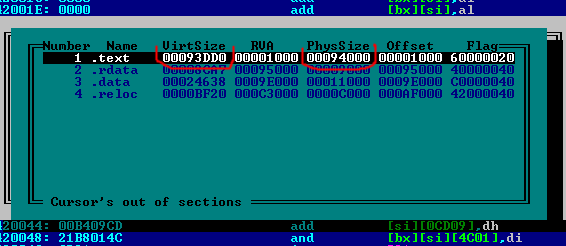 We
see that code section has 560 bytes of unused space (94000
- 93dd0). Good place to add some nop
- s from ;) Don't forget about ofset(1000)
during RVA calculations.
We
see that code section has 560 bytes of unused space (94000
- 93dd0). Good place to add some nop
- s from ;) Don't forget about ofset(1000)
during RVA calculations.
P.S. Ready to use patched JVM.dll & dumper
[email protected]