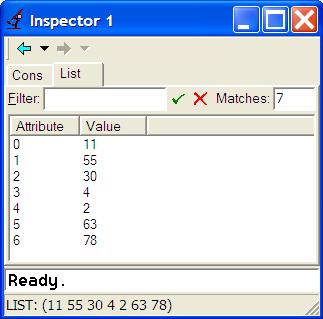
> (setf m '(11 55 30 4 2 63 78))When you activate the inspector on this value (by pressing one button), you see the following window:
You can also switch to a view that considers this object as a cons cell, where you see its CAR and CDR parts:
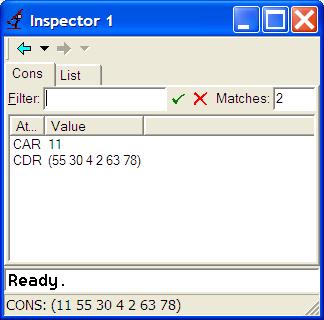
Note that you still see at the bottom of the window a simple representation of the list. To inspect the tail (CDR) of the list, you just double-click on the CDR row, and the inspector will show this list in the same way. Thus you can traverse all data structures by simple double-clicking.
In brutal contrast, let's see how this extremely simple example is already hopelessly beyond reasonable treatment in C++. First, as already explained above, the minimal code to exemplify this case cannot be just one line long, as in Lisp, because you need to write a full program, compile it, link it, and run it. The necessary minimum is nothing less than:
// file: main.cpp
#include <list>
#include <iostream>
using namespace std;
void main()
{
    int k[7]={11,55,30,4,2,63,78};
    list<int> m;
    int i;
    for (i=0; i<7; i++)
        m.push_back(k[i]);
// put here a breakpoint
}
We cannot even get away with initializing m using list<int> m={11,55,30,4,2,63,78}; --
this produces the (partly unintelligible) error message:
error C2552: 'm' : non-aggregates cannot be initialized with initializer list
        'std::list<_Ty>' : Types with a base are not aggregate
        with
        [
            _Ty=int
        ]
Similarly, we cannot initialize m=k;
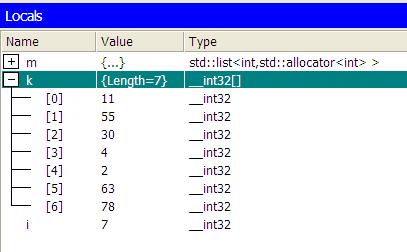
But we are not so lucky with m. First of all, we need to do a lot of clicking on the "+" boxes in order to expand all of m. We can't see all the content at once. Now look at what we get when we do all the expansions:
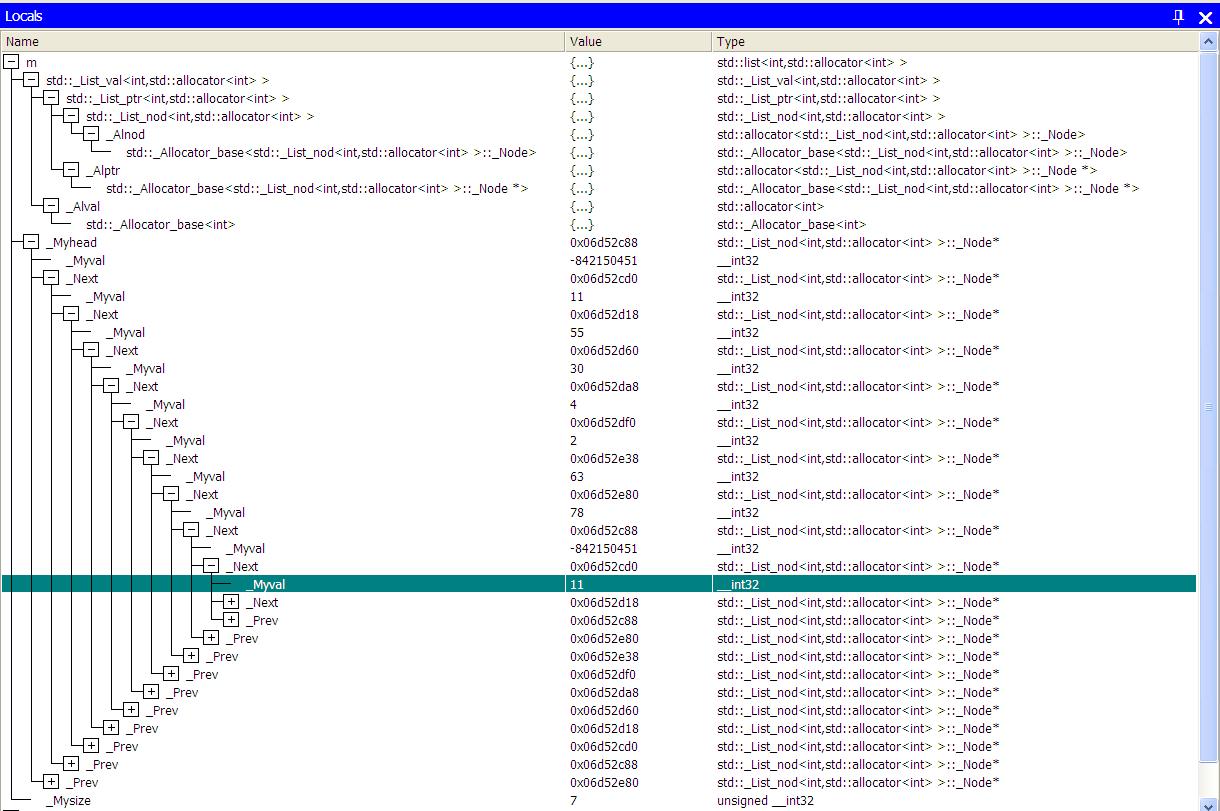
On the top, we see nine lines with all kinds of irrelevant information and misterious names like _Alptr and std::_Allocator_base. Suppose we manage not to be confused, and follow only the _Myval and _Next nodes. Then we can see in the most rudimentary way the content of m. But note that the value of the first element, as well as of the "8th" element is a misterious -842150451. Presumably, there is a "dummy" node at the beginning of the list -- who knows? And, it seems that the list is circular: the "9th" node is the same as the first, and so on. Moreover, the content of this miserably simple list, just 7 elements, barely fits the screen.
What is the consequence of this atrocity? Programmers want to see what they have in their hands, i.e. the content of data structures at run time. So in C++ they are forced to start writing all kinds of "debug printing lines". Note that a simple
cout << m;will not work, and will produce the error message:
error C2679: binary '<<' : no operator found which takes a right-hand operand of type 'std::list<_Ty>' (or
there is no acceptable conversion)
        with
        [
            _Ty=int
        ]
So we are forced to write nothing less than:
list<<int>::iterator iter;
cout << "List: (";
for (iter=m.begin(); iter!=m.end(); iter++)
{
       cout << (*iter) << " ";
}
cout << ")\n";
This produces the following output:
List: (11 55 30 4 2 63 78 )Note the space before the right parenthesis. It is a non-trivial task to eliminate such spaces and make the lists look nice, something that Lisp does for us for free! Note that we used an iterator. There is no other way to systematically go over the list. All the fuss required to show just one simple list is enormous: consider just how much time it takes to write this code, then compile and run it, then fix all the typos involved (especially in the for-loop using the iterator -- read more about it in section ..).
(format t "~A" m)(The t says: print to the standard output.) This will print
(11 55 30 4 2 63 78)By the way, this will work for any variable m whatsoever! That's because all data structures in Lisp, including those defined by the programmer, have default printed forms. (More on that under ...)
Now, if debugging such a simple data structure is so painstaking, imagine what it would be like to debug even slightly more complex structures, not to mention structures from realistic applications. In fact, you don't have to imagine. We'll explore below a slightly more complex example: list of lists. But first:
    vector<int> m;
    m.resize(7);
    for (i=0; i<7; i++)
        m[i]=k[i];
    // put here a breakpoint
Now what do you think you will be able to see with the debugger? This is what you'll see:
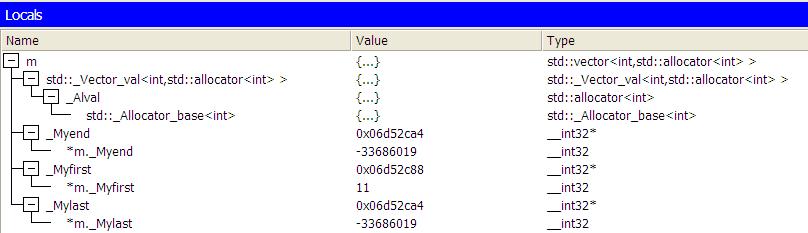
Terrible, isn't it? The visual C++ environment was gracious enough to allow you to see the first element, but that's it! No hope about the other elements, not even about the last element, as you might have hoped due to the misleading field _Mylast. That's what I mean when I say you cannot work with STL: you simply don't know what you have in your hands, unless you go to extreme measures of printing everyting, which is oh so time consuming, error prone, and such a total waste of your time and energy (and hence the company's money)! And Lisp? Oh, the answer is so obvious that it's already boring to say it:
> (setf m (vector 11 55 30 4 2 63 78))The inspector will show you a screen exactly the same as the case for the list, except for the type name. No fuss.
Back to Lisp is the Best!