EMPOWERMENT TECHNOLOGY
Quarter 1 – Module 1
ICT
in the Context of Global Communication


Source image: id.techinasia.com
 Prepared
by:
Prepared
by:
Department of
Education • Republic of the Philippines
Empowerment Technology for Senior High School
Alternative Delivery Mode
Quarter 1 – Module 1: ICT in the Context of Global Communication First
Edition, 2019
Republic
Act 8293, section 176 states that: No copyright shall subsist in any work
of the Government of the Philippines. However, prior approval of the government
agency or office wherein the work is created shall be necessary for
exploitation of such work for profit. Such agency or office may, among other
things, impose as a condition the payment of royalties.
Borrowed materials (i.e., songs,
stories, poems, pictures, photos, brand names, trademarks, etc.) included in
this book are owned by their respective copyright holders. Every effort has
been exerted to locate and seek permission to use these materials from their
respective copyright owners. The publisher and authors do not represent nor
claim ownership over them.
|
Development
Team of the Module
Writers: Sixie Rozz O. Penaso
Content Editor: Aprille Charisse N. Manla
Language Editor: Malyn P. Vidal
Proofreader: Juvy S. Iliwiliw
Illustrator:
Reu P. Casiño
Layout
Artist: Arthel E. Pangan
Development Team:
Chairperson:
Dr. Arturo B. Bayocot, CESO III
Regional Director
Co-Chairpersons:
Dr. Victor G. De Gracia Jr. CESO V
Assistant Regional Director
Jonathan
S. dela Peña, PhD, CESO V
Schools Division Superintendent
Rowena
H. Para-on, PhD
Assistant
Schools Division Superintendent
Mala
Epra B. Magnaong, Chief ES, CLMD
Members: Neil A. Improgo, PhD, EPS-LRMS; Bienvenido
U. Tagolimot, Jr., PhD, EPS-ADM; Erlinda
G. Dael, PhD, CID Chief; Maria Teresa M. Absin, EPS (English); Celieto B.
Magsayo, LRMS Manager; Loucile L. Paclar, Librarian
II; Kim Eric G. Lubguban, PDO
II
Regional
Evaluator: Renel Jay A. Quirit and Regie A. Cate
Gingoog City Division and Ozamiz City
Division
|
Published by the Department of Education – Region X – Northern Mindanao Printed in the Philippines by:
Department of Education –
Alternative Delivery Mode (DepEd-ADM)
Office Address: Masterson Avenue, Upper Balulang, Zone 1,
Cagayan de Oro City
Cagayan
de Oro – Lalawigan ng Misamis Oriental
Telefax: ____________________________________________________
E-mail Address: ____________________________________________________
 SENIOR
HIGH SCHOOL
SENIOR
HIGH SCHOOL
EMPOWERMENT
TECHNOLOGY
Quarter 1 – Module 1
ICT
in the Context of Global Communication
 This
instructional material is collaboratively developed and reviewed by educators
from public and private schools, colleges, and/or universities. We encourage
teachers and other education stakeholders to email their feedback, comments, and
recommendation to the Department of Education at [email protected]
This
instructional material is collaboratively developed and reviewed by educators
from public and private schools, colleges, and/or universities. We encourage
teachers and other education stakeholders to email their feedback, comments, and
recommendation to the Department of Education at [email protected]
We
value your feedback and recommendations.
i
Department of Education • Republic of the Philippines
i
TABLE
OF CONTENTS
Page
No.
Cover Page i
Table of Contents
ii
Introduction
1
Module
Content 1
Learning
Competencies 2
LESSON 1:
What is Information and Communications Technology? 3
What I Need
to Know 3
What I
Know: Pre-Test 3
What’s
In 5
What’s New:
Activity 1.1 Internet and Computer Readiness Test 5
What Is It 6
ICT in the
Philippines 6
The World
Wide Web 7
Features of
Web 2.0 8
What Is It:
Activity 1.2: Where do I belong? 8
What’s New:
Lesson 1.1: Online Platforms and Sites 9
What Can I
Do: Activity 1.3: Which Website Is It? 10
What I Have
Learned 11
Assessment 12
Answer Key
and References 14
LESSON 2:
Online Safety, Security and Netiquette 15
What I Need
to Know 15
What I
Know: Pre-Test 15
What’s In 17
What’s New:
Activity 2.1: Shared or Not Shared? That is the Question 18
What Is It 19
Online
Safety, Security and Netiquette 19
Netiquette 21
What Can I
Do: ACTIVITY 2.2: Can You Keep It Private? 22
What
Is It
23
Kinds
of Online Threats
What Can I
Do: Activity 2.3: Show Me How You Hashtag 27
What I Have
Learned 28
Assessment 28
Answer Key 30
References 31
LESSON 3:
Effective Internet Research 32
What I Need
To Know 32
What I
Know: Pre-Test 31
What’s In:
Activity 3.1: What’s In My Name 33
What’s
New
34
Searching
the Web
What Is It:
Activity 3.2: Can You Find Me? 37
What’s New:
Evaluating Sites 38
What Can I
Do: Activity 3.3: Evaluating Websites: Checklist 40
What I Have
Learned 43
Assessment 43
Answer Key
and References 44
ii

Hello dear learners! Welcome to this module on
Empowerment Technology. This module will help you explore the different
technologies and online platforms and how they can be used effectively. It
contains activities that will let you create your own ICT contents and evaluate
existing online creation tools, platforms, and applications. The module is self
– instructional and allows you to learn in your own space, at your own pace.
So, relax and enjoy learning.
Module Content
First Quarter Module 1: ICT in the Context
of Global Communication will give you an introduction into ICT and the
different online platforms that may be used for its specific purpose. It will
also tackle on online safety, security, and online etiquette. You will be able
to get tips on how to maximize the power of the Internet to assist you in your
research work through discussing research tools and evaluating relevant and
reliable websites.
Module
2: Productivity Tools will help you on using advanced knowledge in Word,
PowerPoint, and Excel applications. This module will also allow you to critic
on good qualities of web design.
To get the most of this module, here are some reminders
for you:
1. Take
your time in reading the lessons.
2. Write
down points for clarification and discuss this with your teacher.
3. Perform
all activities and answer all worksheets.
4. Answer
all tests in this module and check your answers to the answer key found on page
14.
5. Answer
all activities in a separate sheet of paper or in your notebook.
6. Have
fun while learning with this module. It will totally be of great use which ever
strand you may belong because ICT is for everybody.

After going through this module, you are expected to:
1. Compare
and contrast the nuances of varied online platforms, sites, and content to best
achieve specific class objectives or address situational challenges.
2. Evaluate
existing online creation tools, platforms and applications in developing ICT
content for specific professional tracks.
3. Apply
online safety, security, ethics, and etiquette standards and practice in the
use of ICTs as it would relate to their specific professional tracks.
4. Use
the Internet as a tool for credible research and information gathering to best
achieve specific class objectives or address situational.

LESSON
1: What is Information and Communications Technology?
Information and Communications Technology (ICT) often deals
with the use of different technologies such as mobile phones, telephones,
computer, Internet, and other devices, as well as software and applications to
locate, save, send, and manipulate information. Empowering ICT is important for
its innovative uses impacts our daily lives. It has affected our ways of
communicating, made our lives more convenient, and assisted countries towards
their modernization plans.
 Thus,
there is a need to create a foundation of understanding in the world of ICT.
Thus,
there is a need to create a foundation of understanding in the world of ICT.
What are my goals?
By the end of this lesson, you are expected to:
1. Identify
varied online platforms and sites.
2. Compare
and contrast the nuances of varied online platforms, sites, and content to best
achieve specific class objectives or address situational challenges.
3.  Evaluate
existing online creation tools, platforms and applications in developing ICT
content.
Evaluate
existing online creation tools, platforms and applications in developing ICT
content.
You must be excited to flip over
the pages and begin with the lessons.
But first, please answer the pre-test to measure what
topics have you known so far.
Direction:
Read each item carefully and choose the letter of the correct answer.
Write your answers on a separate sheet of paper or in
your notebook.
1. What
type of web page is classified as flat or stationary?
A. Web
1.0 B. Web 2.0 C.
Web 3.0 D.
Web 4.0
2. What
web 2.0 feature allows users to subscribe to a data plan that charges for the
amount of time spent on the internet?
A. Folksonomy B. Long Tail C. User Participation D.
Application
3. What
is the name of the symbol that is used to classify and categorize information?
A. Hashtag
B.
Question Mark C. Asterisk D. At sign
4. What
specific type of social media allows you to connect with other people?
A. Microblogging
C. Media Sharing
B. Social
Networks D. Social News
5. Twitter
is an example of what specific type of social media?
A. Microblogging
C. Media Sharing
B. Social
Networks D. Social News
6. YouTube
and Instagram are examples of what specific type of social media?
A. Blogs
and Forums C. Media Sharing
B. Social
Networks D. Bookmarking Sites
7. What
specific type of social media allows its users to post their original content
on websites such as WordPress, Blogger, and Tumblr?
A. Blogs
and Forums C. Media Sharing
B. Social
Networks D. Bookmarking Sites
8. What
type of social media allows you to manage links to various websites?
A. Blogs
and Forums C. Media Sharing
B. Social
Networks D. Bookmarking Sites
9. What
do you call the global system of interconnected computer networks that use
servers to link billions of devices worldwide?
A. Websites
B.
Web browser C. Internet
D. World Wide Web
10. What
type of web page is classified as a dynamic page?
A. Web
1.0 B.
Internet C. Web
2.0 D. Web
3.0


|
Reflect on the
following questions:
ü How
many times have you checked your phone this morning?
ü How
many updates have you posted on Facebook, Twitter, or Instagram today?
ü Do
you use the internet/ mobile for an hour after you woke up this morning?
ü Have
you followed a celebrity/ a crush on his/ her social media
|
I
nformation
and Communications Technology (ICT) often deals with the use of different
technological inventions like mobile phones, telephones, computer, Internet,
and other devices, as well as software and applications to locate, save, send,
and manipulate information. ICT has greatly contributed to how easy our lives
has been today. Our gadgets have become part of our necessity that we check on
them after we wake up. It made communication easier. We can use cellular phones
that are designed for communicating with other people even they are miles away
from us. It has also assisted us in our work since there are Internet-based
jobs. It has revolutionized our education and in the modernization of our
economy.

ACTIVITY 1.1: Internet and Computer Readiness Test
Directions:
Read and reflect each item carefully. State whether you agree or disagree to
each of the statements by drawing a happy face (J) if you agree and a sad face
(L) if you disagree. There are no right or wrong answers for
this activity.
Write your answers on your notebook.
|
SITUATIONS
|
|
1. I have reliable access to a computer,
mobile phone, tablet, or any gadget that can act as substitute to computers.
|
|
2. I have access to a high-speed
internet connection with video streaming capabilities.
|
|
3. I have experience using email: I can
create, send, forward, reply to, and save email messages and attachments.
|
4.  I
have experience in word processing: I can create, edit, save, and navigate
documents using software program such as Microsoft Word or Pages for Mac.
I
have experience in word processing: I can create, edit, save, and navigate
documents using software program such as Microsoft Word or Pages for Mac.
5. I
have experience in creating slide presentations: I can use programs such as
Microsoft PowerPoint or Keynote for Mac.
6. I
know how to search the web using Internet browsers such as Firefox or Google
Chrome.
7. I
have experience using online or mobile social media (ex. Facebook, Twitter)
8. I
have experience viewing videos online (YouTube)
9. I
have experience filling out forms and taking quizzes online.
10. I have
experiences using cloud-based programs such as Google Drive or Google Docs.
11. I have
experience searching online for academic resources (ex. Google Scholar)
12. I have
experience with video conferencing (ex. Skype).
Did you agree
to all or most of the questions? If so, then you must have experienced using
the different online platforms and sites!

ICT in the Philippines
Philippines is
dubbed as the “ICT Hub of Asia” because of huge growth of ICT-related jobs, one
of which is BPO, Business Process Outsourcing, or call centers. In a data
gathered by the Annual Survey of Philippines Business and Industries in 2010,
the ICT industry shares 19.3% of the total employment population.
When the internet
was fully commercialized in 1995, it has tremendously impacted
culture and commerce, including the rise of near instant communication by
email, instant messaging,
telephony (Voice over
Internet Protocol or
VoIP), two-way interactive video calls,
and the World Wide Web with its discussion forums, blogs, social networking, and online shopping sites. Internet is the global system of
interconnected computer networks that uses the Internet protocol suite (TCP/IP)
to communicate between networks and devices.
The World Wide Web
The
World Wide Web is an information system on the Internet that allows documents
to be connected to other documents by hypertext links, enabling the user to
search for information by moving from one document to another. It was invented
by Tim-Berners Lee. The World Wide Web browser software, such as Microsoft's
Internet Explorer/Edge, Mozilla Firefox, Opera, Apple's Safari, and Google
Chrome, let users navigate from one web page to another via the hyperlinks
embedded in the documents. These documents may also contain any combination of
computer data, including graphics, sounds, text, video, multimedia and
interactive content that runs while the user is interacting with the page. The
Web has enabled individuals and organizations to publish ideas and information
to a potentially large audience online at greatly reduced expense and time
delay.
Types
of Web Pages
• Web 1.0 or The Web. It is the first
stage of the World Wide Web evolution. It is a flat or stationary page since it
cannot be manipulated by the user.
• Web 2.0 or The Social Web allows users
to interact with the page, the user may be able to comment or create a user
account. Most website that we visit today are Web 2.0.
• Web 3.0 or Semantic Web. The semantic
web provides a framework that allows data to be shared and reuse to deliver web
content specifically targeting the user. Search Engine will learn about you and
your habits from each search you perform and will gather details about you from
your previous activities like likes and social postings and present the answers
as per your preferences.
Below is a comparison of Web 1.0, Web 2.0 and Web 3.0:
https://lcy0210.wordpress.com/2019/01/11/web-3-0-to-5-0-is-coming-soon/
|
CRITERIA
|
WEB 1.0
|
WEB 2.0
|
WEB 3.0
|
|
Communication
|
Broadcast
|
Interactive
|
Engaged/ Invested
|
|
Information
|
Static/ Read-only
|
Dynamic
|
Portable & Personal
|
|
Focus
|
Organization
|
Community
|
Individual
|
|
Content
|
Ownership
|
Sharing
|
Immersion
|
|
Interaction
|
Web Forms
|
Web Application
|
Smart Applications
|
|
Search
|
Directories
|
Tags/ Keywords
|
Context/ Relevance
|
|
Metrics
|
Page Views
|
Cost per Click
|
User Engagement
|
|
Advertising
|
Banners
|
Interactive
|
Behavioral
|
|
Technologies
|
HTML/ FTP
|
Flash/ Java/ XML
|
RDF/ RDFS/ OWL
|
Features of Web 2.0
|
FEATURES WEB 2.0
|
|
FOLKSONOMY
|
allows
users to collectively classify and find information using freely chosen
keywords (e.g. "tagging" by facebook). Tagging uses the pound sign
#, often referred to as hastag.
|
|
RICH USER EXPERIENCE
|
dynamic
content that is responsive to user input (e.g., a user can "click"
on an image to enlarge it or find out more information)
|
|
USER
PARTICIPATION
|
the
owner of website is not the only one who is able to put content. Others are
able to place a content on their own by means of comments, reviews, and
evaluation.
|
|
LONG TAIL
|
services
that are offered on demand rather than on a one-time purchase. This is
synonymous to subscribing to a data plan that charges you for the amount of
time you spent in the Internet, or a data plan that charges you for the
amount of bandwidth you used.
|
|
SOFTWARE AS A SERVICE
|
users will subscribe to a software only
when needed rather than purchasing them.
|

ACTIVITY 1.2: Where do I belong?
DIRECTIONS: Using the Internet, look
for the webpages of the pages listed below. Evaluate whether they are Web 1.0,
Web 2.0, or Web 3.0. Write your answers in your activity notebook.
1.
Amazon.co.uk 6. Siri’s Apple Voice Recognition
2.
 7.
7. 
3.
 8. Encyclopedia Britannica
4.
 9. Trio Healthcare Group
LESSON
1.1: ONLINE PLATFORMS AND SITES
Because of the wide
capacity of Web 2.0, it has helped in creating dynamic online platform sites.
Online platform is a specially developed platform using Internet technology.
Online platforms have revolutionized access to any information. Online
platforms currently include, but are not limited to:

 Presentation or Visualization
Cloud Computing
File Management
Mapping
Social Media
Let us go through them one by one!
1. Presentation or Visualization Platform allows
you to present and share presentations, infographics and videos with other
people. It is used to communicate information clearly and efficiently.
2. Cloud Computing Platform is also called
as “The cloud.” It is the practice of using a network of remote servers hosted
on the internet. Instead of using your computer’s hard drive, you store and
access your data and programs over the Internet.
3. File Management Platform is used for
the storing, naming, sorting, and handling of computer files. Allows you to
convert and manage files without download in the software tool.
4. Mapping Platform is a transformation
taking the points of one space into the points of the same or another space.
Uses GPS to detect location and used for navigation.
5. Social Media Platform is a
computer-mediated tools that allow large group of people to create, share or
exchange information, interest and the information shared can be in the form of
ideas, pictures, videos or anything that you want to create and share to
virtual communities. It can be in the following platforms:
 Social
Networks. These sites allow you to connect with other people with the same
interests or background.
Social
Networks. These sites allow you to connect with other people with the same
interests or background.
 Bookmarking
Sites. These are sites that allow you to store and manage links to various
websites and resources.
Bookmarking
Sites. These are sites that allow you to store and manage links to various
websites and resources.
Social
News. These are sites that allow users to post their own news items or
links to other news sources.
Media
Sharing. These are sites that allow you to upload and share media content
like images, music, and video. Media sharing sites can be specific for video
sharing, photo sharing, slide sharing, social bookmarking, and gaming.
Microblogging.
These are sites that focus on short updates from the user. Those subscribed to
the user will be able to receive these updates. Posts are brief that range
typically from 140 – 200 characters.
Blogs
and Forums. These are websites that allow users to post their content.
Other users can comment on the said topic.

WHAT CAN I DO
ACTIVITY 1.3: Which Website Is It?
DIRECTIONS:
Listed below are some of the platforms. Complete the table below by providing
name of website and a short description using the internet. Write your answers
on your notebook.
|
PLATFORMS
|
NAMES OF WEBSITES
|
DESCRIPTION
|
|
Presentation or Visualization
|
|
|
|
Cloud Computing
|
|
|
|
File Management
|
|
|
|
Mapping
|
|
|
|
Social Networks
|
|
|
|
Social News
|
|
|
|
Microblogging
|
|
|
|
Blogs and Forums
|
|
|

eflect on the following questions and
answer them briefly on your activity notebook. Please refer to the rubrics on
the next page.
1. How
dependent are we on technology?
______________________________________________________________
______________________________________________________________
______________________________________________________________
______________________________________________________________
2. How
do the different online platforms help you as a student in your chosen track?
______________________________________________________________
______________________________________________________________
______________________________________________________________
______________________________________________________________
______________________________________________________________
Rubrics for grading:
|
Criteria
|
|
Score
|
|
|
|
Completeness
(5 points)
Does your response directly answer each
part of the question(s)?
|
5
|
4
|
3
|
2
|
1
|
|
Knowledge
(10 points)
Does your response clearly show you have
read and understand the lesson content by correctly defining key terms, key
persons and summarizing concepts?
Have you made inferences based on this
knowledge to personal or modernday applications?
|
10 - 9
|
8 - 7
|
6 - 5
|
4 - 3
|
2 - 1
|
|
Writing
Skills (5 points)
Do you write clearly, in complete
sentences, with minimal errors in grammar and spelling?
|
5
|
4
|
3
|
2
|
1
|
|

|
|
You are finally done with Lesson 1!
|
|

Directions: Read each item carefully and
choose the letter of the correct answer. Write your answers on a separate sheet
of paper or in your notebook.
1. What type
of web provides a framework that allows data to be shared and reuse to deliver
web content specifically targeting the user?
A. Web
1.0 B. Web 2.0
C. Web 3.0
D. Website
2. Which of
the following is an example of sites under web 2.0?
A. Facebook B. YouTube
C. Wikipedia D.
All of the above
3. What type
of web page is classified as flat or stationary?
A. Web
1.0 B. Internet C. Web 2.0
D. Web
3.0
4. Twitter
statuses are only composed of a few characters. What type of social media site
does Twitter belong?
A. Micro
blogging C. Social
Networks
B. Media
Sharing D. Bookmarking Sites
For #’s
4-5, use the choices inside the box.
|
A. If only
the FIRST statement is TRUE.
|
C. If BOTH statements
are TRUE.
|
|
B. If only
the SECOND statement is TRUE.
|
D. If BOTH
statements are FALSE.
|
5. Social
networks are sites that allow you to connect with other people having the same
interests. It allows you to share your own news and other news from other
sources.
6. The
Philippines is considered as the “ICT Hub in Asia.” The ICT Industry shares
19.3% of the total employment population in the Philippines coming from the
government agencies.
7. Marisa
wants to publish her collections of original poems online. Which online
platform must she do this?
A. Social News
B.
Bookmarking Site C. YouTube
D. Blogs
8. Watson is
creating a cover video of his favorite song. Which online platform must he
publish this?
A. Social News
B.
Bookmarking Site C. YouTube
D. Blogs
9. Cathy has
created a very good slideshow presentation on a certain topic, and she wants to
share it to other teachers around the world.
Which online platform must she publish this?
A. Presentation
Platforms C. File Management
Platforms
B. Cloud
Computing Platforms D. Social Media Platforms
10. What is the
name of the symbol that is used to classify and categorize information? A. Hashtag B.
Question Mark C. Asterisk D.
At sign
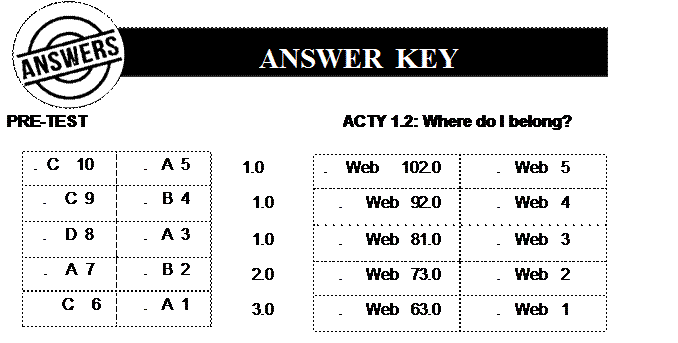
ACTY 1.3:
Which Website is It? POST-TE

1. De
Lara, Maricel. (2016, Nov. 3). Empowerment Technology. Retrieved from https://www.slideshare.net/maricelbaldomerodelara/lesson-1empowerment-technology.
Retrieved on May 19, 2020.
2. Educational
Technology: Students Readiness and Self – Assessment.
Retrieved from https://www.surveymonkey.com/r/ET_studentreadiness.
Retrieved on May 19, 2020.
3. Quiambao,
A. (2019, Sep 8). Online platforms for ICT Content Development. Retrieved from https://www.slideshare.net/AngelitoQuiambao/onlineplatforms-for-ict-content-development-169954837.
Retrieved on May
2
0
 LESSON
2: Online Safety, Security and Netiquette
LESSON
2: Online Safety, Security and Netiquette
The internet is the guiding technology of the Information
Technology Age just as the electrical engine was of the Industrial Age. In
these times, more and more people are already engaged in the use of technology.
These people who are raised in a digital, media-saturated world are called digital natives. No doubt, the Internet
has been very useful to us but with the rise of instant messaging, chat rooms,
emails and social networking sites, it can also bring trouble - from
cyberbullying to more serious Internet dangers, including exposure to sexual
predators. Thus, internet safety is always our primary concern.

By the end of this lesson, you are
expected to:
1. Identify
what constitutes appropriate and inappropriate online behavior.
2. Apply
internet online safety, security ethics and etiquette standards and practice in
the use of ICTs.
3. Discern
possible deceptive information and wrongly evaluated data.

I bet you are ready to know if you
have practiced online safety, aren’t you? But before that, take time to answer
the pre-test to gauge how much you know about the lesson.
Direction:
Read each item carefully and choose the letter of the correct answer. Write
your answers on a separate sheet of paper or on your notebook.
1. What is Netiquette?
A. The
proper use of manners and etiquette on the Internet.
B. Using
a net to catch fish.
C. Being
mean to other people on Facebook.
D. Using
proper manners at the dinner table.
2.
What is considered shouting over the Internet?
A. Screaming at your computer.
B. Writing
in all CAPS.
C. Putting
a lot of exclamation marks at the end of a sentence.
D. Not
answering a friend request on Facebook.
3.
It is OK to forward or post an email message
that you received if __________ A. the message is typed in all capitals.
B. the
author of the message has given you permission to forward or post it.
C. it
does not contain any copyrighted material.
D. the
author of the message hasn't marked it as confidential.
4.
What is a flame in cyberspace?
A. A
person who follows the rules of Netiquette.
B. An
expert programmer.
C. An
online chain letter.
D. A
post or email message that expresses a strong opinion or criticism.
5.
Knowledge and understanding of netiquette is
useful because ___________
A. it
will help you create a positive impression on those you meet in cyberspace.
B. it
explains some of the technical limitations of online communications.
C. it
explains the conventions already being used by millions of cybernauts.
D. All
of the above.
6.
What type of online threat happens when an
attacker uses electronic devices to do unwanted surveillance against its
victim?
A. Cyberbullying
B.
Phishing C. Spamming D.
Cyberstalking
7.
What type of online threat happens when the
attacker impersonates another individual or organization to gather personal or
business information?
A. Cyberstalking
B.
Spoofing C. Scamming D. Pharming
8.
What type of information should you avoid giving
when using the internet?
A. Phone
number B. Profile Picture C.
Shirt Size D.
Religion
9.
What is the golden rule of netiquette?
A. Remember
the human. C. Use correct grammar.
B. Put
a smiley in every message. D. Respect people’s time.
10. You
get an email telling you that you won a hundred thousand without joining in a
competition. You should ____________.
A. Claim
the prize. C. Return the email with response.
Read
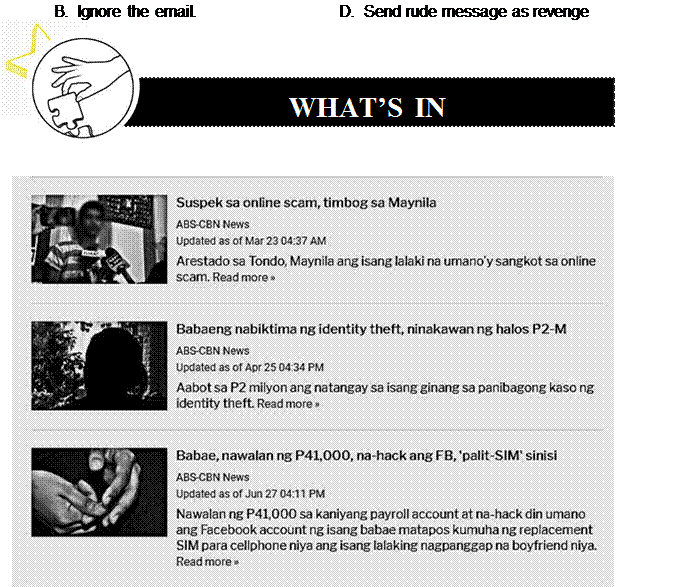
the headlines found below and try to reflect on the questions that follow.
ABS-CBN News Topic Page on Identity-theft. Retrieved from https://news.abs-cbn.com/list/tag/identity-theft.
Reflect on the following questions:
ü What
is common among the headlines above?
ü  Are
your social media accounts securedTurn to page 29 to check your answer enough
that you may not ! be a victim of these things? 17
Are
your social media accounts securedTurn to page 29 to check your answer enough
that you may not ! be a victim of these things? 17
ü What
type of information do you share in your social media accounts?
There's almost no
limit to what you can do online. The Internet makes it possible to access
information quickly, communicate around the world, and much more.
Unfortunately, the Internet is also home to certain risks, such as malware,
spam, and phishing. If you want to stay safe online, you'll need to understand
these risks and learn how to avoid them.

ACTIVITY
2.1: Shared or Not Shared? That is the Question
DIRECTIONS: Read and reflect
each item carefully. Copy the table
below on your notebook and check the space whether you have shared or not
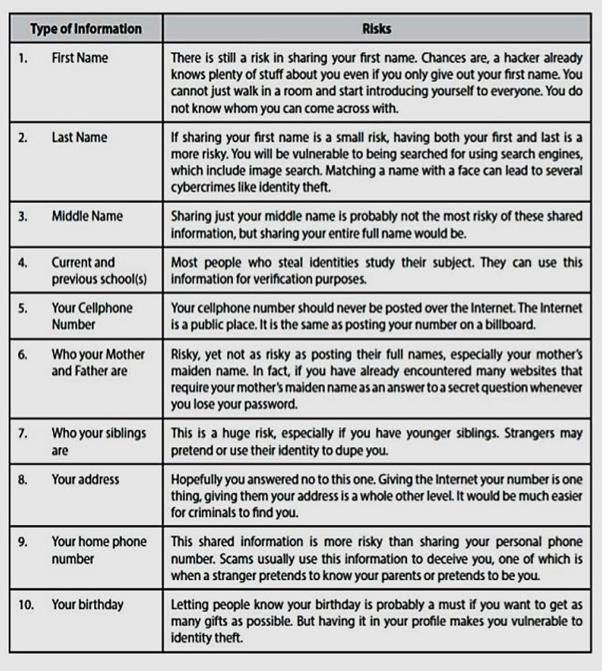
shared these pieces of information in all your social media accounts.
|
TYPE
OF INFORMATION
|
SHARED
|
NOT
SHARED
|
|
First Name
|
|
|
|
Middle Name
|
|
|
|
Last Name
|
|
|
|
Current and Previous
School/s
|
|
|
|
Your cellphone number
|
|
|
|
Complete name of mother and
father
|
|
|
|
Your parents’ cellphone
numbers
|
|
|
|
Name of Siblings
|
|
|
|
Your Address
|
|
|
|
Your Birthday
|
|
|
1. How
many of these information have you SHARED?
______________________________________________________________
2. How
many of these information have you NOT SHARED?
______________________________________________________________
3. Based
from your answers above, do you think you are safe when using the Internet?
Why?
______________________________________________________________
______________________________________________________________

Lesson
2.1: Online Safety, Security and Netiquette
Online safety
refers to the practices and precautions that should be observed
when using the internet to ensure that
the users as well as their computers and personal information are safe from
crimes associated with using the internet. Below are personal information that
must be kept confidential.
There are numerous
delinquencies that can be committed on the internet such as stalking, identity
theft, privacy violations, and harassment.
To avoid these online crimes, follow the following
online safety measures:
 Never give any personal information out
about yourself over the internet.
Never give any personal information out
about yourself over the internet.
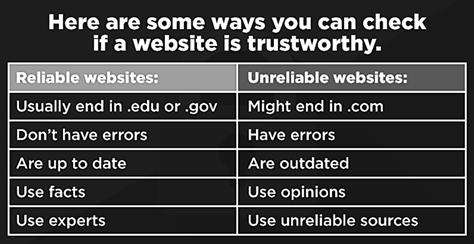
 Do not give any banking or sensitive
information unless you are sure that it is a reputable business having a secure
service. To make sure that you are in a secured network, the website address
should begin with “https://’ as
opposed to “http://”. Never access your accounts by following an email link,
instead type your URL by yourself.
Do not give any banking or sensitive
information unless you are sure that it is a reputable business having a secure
service. To make sure that you are in a secured network, the website address
should begin with “https://’ as
opposed to “http://”. Never access your accounts by following an email link,
instead type your URL by yourself.
Info source:
https://www.wikihow.com/Find-if-a-Website-Is-Legitimate
Never open messages or attachments from
someone you do not know.
Regularly review your privacy settings
in your online accounts to make sure you are not sharing important personal
information.
When using a public computer terminal,
be sure to delete your browsing data before leaving.
Keep your software updated to avoid
security holes.
Do not download or install software or
anything on your computer or cell phone that is unknown to you.
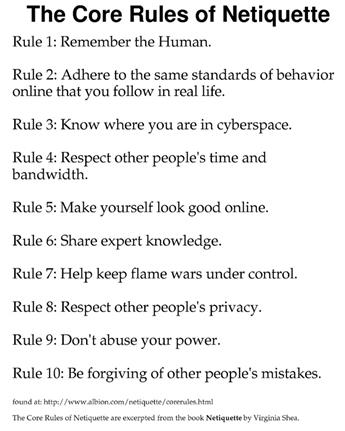
Netiquette is a combination of the words network and etiquette. It
is a set of rules for behaving properly online. Below are the 10 rules of
netiquette:
 Flame war is a series of flame posts or
messages in a thread that are considered derogatory in nature or are completely
off-topic. Often these flames are posted for the sole purpose of offending or
upsetting other users. The flame becomes a flame war when other users respond
to the thread with their own flame message.
Flame war is a series of flame posts or
messages in a thread that are considered derogatory in nature or are completely
off-topic. Often these flames are posted for the sole purpose of offending or
upsetting other users. The flame becomes a flame war when other users respond
to the thread with their own flame message.
Image from: https://twitter.com/Parkster00/status/1246347088625045504

DIRECTIONS:
Choose the most appropriate thing to do in the following situation. Write the
letter of the correct answer in your notebook.
1. Your
family is going out on a vacation. What should you do? A. Post pictures when
you return home.
B. Post
the dates you will be gone online.
C. Post
updates of where you are currently checking in hotels or places.
D. Tell
no one. Vacations are for getting away.
2. Do
you have the same passwords for all your accounts? A. Yes. That is how I
remember all my passwords.
B. I
have different passwords for all different accounts.
C. I
keep it simple. I don’t have any passwords.
D. I
have two similar passwords that I alternately use for all my accounts.
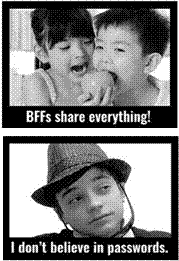
3. Choose
which image below describes how you feel about sharing your password with your
boyfriend/ girlfriend?
Image source: https://www.nku.edu/~rkdrury/experiment/netiquette_quiz.htm.
A
 C
C
B
D
4. Your
parents bought you your first cellphone. How will you share your cellphone
number?
A
Do not share your cellphone number to
anyone.
B
Post your cellphone number in your social
media account.
C
Share your cellphone number only in
person.
D
Post your cellphone number in your group
chat.
5. Your
social media friends list should only be composed of ______________.
A
Your favorite brands. C.
Anyone who sends you a friend request
There is no doubt that
you need to be vigilant online. As the World Wide Web evolved over the years,
many internet predators have been playing on vulnerabilities to attack
computers and retrieve sensitive data from individuals. Half the time, we
aren’t even aware it is happening until it is too late.
Online threat is deemed any malicious act that attempts to gain
access to a computer network without authorization or permission from the
owners. These are usually done by computer hackers who uses the World Wide Web
to facilitate cybercrime. Web threats use multiple types of malware and fraud,
all of which utilize HTTP or HTTPS protocols, but may also employ other
protocols and components, such as links in email or Instant Messaging apps, or
any malware attachments on servers that access the Web. They benefit cybercriminals
by stealing information for subsequent sale and help absorb infected PCs into
botnets. Web threats pose a broad range of risks, including financial damages,
identity theft, loss of confidential information/data, theft of network
resources, damaged brand/personal reputation, and erosion of consumer
confidence in e-commerce and online banking.
The following are the top kinds of online threats
that you should be aware of:
8 Phishing happens when an email is sent
from an internet criminal disguised as an email from a legitimate, trustworthy
source. The message is meant to lure you into revealing sensitive or
confidential information.
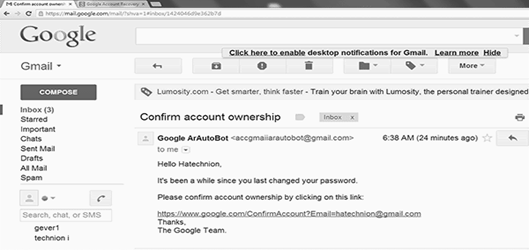
Image
source: https://searchsecurity.techtarget.com/definition/phishing
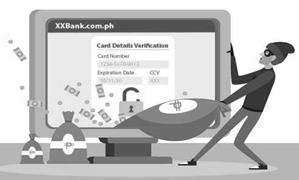
8 Pharming happens when a hacker (or
“pharmer”) directs an internet user to a fake website instead of a legitimate
one. These “spoofed” sites can capture a victim’s confidential information,
including usernames, passwords, and credit card data, or install malware on
their computer. Pharmers usually focus on websites in the financial sector,
including banks, online payment platforms, or other e-commerce destinations.
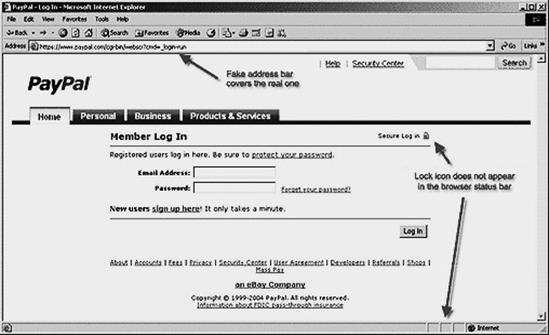
Image
source:
https://ed451phishnpharm.weebly.com/how-to-spot-a-fake-website-pharming.html
8 Internet Scam generally refers to
someone using internet services or software to defraud or take advantage of
victims, typically for financial gain. Cybercriminals may contact potential
victims through personal or work email accounts, social networking sites,
dating apps, or other methods in attempts to obtain financial or other valuable
personal information. Online scams may come in various forms such as lottery
scam, charity fraud scams, job offer scams, and online dating scams to name a
few.
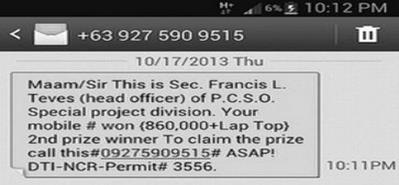
8 Internet robots are also known as
spiders, crawlers, and web bots. It is a software application that is
programmed to do certain tasks. Bots are automated, which means they run
according to their instructions without a human user. Some bots are useful,
such as search engine bots that index content for search or customer service
bots that help users. Other bots are "bad" and are programmed to
break into user accounts, scan the web for contact information for sending
spam, or perform other malicious activities. If it's connected to the Internet,
a bot will have an associated IP address.
8 Malware or malicious software, is any
program or file that is harmful to a computer user. Here are the most common
offenders in the rogues’ gallery of malware:
 Adware
(advertising supported software) is unwanted software designed to throw
advertisements up on your screen. Example, pop-up ads and banner ads.
Adware
(advertising supported software) is unwanted software designed to throw
advertisements up on your screen. Example, pop-up ads and banner ads.
Spyware
is malware that secretly observes the computer user’s activities without
permission and reports it to the software’s author.
Example is a keylogger.
Virus
and Worms are malwares that attach to another program and, when
executed—unintentionally by the user—replicates itself by modifying other
computer programs and infecting them with its own bits of code.
Trojan,
or Trojan horse, is one of the most dangerous malware types. It usually
represents itself as something useful in order to trick you.
Once it’s on your system, the
attackers behind the Trojan gain unauthorized access to the affected computer.
From there, Trojans can be used to steal financial information or install
threats like viruses and ransomware.
Ransomware
is a form of malware that locks you out of your device and/or encrypts your
files, then forces you to pay a ransom to get them back.
8 Spams are unsolicited emails, instant
messages coming from recipients that are not granted verifiable permission for
the message to be sent. Spam messages can be damaging if you open or respond to
it.
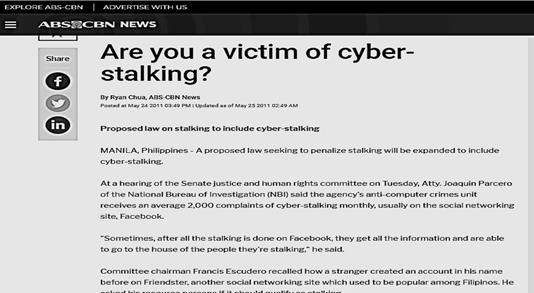
8 Cyberstalking refers to the use of the
internet or other electronic device to harass or stalk individuals or
organizations.
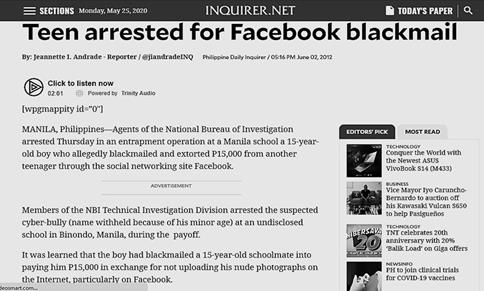
8 Cyberbullying refers to the act of
tormenting, harassing, or embarrassing another person using the internet.
8 Spoofing happens when someone or
something pretends to be something else to gain our confidence, get access to
our systems, steal data, steal money, or spread malware.

ITY 2.3: Show Me How You Hashtag
Direction: Look at
the following images and create a hashtag based on the type of online threat
represented by each image. Write your answers in your activity notebook.
Image source: https://www.avg.com/en/signal/what-is-spyware Image source:
https://itigic.com/tag/adware/
 1.
#_______________________
1.
#_______________________
2. #
_____________________
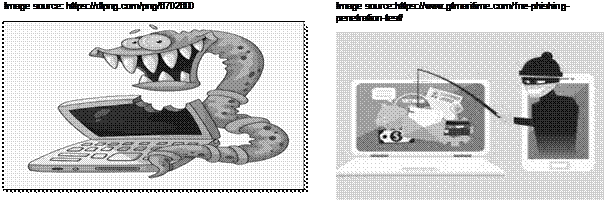
3. #
________________________ 4. #
_____________________
Image source:
http://www.upgrademag.com/web/2018/07/18/entry-of-3rd-
telco-player-to-benefit-consumers-says-globe-telecom/
From all you have learned in
Lesson 2, why is there a need to “think before you click?”
Image source:
https://shieldguide.wordpress.com/2017/03/12/think-before-you-click/
___________________________________________________________________
___________________________________________________________________
__________________________________________________________________

Directions: Read
each item carefully and choose the letter of the correct answer. Write your
answers on a separate sheet of paper or in your notebook.
1. What type
of malicious program is designed to replicate itself and transfer from
one computer to another either through the internet or local networks or data
storage like flash drives and CDs?
A. Adware
C. Worms and Virus
B. Spyware
D. Ransomeware
2. What
harmful online programs are designed to send you advertisements, mostly pop-up
ads?
A. Adware
C. Worms and Virus
B. Spyware
D. Ransomeware
3. What
harmful online program is used to record keystrokes done by users to steal
passwords?
A. Adware
C. Worms and Virus
B. Spyware
D. Ransomeware
4. What
is ransomware based on?
A. Fear
of hackers C. Fear of spyware
B. Fear
of the Internet D. Fear of losing important files
5. Which
of the following is an example of a “phishing” attack?
A. Sending
someone an email that contains a malicious link that is disguised to look like
an email from someone reliable.
B. Creating
a fake website that looks nearly identical to a real website in order to trick
users into entering their login information.
C. Sending
someone a text message looks like a notification that the person has won a
contest.
D. Sending
someone an email that records their keystroke activities while using their
computers.
6. Which
of the following must NOT be done if
you received an embarrassing picture from your friend?
A. Tell
your parents or teachers
B. Send
the picture on to other friends
C. Talk
to your friend about its negative outcomes.
D. Discourage
your friend from sending pictures like that.
7. What
is a flame in cyberspace?
A. A
person who follows the rules of Netiquette.
B. An
expert programmer.
C. An
online chain letter.
D. A
post or email message that expresses a strong opinion or criticism.
8. What
is considered shouting over the Internet? A. Screaming at your computer.
B. Writing
in all CAPS.
C. Putting
a lot of exclamation marks at the end of a sentence.
D. Not
answering a friend request on Facebook.
9. To
avoid being cyber-bullied you should always...
A. Give
out personal information to anyone who asks.
B. Strike
first - post mean things about other people on your Wall on Facebook.
C. Observe
proper netiquette rules.
D. Ignore
any requests from people to be your friend online.
10. How are
you judged in cyberspace?
A. No
one can see you, so no one can judge you.
B. You
are judged by what you do on the Internet and how it looks - by your spelling,
grammar, and netiquette.
C. You
are judged by your intent - if you didn't mean to hurt someone's feelings, then
it's okay.
D. You
 You
are finally done with Lesson 2!
You
are finally done with Lesson 2!
a
r
j udged by how you look - your profile picture is
important.

PRE-TEST ACTY
2.1: Shared or Not Shared


 ACTY 2.2: Can You Keep It Private?
ACTY 2.3: Show Me How You Hashtag


1. ABS-CBN
News Topic Page on Identity-theft. Retrieved from https://news.abs-cbn.com/list/tag/identity-theft. Retrieved on
May 22, 2020.
2. National
Center for Missing and Exploited Children. (n.d.). NSTeens: Can you keep it
private. Retrieved from
3. Netiquette
Quiz. Retrieved from https://www.nku.edu/~rkdrury/experiment/netiquette_quiz.htm.
Retrieved on May 22, 2020.
4. Quiambao,
Angelito. (2018, Jul. 23). Online safety, security, ethics, and etiquette.
Retrieved from
https://www.slideshare.net/AngelitoQuiambao/online-safety-security-ethicsamp-etiquette.
Retrieved on May 22, 2020.
5. Belcic,
Ivan. (2019, Nov. 7). What is pharming and how to protect against attacks.
Retrieved from https://www.avg.com/en/signal/what-is-pharming. Retrieved on May 22,
2020.
Images
1. https://twitter.com/Parkster00/status/1246347088625045504
2. Shea,
Virginia. (2011). Netiquette. Retrieved from http://www.albion.com/netiquette/introduction.html.
Retrieved on May 22, 2020.
3. https://searchsecurity.techtarget.com/definition/phishing
4. https://ed451phishnpharm.weebly.com/how-to-spot-a-fake-websitepharming.html
5. Chua,
Ryan (2011, May 24). ABS-CBN News. Are you a victim of cyberstalking. Retrieved
from https://news.abs-cbn.com/nation/05/24/11/are-youvictim-cyber-stalking.
Retrieved on May 22, 2020.
6. Andrade,
Jeannette. (2012, June 2). Teen arrested for Facebook blackmail. Retrieved from https://technology.inquirer.net/11673/teen-arrested-forfacebook-blackmail.
Retrieved on May 22, 2020.
7. https://www.avg.com/en/signal/what-is-spyware
8. https://itigic.com/tag/adware/
9. https://dlpng.com/png/6702600
10. https://www.gtmaritime.com/free-phishing-penetration-test/
11. http://www.upgrademag.com/web/2018/07/18/entry-of-3rd-telco-player-tobenefit-consumers-says-globe-telecom/
12. https://shieldguide.wordpress.com/2017/03/12/think-before-you-click/

The Internet has made our lives easier
especially in terms of doing research. By browsing the internet, we can access
limitless topics. Web-based catalogs are available in many libraries to assist
researchers in locating printed books, journals, government documents and other
materials. The biggest obstacle facing all researchers on the internet is how
to effectively and efficiently access the vast amount of information available
(The Internet: Research Tools, 2013).

By
the end of this lesson, you are expected to:
1. Facilitate
the practice in judging the credibility, value, and usefulness of researched
materials.
2. Use
the Internet as a tool for credible research and information gathering to best
achieve specific objectives.

Before we take on another journey
towards exploring the great capacity of the internet into research, kindly take
time to answer the following questions for your pretest.
Direction: Read each item carefully and choose the letter of the
correct answer. Write your answers on a separate sheet of paper.
1. What
is the Boolean logic technique used for?
A. Narrowing,
broadening or eliminating a search term.
B. Using
a robot to do instant research.
C. Searching
several search engines at the same time.
D. Searching
the infinite information from the internet.
2. http://www.avg.com/en/signal/what-is-spyware
is an example of?
A. Access
code B. Directory
C.
Server D.
URL
3. Which
of the following is a search engine?
A. Netscape
C. Elsevier
B. Yahoo D. Macromedia Flash
4. Which
of the following is NOT an example of a domain? A. .gov B. .com
C.
.npr D.
.edu
5. What
are the three Boolean logic search operators?
A. FROM,
TO, WHOM C. AND, OR, BUT
B. AND,
OR, NOT D. SEARCH, KEYWORD, TEXT

Direction:
Write all your answers in your activity notebook.
1. Using
the Internet, try to search for your complete name.
2. Write
down how many sites have featured your personal name and what is written about
you.
3. Answer
the following:
 What other information are written
about you?
What other information are written
about you?
________________________________________________________
________________________________________________________
________________________________________________________
Are the search results coming from
reliable sources? Why?
________________________________________________________
________________________________________________________
________________________________________________________
Should these bits of information need
to be posted or shown in public?
________________________________________________________
________________________________________________________
_
_
 ____________________________________________________
Lesson 3.1: Searching the Web
There are billions
of information on the web and it is a challenge for us to truly find which
information is reliable and relevant. Here are some tips you may use to be able
to look for relevant and reliable sources:
 Search
Engines are websites used for retrieval of data, files, or documents from
data bases. Some search engines we use today are:
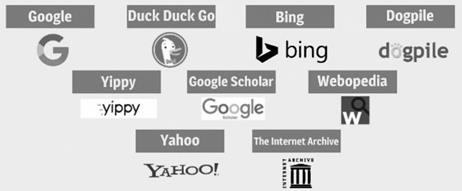
Search
Engines are websites used for retrieval of data, files, or documents from
data bases. Some search engines we use today are:
Anatomy of a URL
A URL is one type of Uniform
Resource Identifier (URI). It is a generic term for all types of names and
addresses that refer to objects on the world wide web. Knowing the URL endings
will give you clues to who is sponsoring the website and help evaluate the
sources.
https://www.searchenginejournal.com/alternative-searchengines/271409/#close

1.
Protocol 4.
Top-level Domain 7. Named
anchor
|
2. Subdomain
|
5.
Folders/ Paths
|
|
3. Domain
|
6.
Page
|
Popular Domains
|
Top- level Domains
|
Country code top level domains
|
|
.edu – educational institution
.org –
non-profit organization
.gov –
government site
.com –
commercial site
.net - network
|
.ph –
Philippines
.eu – European
Union
.uk – United
Kingdom
.au
- Australia
|
Search Skills and Tools
1. Boolean Logic – narrows, broadens, or
eliminates search term.
a. Boolean “or” – this operator will find
pages that include either of the search terms.
Ex.
A or B
b.  Boolean “and” – this operator will
retrieve only pages containing both terms
Boolean “and” – this operator will
retrieve only pages containing both terms
Ex. A and B
A
B
c. Boolean “not” –
this operator will find pages that do not include search term immediately following
it.
Ex. A not B
A
B
2. Phase Searching – is used to search for
famous quotes, proper names, recommendations, etc. It encloses the phrase in
quotation marks.
Ex. “Jane Doe” “To be or not to be”
3. Plus (+) – indicates that the word after
the sign is a required word must be found in search. Example: +fire
4. Minus (–) sign – indicates to exclude a
word from your search that is not required on the result. Example: Jaguar speed
–car
5. Ampersand (@) is used to find social
tags. Example: @SteveJobs
6. Hashtag (#) is used to find popular
hashtags. Example: #LawOfClassroom
7. Finding Documents – using the filetype
refines the search for documents on the web.
o
filetype:pdf o filetype:doc o filetype:xls
Ex. ICT in the Philippines pdf
8. Searching Site – the sites find webpage
from a website.
Ex.: National Geographic information in Australia
Search: Australia site: NationalGeographic.com

Directions: Use the Internet to research on a news article on Information
URL:
_______________________________________________________
Title
of Article: _______________________________________________
Paste printed article here.
38
Technology
in the Philippines. This information must come from a government site in PDF or
Word document. Print the article and paste your work on a separate sheet of
paper. Do not forget to include the URL of the article you have taken the
information.

The web provides access to
some excellent information and can also give access to those that are
irrelevant and outdated. Here is some checklist that you can use to evaluate
your website:
1. Authority. It reveals that the person,
institution or agency responsible for a site has the qualifications and
knowledge to do so. Evaluating a web site for authority:
ü Authorship:
It should be clear who developed the site.
ü Contact
information should be clearly provided: e-mail address, snail mail address,
phone number, and fax number.
ü Credentials:
the author should state qualifications, credentials, or personal background
that gives them authority to present information.
ü Check
to see if the site supported by an organization or a commercial body
2. Purpose. The purpose of the information
presented in the site should be clear. Some sites are meant to inform,
persuade, state an opinion, entertain, or parody something or someone.
Evaluating a web site for purpose:
ü Does
the content support the purpose of the site?
ü Is
the information geared to a specific audience (students, scholars, general
reader)?
ü Is
the site organized and focused?
ü Are
the outside links appropriate for the site?
ü Does
the site evaluate the links?
39
3. Coverage. This refers to how
comprehensive the website is in their discussion of certain topics. Evaluating
a web site for coverage:
ü Does
the site claim to be selective or comprehensive?
ü Are
the topics explored in depth?
ü Compare
the value of the site’s information compared to other similar sites.
ü Do
the links go to outside sites rather than its own?
ü Does
the site provide information with no relevant outside links?
4. Currency. It refers to: (1) how current
the information presented is, and (2) how often the site is updated or
maintained. It is important to know when a site was created, when it was last
updated, and if all of the links are current.
Evaluating a web site for currency involves finding the
date information was:
ü first
written
ü placed
on the web ü last revised
5. Objectivity. Objective sites present
information with a minimum of bias.
Evaluating a web site for objectivity:
ü Is
the information presented with a particular bias?
ü Does
the information try to sway the audience?
ü Does
site advertising conflict with the content?
ü Is
the site trying to explain, inform, persuade, or sell something?
6. Accuracy. It refers to the credibility
of the website. Evaluating
a web site for accuracy:
ü Reliability:
Is the author affiliated with a known, respectable institution?
ü References:
do statistics and other factual information receive proper references as to
their origin?
ü Is
the information comparable to other sites on the same topic?
ü Does
the text follow basic rules of grammar, spelling and composition?
ü Is
a bibliography or reference list included?

ity 3.3: Evaluating
Websites: Checklist
This activity is adapted from the University of Maryland: Evaluating Web
Sites: A Checklist www.lib.umd.edu/tl/guides/evaluating-checklist Directions:
1. Using
the Internet, research on topics under CoVid-19 in the Philippines.
2. Read
through the checklist and answer each question in your notebook.
3. Attach
a printout of the web site you are evaluating and paste in your notebook:
Print out of the
website
41
1. What
is the URL or web address of the web site you are evaluating?
http://_____________________________________________________
2. What
is the title of the web site? ____________________________________
AUTHORITY AND ACCURACY
I couldn’t tell The author is:
_______________________________________
 Who is the author of the web site?
 What authorship clues did the URL (web
address) provide? Check all that apply:
What authorship clues did the URL (web
address) provide? Check all that apply:
company (.com) country-specific site (e.g., .uk)
non-profit
organization (.org) military site (.mil) academic institution (.edu) network of
computer (.net) government agency (.gov) other? Please describe:
personal web page (e.g., www.jamieoliver.com)
PURPOSE AND CONTENT
What is the purpose of the web page or
site? Check all that apply:
A personal web page
A company or organization web site
A forum for educational/public service information
A forum for scholarly/research information
For entertainment
An advertisement or electronic
commerce A forum for ideas, opinions, or points of view
Other – please explain:
In your own words, briefly describe the
purpose of the web site:
______________________________________________________________
______________________________________________________________
What does the web site provide? Check
one:
Balanced, objective or factual information
Biased, subjective or opinionated statements
Are the arguments well supported? ____ Yes ____ No
Both objective and subjective information
I couldn’t tell
Other – please explain:
 Does the web site provide any contact
information or means of communicating with the author or webmaster? ____
Yes _____ No
Does the web site provide any contact
information or means of communicating with the author or webmaster? ____
Yes _____ No
CURRENCY
I couldn’t tell
It was updated
on:___________________________________
When was the web site last revised,
modified, or updated?
Is the site well maintained?
I couldn’t tell
Yes
No
File: Evaluating Websites: A
Checklist University of Maryland Libraries * T&L * 2/2014

Website evaluation is an important
skill that everyone should practice and master through time. It is always
important to learn which information are relevant and reliable to be able to
avoid misinformation and be a victim of fake news.

Direction: Read
each item carefully and choose the letter of the correct answer. Write your
answers on a separate sheet of paper or in your notebook.
1. What
happens when a phrase or sentence is placed inside quotation marks when doing
research?
A. Will
only return items that have both terms.
B. Will
search for words that are together and in order
C. Will
return items that exclude a term
D. Will
return items that have either of the terms
2. What
is a URL?
A. A
computer software program
B. An
acronym for Unlimited Resources for Learning
C. The
address of a document or "page" on the World Wide Web
D. A
search engine
3. What
are the three main search expressions, or operators, recognized by Boolean
logic?
A. and,
or, not C. and, or, but
B. from,
to, whom D. search, keyword, text
4. How
do you evaluate a web page?
A. You confirm that the author or site an
authority on the subject.
B. You
check to see if the author has been objective.
C. You
check to see if the information is current.
D. You
do as many of the above as possible.
5. An
article that only presents one point of view or omits facts is biased.
A.  True B. False
in

1. Dalhousie
University. (n.d.) 6 criteria for websites. Retrieved from https://cdn.dal.ca/content/dam/dalhousie/pdf/library/CoreSkills/6_Criteria_fo
r_Websites.pdf.
Retrieved on May 24, 2020.
2. Quiambao,
Angelito. (2018, Jul. 23). Contextualized Online Search and
Research
Skills. Retrieved from https://www.slideshare.net/AngelitoQuiambao/onlineresearch-107104482.
Retrieved on May 24, 2020.
3. University
of Maryland. (2020). Evaluating Web Sites: A Checklist. Retrieved from www.lib.umd.edu/tl/guides/evaluating-checklist.
Retrieved on May 24, 2020.