 |
|
|
|
|
|
|
|
|
|
|
|
|
|
|
|
|
|
|
|
|
 |
|
|
|
|
|
Our Campus Network |
|
|
|
Reflecting The Ministry of Education goal to integrate technology into Malaysia's school curriculum, our college have moved forward by deploying our new intra network. This will allow trainee teachers as well as lecturers to get connected in new ways in inplementing the teacher trainning curriculum. Here are some informations to help you to understand our new network. |
|
|
|
What is WiFi ? |
|
|
|
WiFi is a wireless Local Area Network technology designed to serve customers in a relatively small area - a Hot Spot ! Let's say you find yourself at the airport, and you want to check your email, or send a report. With Wireless Fidelity (WiFi) you just take out your laptop (with WiFi card installed), log in to the WiFi provider and connect wirelessly to the Internet or your corporate network - where you can start sending and receiving data at speeds up to that of regular High Speed service (50 - 70 times faster than with a 28.8kb modem) |
|
|
Hot Spots |
|
|
 |
|
|
|
|
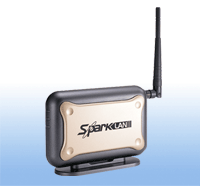
Hot spots are locations where a Wireless Access Points are fixed in the vicinity and anyone with a laptop or device equipped with a Wifi card can log onto the Internet at high speeds without having to "plug in" to anything. Hot Spots are found in busy places like airports, libraries, convention centres, and hotels, where the WiFi Local Area Network (LAN) seamlessly provides public, high speed, wireless Internet service to anyone within a 50 to 100 meter radius. |
|
|
|
Maktab Perguruan Persekutuan (M4P) is currently adopting this state-of-the-art wireless technology and planning to cover the whole campus in stages. This is our alternative Campus Network nicknamed |
|
|
Wireless Acess Point |
|
|
|
|
|
ii Zone and at present strong signals are sensed in the Library, Science Labs, Micro- teaching Room, Lecturer's rooms, Jabatan Agama and Tamaddun Islam, Jabatan Teknologi Maklumat dan Komunikasi, Jabatan HEP, Jabatan Kajian Sosial, Admin Block, Self Access Centre and also the nearby student hostels. It is now possibble for lectures and trainee teachers to get engaged in active teaching and learning that is not constrained to a computer lab environment anymore.
Speeds are always fast but during heavy usage periods you may experience slightly slower connections as more customers login to access bandwith. M4P has upgraded to Telekom Malaysia's SDSL broadband Internet connection and planning to have a second telecomunication link through Time dotCom Berhad, a company that owns a nationwide fibre optic trunk network. This additional 1 Mb/s connection will broaden the bandwith further - it's like having two PLUS highways linked to our college. Bravo ! |
|
|
|
How to log on to WiFi ? |
|
|
|
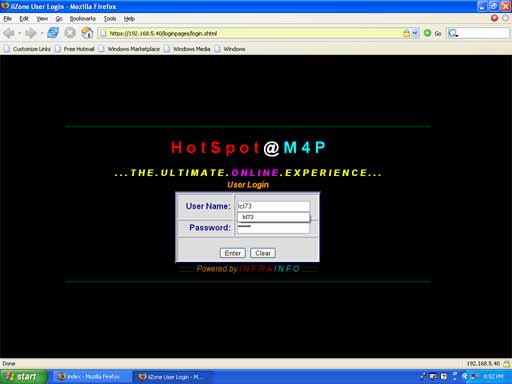
Get yourself registered to ii Zone. All you need to do is open up a web browser in any WiFi location. You will be automatically redirects to the HotSpot@M4P login screen shown below: |
|
|
|
 |
|
|
|