Harvey ROWSON's Windows Mobile page
To go to my home page (http://www.geocities.com/hrowson) click here
Offer me a coffee!
If you have fun with any of my stuff and find it's worth a coffee, you're welcome. Click HERE to use my PayPal button.
Pocket PC - WM5/WM6 - .NET2 SoftwareIntroductionAll the software provided here is totally free and unlimited (no registration/identification/activation or anything else required, just download, unzip and run). However, it is not open source.
I developed it for my personal use and thought it might interest some others. It is provided as is and you can choose to use it if you wish (and you take responsibility for this).
If you have any problems, comments or requests concerning the software I provide, feel free to email me at [email protected] and I'll be pleased to exchange and maybe use your ideas to improve my applications (as long as I have time of course…).
To install, do as follows:
Note: For information, and thanks to Microsoft's .NET device independent strategy, the software also runs on a desktop PC and in fact probably on anything which has a .NET 2.0 Compact Framework compatible environment installed. PrerequisiteFirst, in order to use the software supplied on this web page you must ensure that your Windows Mobile 5 has the Microsoft .NET Compact Framework 2.0 Redistributable installed (it is by default on Windows Mobile 6).
You can get this from Microsoft's web page:
Or you can do a search with your favourite search engine with "download .net 2.0 compact framework".
|
C# IDE MobileIntroductionC# IDE Mobile, as its name implies, is a C# Integrated Development Environment which executes on Windows Mobile 5 or 6 with .NET Compact Framework 2. It allows you to write programs using the C# language and the .NET 2.0 Compact Framework (.NET2CF). The program is parsed and executed at runtime (there is no compilation or link required).
Important note: No .NET SDK IS REQUIRED: Unlike other tools which do "C# Scripting" by wrapping CSC.EXE, C# IDE Mobile doesn't require you to have the .NET SDK (which includes the compilers). It only requires having the .NET 2.0 (Compact or not) Framework Redistributable (i.e. the runtime .NET). It isn't a wrapper around the Microsoft CSC.EXE compiler.
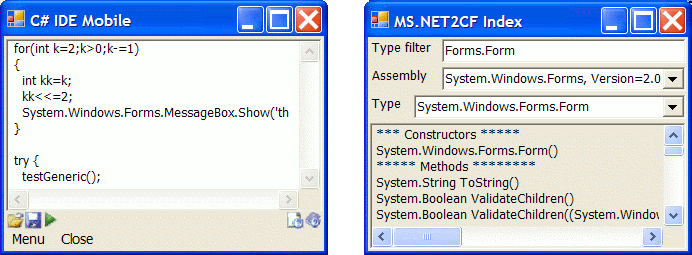
Here is a picture of the main window on the left and the online .NET2CF platform help (showing the methods of the class Form) on the right (version 8 shown):
The goal is mainly to develop code while away from your desktop and be able to test it. Then you can compile into native PPC applications using Microsoft's compilers (with Visual Studio for example).
Here are just some examples of what is possible on your Pocket PC thanks to this:
Basically, you can write C# code and execute it on your Pocket PC (then you can compile it later on your desktop to get a native .NET program).
Just to illustrate (more advanced examples are provided in the download section), here is a very simple example of code you can write:
namespace TestNS { class Test { public static void Main() { System.Windows.Forms.Form f=new System.Windows.Forms.Form(); f.ShowDialog(); } } } ManualsOnce installed you can access the integrated manual via the "Menu/Help/C# IDE Mobile Manual" entry (or in the "css_scripter_v2_0\plugins\css_plugin_ressources\manual" folder).
You can also view the online manual here (it is written small because it is meant to be read from the help menu on the Pocket PC):
DownloadsClick the following links to download C# IDE Mobile and some source code examples which you can test and use to start your own.
Release notesSee release note section of the online manual (it si written small because it is meant to be read from the help menu on the Pocket PC):
|
C# Mobile ScripterIntroductionC# Mobile Scripter is based on the C# IDE Mobile interpreter and provides a scripting facility for .NET Compact Framework enabled devices.
It is a DLL which mainly provides functions to pass in some C# source code and execute it.
This can be used in your mobile applications to provide scripting functions, similarly too what VBA does in MS Office applications.
Here is an example of how it is used:
using System.Windows.Forms;
using csinterpretor;
namespace TestNS { class TestCL {
static public string MyPowerFunctionDelegate(string data) { MessageBox.Show("In power delegate, here I've been called from the script..."); return data + ", handled this stuff, get on..."; }
public static void Main() { MessageBox.Show("Real hello world");
string nl="\n"; string txt = ""; txt += "using System.Windows.Forms;" + nl; txt += "namespace TestNS" + nl; txt += "{" + nl; txt += " class TestCL" + nl; txt += " {" + nl; txt += " public static void Main()" + nl; txt += " {" + nl; txt += " MessageBox.Show(\"Script hello world\");" + nl; txt += " MessageBox.Show(PowerFunction(\"hi real c#\"));" + nl; txt += " }" + nl; txt += " }" + nl; txt += "}" + nl;
CsInterpretor csi=new CsInterpretor(txt); csi.SetPowerFunction(MyPowerFunctionDelegate); csi.runScript(); } } }
Note the SetPowerFunction which is a function delegate you set so that you can call your compiled code from the script (you'll soon see why this is useful when you get into your application).
C# Mobile Scripter is included in C# IDE Mobile so see above for manuals, downloads and release notes. Download C# IDE Mobile, unzip and look in the "cs_mobile_scripter" folder, read the small "readme.txt" file to test the sample application.
… |
Under construction (More free software here soon…)…
… … |
 Download the zip