 Networking
Links
Networking
Links
--An Educator's Guide to School Networks
This site contains information about networking, protocol, cables, etc.. This site has the information needed in order to solve your computer problems.
Click here to visit!!!
Networking
Links
--An
Educator's Guide to School Networks
This site contains information about networking, protocol, cables, etc..
This site has the information needed in order to solve your computer problems.
Click here to visit!!!
--A Guide to Networking a K-12
School District
What is a network, how do you do it, is it useful, how will it fit into
my curriculum? These are all questions which are answered on this
site.
Answers!!!!!
--Consortium for School Networking
Looking for ways to become more involved in the advancement of technology
in schools? This site can help you to become more knowledgeable and
more involved. It has informational sites and program involvement
sites.
Get Involved!!
--A Guide to Networking for K-12
This
site has different ways to network your computer lab, examples of other
networking strategies, steps to take when networking, and resources for
networking help.
Need Help? Click here
--School Networking Resources
This
site provides the viewer with resources to support school networking and
design. A great thing about this site is it is specific to a few
upper western states. One of these states is Montana. Under
the Montana listing you will find contacts in our area. It also gives
information on what the Montana chapter is working on. For example,
the Montana chapter is working on networking rural schools and raising
money for the universal service fund.
Check out Montana's
Networking!!
Important
Networking Terms
--All of the following graphics
and definitions are from the above links.
-Peer-to-Peer Networks and Client/Server
Networks
Peer-to-Peer
Networks are networks where two or more users can become networked together
in order to carry on a conversation.
-Client/Server Networks
Client/Server Networks are networks where
users use devices so they can share information through the use of printers,
computers, or application programs.
-LAN/WAN
A LAN is a local area network where all clients
share a common infrastructure and are usually in the same building or group
of buildings. While a WAN is a wide area network. This type
of network spans over a large geographic area.
| Protocol | Wiring | Maximum bandwidth | Maximum
length
|
Topology | Cost |
|---|---|---|---|---|---|
| Ethernet | Cat 5 twisted pair | 10 Mbps | 100 meters | Star | Low |
| Thick | 10 Mbps | 500 meters | Bus | High | |
| Coaxial cable | 10 Mbps | 200 meters | Bus | Low | |
| Fiber | 10 Mbps | 1000 meters | Star | Very high | |
| Fast Ethernet | Cat 5 twisted pair | 100 Mbps | 100 meters | Star | High |
| Token Ring | Coaxial cable | 16 Mbps | 100 meters | Ring | High |
| FDDI | Fiber | 100 Mbps | 1000 meters | Star | Very high |
| CDDI | Cat 5 twisted pair | 100 Mbps | 100 meters | Star | Very high |
| LocalTalk | Cat 3 twisted pair | 230 Kbps | 300 meters | Bus | Very low |
| ATM | Fiber | 1 Gbps | 100 meters | Star | Very high |
table provided by http://choices.cs.uiuc.edu/schools/bl-thesis/toc.doc.html
- A Few Technologies for Networking the WAN
-Wireless
Wireless networking can be done using either lasers or microwaves.
The lasers run at higher speeds but have shorter ranges (few 100 meters)
and can be blocked by certain types of weather. The microwaves run
on a frequency so they can go a longer distance but they can interfere
with other frequencies.
-Leased Line
When using a leased line the district buys a permanent connection from
the phone company. They use this line to connect to to either another
school or an ISP. There are two types of leased lines: dry
line and leased line. The dry line runs at a speed of 56 Kbps and
must be in closely placed buildings while a leased line runs at a speed
of 56 Kbps- 1.5 Mbps and can pretty much run over any distance.
-Integrated Services Digital Network (ISDN)
This type of network runs at a speed of 64 Kbps- 128 Kbps. It is
much like a leased line except for the fact that the phone company only
bills the user for the actual usage.
-Plain Old Telephone Service (POTS)
This type of networking relies on a standard phone line to connect to schools.
It runs at a speed of 28.8 Kbps in each direction. It is cheap and
easy!!!
-Terms
-Topology:
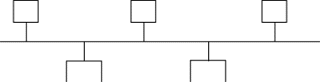
A topology is the shape or pattern that a
network takes on as it is built. There are three types of of topologies:
star, ring, and bus.
-star: this type of topology creates a client networked to a central location
or hub.
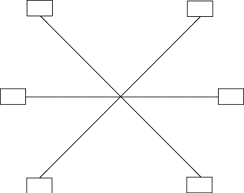
-ring: a ring topology connects in a continuos loop.

-bus: a bus topology creates a network where clients are strung along
a single cable.
-Protocol
-Protocol is a standard for how devices communicate.
The internet uses a type of protocol called a protocol suite. The
exact type of suite used by the internet is TCPIIP.
-Another type of protocol is the Fast Ethernet protocol. This protocol
is called the 100baseT. This protocol uses a Category 5 UTP and is
a lot quicker than the 10baseT version, but is more expensive.
-Repeater
- A repeater is a device which regenerates
signals to extend transmission distance.
-Hub
A hub is a device that serves as the center of a star topology network
like 10baseT. Another word for a hub is a concentrator. There
are two modules in a hub: stackable and modular. That stackable module
has a fixed number of ports available to connect devices. A modular
module is more flexible, but it costs more.
-Bridge
A bridge is a device used to connect local or wide area networks that use
the same protocol.
-Router
A router is a device that connects networks to other networks. It
selects what data will go outside the network and what data will stay in
the network.
-NIC's
A NIC is a network interface card which can
add on board that serves the connection between the client computer and
the network infrastructure.
-Cables
Unshielded twisted pair- attaches phones
for local service. It can be labeled in categories ranging from a Category
1--Category 5 (high speed).
Fiber Optic- useslight instead of electricity to carry data. It can move data at high speeds and not be affected by proximity or electrical equipment. This cable has three components: core, clodding, and coating.
Coaxil- most well known. It has several layers of material surrounding a common axis. It is most commonly used for video distribution.
Wireless- uses radio or microwave transmission for data. These cable networks are useful in campus or district networks.
The cable which would be the most appropriate in a school is wireless. It is reliable and created to work mainly in district or campus networks. Although it is a great cable, one should analyze its cost.
Wazza's
School Computer Network Info
-Networking and intranet explanations
and suggestions for schools.
-All new networks in schools are Ethernet
networks.
-The recommended school standard cable is unshielded twisted pair cable
(UTP). This cable has the ability to upgade components without replacing
the cable.
-A school intranet is an internal computer network which uses tools and
protocols normally associated with the internet. It is just like
the internet, but because it is not connected to any computers outside
of the school the content can be controlled.
Networking
Design and Research Center
This is one of the best resource site I have
come across. It has networking terms listed alpahabetically so all
you have to do is click on the letter and it also has a variety of networking
resources. Not only is this site very informative, it is also very
easy to use.